Compare containers and VMs precisely on isolation, performance, density, operations and security, explain why containers usually run inside VMs in the cloud, choose sandboxed or microVM runtimes when isolation matters, and justify runtime choices for different workloads
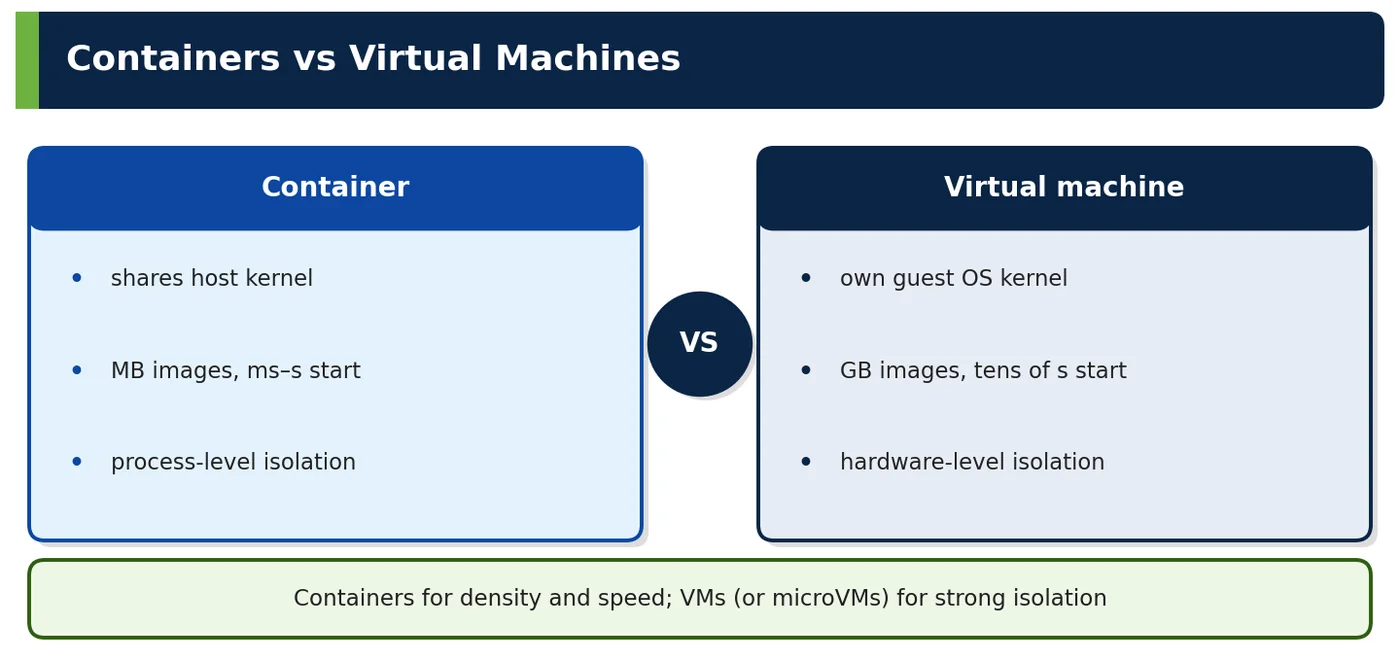
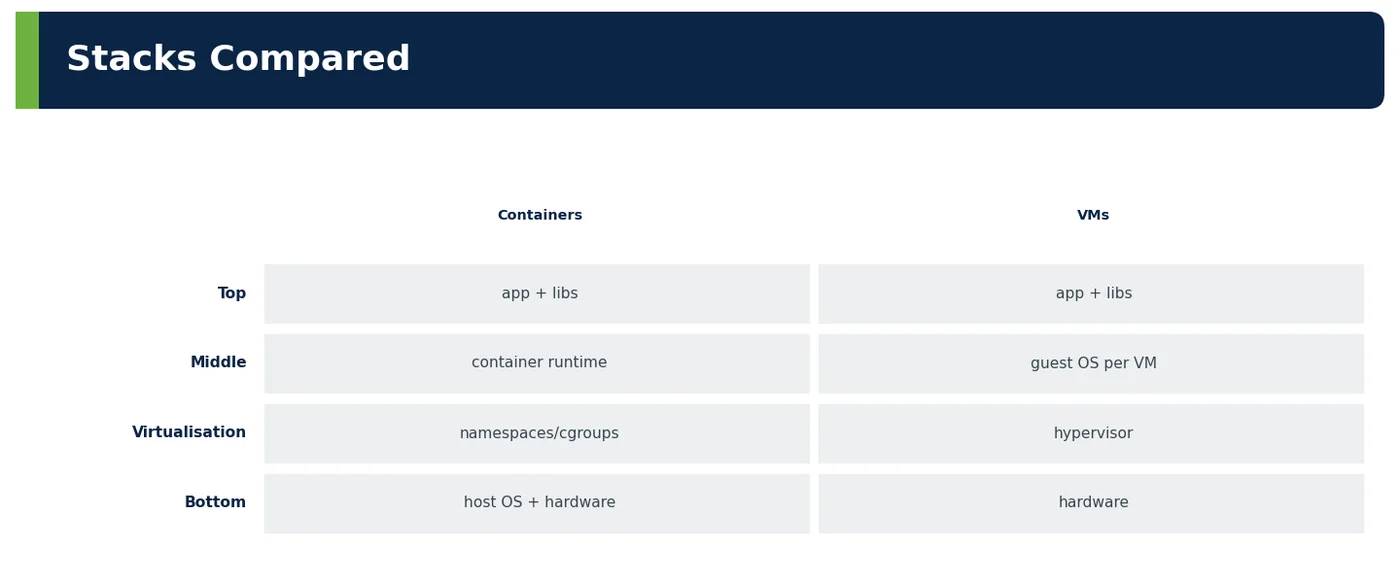
A virtual machine virtualises hardware: a hypervisor gives each VM virtual CPUs, memory and devices, and each VM runs its own operating system kernel. A container virtualises the operating system: all containers on a host share the host kernel, isolated by namespaces and cgroups. The difference drives everything else — speed, density, isolation and operations.
Figure 1 — Containers vs virtual machines
Figure 2 — Stacks compared
Vocabulary
Meaning
Hypervisor
Software/hardware layer running VMs (Nitro, KVM)
Guest kernel
OS kernel inside a VM
MicroVM
Minimal VM optimised for fast start (Firecracker)
Sandboxed container
Container with an extra isolation layer (gVisor, Kata)
Table 1 — Terms
2Why It Exists
Need
Better fit
Many small services, fast deploys
Containers
Different OS kernels / Windows + Linux
VMs
Untrusted multi-tenant code
MicroVMs / sandboxes
Legacy apps expecting full OS
VMs
Table 2 — Why both exist
3Core Concepts — Containers vs VMs
Dimension
Containers
VMs
Isolation
Process-level, shared kernel
Hardware-level, separate kernels
Startup
Milliseconds–seconds
Tens of seconds–minutes
Image size
MBs–hundreds of MBs
GBs
Density
Tens–hundreds per host
Few–tens per host
Patching
Rebuild image; host kernel patched separately
Patch each guest OS
Portability
Same image across hosts with compatible kernel/arch
Image tied to hypervisor formats
Overhead
Near native
Small (Nitro) to moderate
Table 3 — Comparison
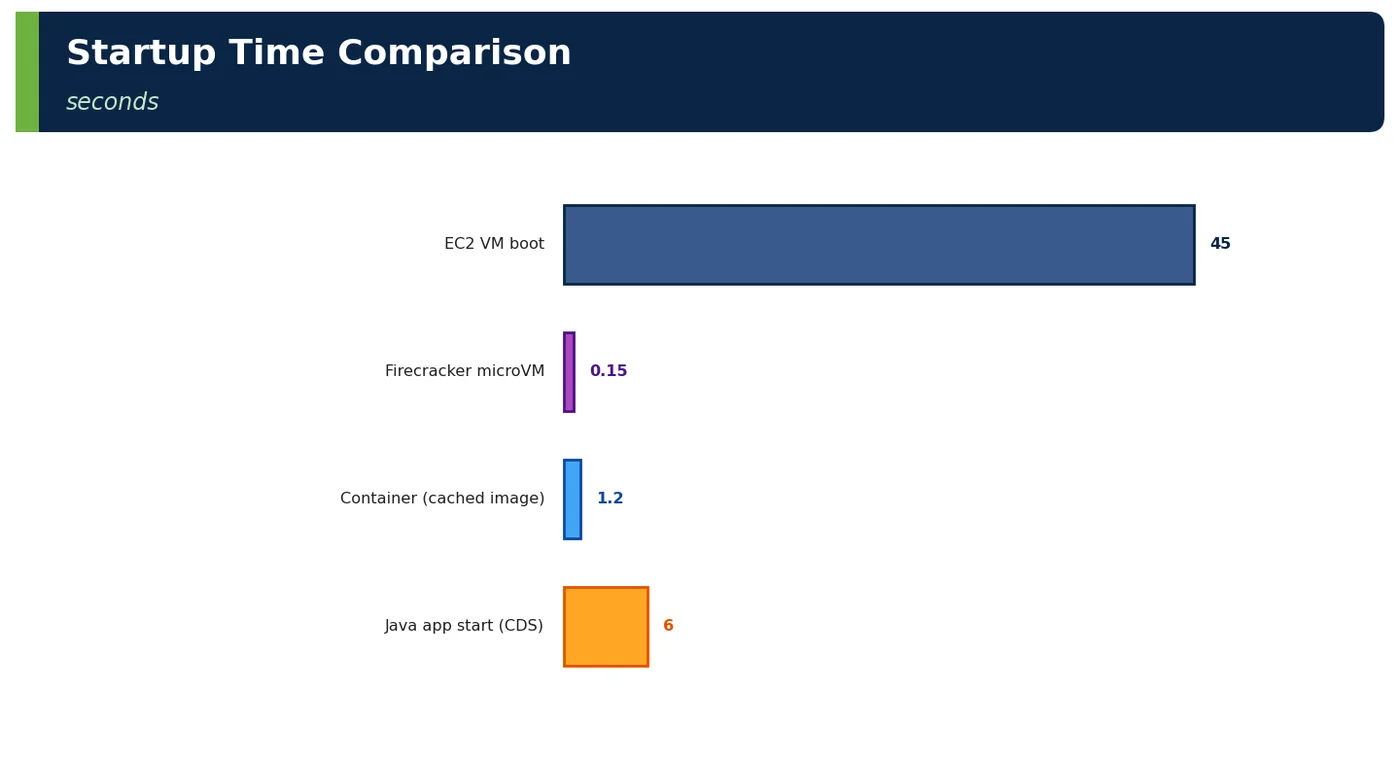
Figure 3 — Startup time comparison
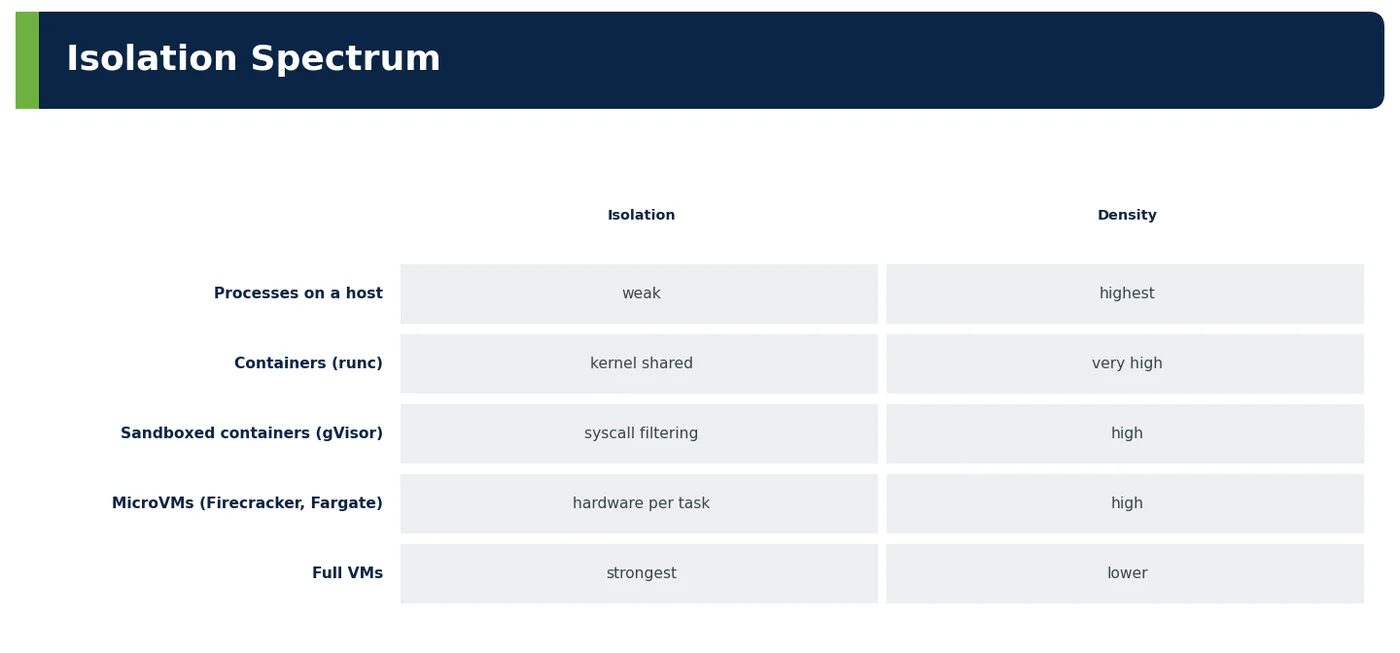
4How It Works Internally — Isolation Spectrum
Figure 4 — Isolation spectrum
Runtime
How
AWS example
runc
Namespaces/cgroups on host kernel
EKS on EC2 nodes
gVisor
User-space kernel intercepts syscalls
Sandboxing untrusted code
Kata Containers
Lightweight VM per pod
Strong isolation on K8s
Firecracker
MicroVM per function/task
Lambda, Fargate
Table 4 — Runtimes
4ADeep Dive — Choosing Runtimes for ShopNow and PayGrid
Workload
Runtime
Reason
60 internal Java services
Containers on EKS EC2 nodes (runc)
Trusted code, density, cost
Seller-uploaded image processing
Lambda (Firecracker)
Untrusted input, per-invocation isolation
Partner sync jobs
ECS Fargate (microVM per task)
No node management, isolation
PayGrid CDE services
Containers on dedicated node pool (EC2), strict policies
PCI scope isolation at node level
Legacy Windows reporting
EC2 Windows VM
Windows-specific stack
Table 5 — Mixed estate by risk and workload
4BDeep Dive — Same Service, Three Runtimes (checkout, 2 vCPU/4 GiB equivalent)
Metric
EC2 VM (m7g.large)
Container on EKS node
Fargate task
Time to serve after scale event
~75 s
~8 s (node exists)
~45 s
Monthly cost per replica
~₹5,300
~₹2,900 (bin-packed)
~₹6,800
Isolation boundary
Hypervisor
Kernel (shared)
MicroVM
Ops effort
AMI, patching
Platform team
Minimal
Best for
Legacy
Many services
Few services, isolation
Table 6 — Measured trade-offs
5APIs / Features / Syntax
BASH
# Compare kernel versions: containers share the host kerneluname -r # host: 6.1.xdocker run --rm alpine uname -r # same kernel 6.1.xdocker run --rm ubuntu:24.04 cat /etc/os-release # different userland, same kernel
# EKS Fargate profile: each pod in its own microVM boundaryfargateProfiles: - name: sandbox selectors: - namespace: untrusted-jobs
6Practical Examples
6.1 Consolidation savings
ShopNow's 40 services on 40 small VMs averaged 12% CPU. Moving to containers on 14 larger nodes raised utilisation to 55% and cut compute cost by 48%.
6.2 Kernel vulnerability exposure
A Linux kernel CVE affecting namespaces required patching nodes. Because containers share the kernel, the fix was node AMI replacement (Karpenter drift) — not image rebuilds.
6.3 Untrusted code isolated
User-supplied image transformations run in Lambda (Firecracker microVMs) rather than shared cluster pods, containing any exploit to a disposable microVM.
6.4 Worked example — startup impact on scaling
Unit
Time to serve traffic
New EC2 VM from AMI
60–90 s
New pod on existing node
5–10 s (Java with CDS)
New pod needing new node
60–90 s
Table 7 — Containers scale faster when capacity exists
6.5 Worked example — patching models
Layer
Containers
VMs
App libraries
Rebuild image
Patch in place or rebuild AMI
OS userland
Rebuild image (base update)
Patch guest
Kernel
Patch host nodes
Patch each guest
Table 8 — Different responsibilities
6.6 Worked example — licensing
Software licensed per
Effect
VM/core
Containers may need dedicated nodes to count cores
Table 9 — Licensing can drive design
6.7 Worked example — interview whiteboard
Prompt
Answer outline
"Containers or VMs?"
"VMs virtualise hardware with separate kernels — strong isolation, heavier, slower. Containers share the host kernel with namespaces/cgroups — light, fast, dense, weaker isolation. In AWS, containers usually run on VMs (EKS nodes) or in microVMs (Fargate, Lambda). Choose containers for trusted microservices, VMs for different kernels/Windows/legacy, microVMs or gVisor/Kata for untrusted or multi-tenant workloads."
Table 10 — Structured answer
6.8 Worked example — PayGrid isolation layers
Layer
Isolation
Account
CDE separate
Node pool
Dedicated, tainted
Pod
Restricted security context
Network
Policies default deny
Table 11 — Defence in depth instead of relying on containers alone
6.9 Worked example — anti-patterns
Anti-pattern
Effect
Running untrusted tenant code in shared pods
Escape risk
Treating containers as VMs
Operational mess
One VM per microservice
Low utilisation
Table 12 — Common mistakes
6.10 Worked example — Windows containers
Fact
Detail
Need Windows host kernel
Windows nodes in EKS
Larger images
Slower pulls
Table 13 — Special case
6.11 Worked example — performance overhead
Workload
Container vs bare metal
CPU-bound Java
~0–2%
Network-heavy
Small overhead (veth/CNI)
Storage via overlay
Use volumes for heavy I/O
Table 14 — Near-native performance
6.12 Worked example — nested virtualisation
Case
Note
Kata on EC2
Needs bare-metal or nested virtualisation support
Firecracker
Bare metal instances
Table 15 — Constraints for sandboxes
6.13 Worked example — cost model
Model
Billing
EC2 nodes for containers
Per instance (bin-packing matters)
Fargate
Per task vCPU/memory
Lambda
Per request/duration
Table 16 — Isolation choice changes billing
6.14 Worked example — debugging differences
Task
Containers
VMs
Shell access
kubectl exec / ephemeral containers
SSM Session Manager
Logs
stdout
Files/agents
Table 17 — Different operations
6.15 Worked example — decision table
Criterion
Choose
Trusted code, many services
Containers on nodes
Untrusted/multi-tenant
MicroVMs or sandboxed runtimes
Need full OS control
VMs
Short, event-driven
Lambda
Table 18 — Quick guide
6.16 Worked example — compliance view
Auditor question
Answer
How are tenants isolated?
Accounts, node pools, policies, microVMs where needed
Table 19 — Explain layered isolation
6.17 Worked example — Firecracker facts
Metric
Value
Boot
~125 ms
Memory overhead
< 5 MiB per microVM
Table 20 — MicroVM efficiency
6.18 Worked example — checklist
Item
✔
Isolation need assessed
✔
Runtime chosen per workload
✔
Node patching plan
✔
Licensing checked
✔
Table 21 — Before choosing
6.19 Worked example — migration path VM → container
Step
Detail
Externalise config and state
Env, S3, DB
Log to stdout
Collector-friendly
Containerise with multi-stage build
Small image
Run on EKS with same health checks
Parity
Decommission VMs
Cost saving
Table 22 — Typical replatform
6.20 Worked example — "lift and shift" into containers
Risk
Mitigation
App writes local files
Volumes or S3
Background cron inside app VM
Kubernetes CronJobs
Hard-coded hostnames
Service discovery
Table 23 — Containers expose hidden VM assumptions
6.21 Worked example — observability differences
Signal
Containers
VMs
Host metrics
Node exporter per node
Per VM agent
App logs
stdout → Fluent Bit
Files → agent
Lifecycle events
Kubernetes events
EC2 state changes
Table 24 — Different telemetry sources
6.22 Worked example — security scanning scope
Target
Containers
VMs
Image/AMI CVEs
Image scanning (ECR/Inspector)
AMI scanning
Runtime
GuardDuty EKS runtime
GuardDuty EC2 runtime
Table 25 — Both need coverage
6.23 Worked example — density risk
Risk
Mitigation
Noisy neighbour on shared node
Requests/limits, QoS classes, topology spread
Node failure takes many pods
Replicas across nodes/AZs, PDBs
Table 26 — Density needs discipline
6.24 Worked example — hybrid estate map
Workload
Runtime
60 Java services
EKS containers
12 partner jobs
ECS Fargate
200 event functions
Lambda
3 legacy apps
EC2 VMs
1 Windows tool
EC2 Windows
Table 27 — Most estates mix runtimes
6.25 Worked example — exam-style comparison questions
Question
Answer
Which has its own kernel?
VM
Which packs more per host?
Containers
Which isolates untrusted tenants best?
VMs/microVMs
Table 28 — Quick recall
6.26 Worked example — interview follow-up
Follow-up
Answer
"Is Docker a VM?"
No — it manages isolated processes on the host kernel
"Why is Fargate more isolated than EKS on EC2?"
Each task runs in its own microVM
Table 29 — Common probes
7Common Problems & Mistakes
Mistake
Fix
Assuming VM-level isolation
Add sandboxes/microVMs
Ignoring kernel patching
Node AMI pipeline
Over-isolating trusted apps
Containers are fine
Table 30 — Mistakes and fixes
The most common container mistake is treating a container as if it were a VM-strength security boundary. Teams run tenant code or third-party plugins in shared pods and assume namespaces will hold; for untrusted workloads use microVMs or sandboxed runtimes instead. The second is forgetting that containers moved kernel patching rather than removing it: if nobody owns node AMI updates, a kernel CVE stays open on every node regardless of how clean the image scans are. The opposite error also happens: putting each trusted internal service in its own VM or Fargate task for isolation it does not need, which multiplies cost and slows scaling. Match isolation to the trust level of the code, and write that rule down per workload class.
8Performance & Production Considerations
Consideration
Practice
Node sizing
Bin-packing efficiency
Cold starts
Image size, caching
Isolation overhead
Measure sandboxes
Table 31 — Operating runtimes
Container efficiency depends on bin-packing, so size nodes and pod requests deliberately. Requests set too high waste capacity; set too low, pods are throttled or evicted under load. For Java, set memory limits that cover heap, metaspace, thread stacks and direct buffers, and let the JVM size its heap as a percentage of the limit. Scale-out speed depends on image size and caching: small JRE base images, layered jars and images pre-pulled on new nodes keep it fast. Sandboxed runtimes are not free, so measure gVisor or Kata overhead on the real workload, especially syscall-heavy I/O, before mandating them. Finally, make node replacement routine, so that kernel patching and AMI updates never become emergency work.
9Architecture & Design Considerations
Guideline
Detail
Match isolation to trust
Risk-based
Containers on VMs is normal
Layers
Serverless for untrusted bursts
MicroVMs
Table 32 — Design guidance
10Interview Questions & Answers
Q1BasicConcept
Main difference between containers and VMs?
The isolation boundary is different. A virtual machine virtualises hardware: a hypervisor such as Nitro or KVM gives each VM virtual CPUs, memory and devices, and each VM boots its own operating system kernel. A container virtualises the operating system: containers are ordinary processes on one shared host kernel, isolated by namespaces, which control what they can see, and cgroups, which limit what they can use. Everything else follows. Containers start in milliseconds to seconds, images are megabytes rather than gigabytes and dozens fit on a host, but a kernel flaw affects them all. VMs are heavier and slower, but give stronger isolation and can run different kernels, including Windows.
Q2BasicConcept
Which starts faster?
Containers start much faster, typically in milliseconds to a few seconds, while a new VM takes tens of seconds to minutes. Starting a container only creates namespaces and cgroups and launches a process on a kernel that is already running; booting a VM involves firmware, a guest kernel, init and agents. For scaling, what users feel is time to serve traffic. In the note's figures, a new pod on an existing node served in 5 to 10 seconds for Java with CDS, mostly JVM startup, while a new EC2 instance took 60 to 90 seconds. A pod that needs a new node pays the VM cost as well, which is why spare node capacity matters.
Q3IntermediateInternals
Why are containers less isolated?
Because all containers on a host share one kernel, and the kernel is a very large attack surface. Namespaces and cgroups are kernel features, so isolation is only as strong as the kernel code enforcing it. A container calls the host kernel directly through hundreds of system calls, and a vulnerability in any of them, or in namespace handling, can let a process escape and reach every other container on the node. Misconfiguration widens the gap: privileged containers, host mounts, broad capabilities or running as root. A VM talks to a much smaller hypervisor interface instead. Mitigations include seccomp profiles, dropped capabilities, non-root users, read-only filesystems and sandboxed runtimes.
Q4IntermediateConcept
What is a microVM?
A microVM is a minimal virtual machine designed to start almost as fast as a container while keeping hardware-level isolation. Firecracker, the open-source virtual machine monitor that AWS built on KVM, is the main example. It removes legacy devices and emulation and exposes only a few virtio devices, so a microVM boots in about 125 milliseconds with under 5 MiB of memory overhead. Each microVM runs its own small guest kernel, so one tenant's kernel exploit does not reach another tenant. AWS runs every Lambda execution environment and each Fargate task in its own Firecracker microVM, which is how it can safely place many customers' workloads on the same physical servers.
Q5Senior EngineerInternals
What are gVisor and Kata?
gVisor and Kata Containers are sandboxed container runtimes that add an extra isolation layer while keeping the normal container interface. gVisor, through its runsc runtime, runs a user-space kernel written in Go that intercepts the container's system calls and implements them itself, so the application never talks directly to the host kernel; it costs some performance on syscall-heavy and I/O-heavy workloads. Kata Containers runs each pod inside a lightweight VM with its own guest kernel, giving hardware-backed isolation, but needs bare-metal or nested virtualisation support. In Kubernetes you select either through a RuntimeClass, so only untrusted workloads, such as a renderer for user-supplied files, pay the overhead.
Q6Senior EngineerTricky
How is the kernel patched for containers?
By patching or replacing the host nodes, not by rebuilding container images. An image contains only userland, libraries and the application; the kernel belongs to the node, so a kernel CVE is fixed at the node layer. On EKS this usually means publishing a new node AMI, such as an updated Bottlerocket or EKS-optimised image, and letting Karpenter drift or managed node group updates replace nodes gradually, with pod disruption budgets keeping services available. ShopNow handled a namespace-related kernel CVE exactly this way. Image rebuilds are still needed for library and base-image vulnerabilities, so patching responsibility splits between the platform team for nodes and service teams for their images.
Q7Technical ArchitectInternals
Why run containers inside VMs in the cloud?
In the public cloud the hypervisor is the isolation boundary between customers, and containers add density and fast deployment inside one customer's boundary. A provider cannot let two customers share a kernel, because a single kernel exploit would expose the other, so customer workloads always sit inside VMs on Nitro, either EC2 instances or Firecracker microVMs. Inside your own nodes, containers pack many trusted services onto each VM, giving high utilisation and quick scaling. ShopNow moved 40 services from 40 small VMs averaging 12% CPU to containers on 14 larger nodes at 55%, cutting compute cost by 48%. You get both layers: VM isolation between tenants and container efficiency within one.
Q8Technical ArchitectTrade-off
When choose Fargate over EC2 nodes?
Choose Fargate when you want each task or pod isolated in its own microVM and do not want to manage nodes at all: no AMIs, patching, node scaling or bin-packing decisions. It suits a modest number of services, partner jobs or workloads that need stronger isolation, like ShopNow's partner sync jobs. Choose EC2 nodes when you run many services at scale: bin-packing on EC2, especially with Graviton and Spot, is cheaper, roughly ₹2,900 against ₹6,800 per replica in the note's comparison, and pods start faster on existing nodes. EC2 nodes also support DaemonSets, GPUs, custom kernels and privileged agents, which Fargate does not. Many estates sensibly use both.
Q9Solution ArchitectScenario
How would you run untrusted customer code?
Never in plain containers sharing a kernel with other tenants or with your own services. Put each execution inside a hardware-isolated boundary: Lambda or Fargate, which run on Firecracker microVMs, or a Kubernetes RuntimeClass using Kata Containers or gVisor on dedicated, tainted nodes. Then add defence in depth, because the sandbox is only one layer: no network egress by default, no credentials or a minimal IAM role per execution, CPU, memory and time limits, read-only filesystems, and inputs and outputs passed through queues or S3. Make each environment disposable after a single job. ShopNow runs seller-uploaded image transformations in Lambda, so any exploit stays inside a short-lived microVM.
Q10Solution ArchitectTrade-off
When stick with VMs?
Stay with VMs when the workload needs something containers cannot provide cleanly. Examples are a different kernel or operating system, such as Windows-specific stacks; legacy software that expects a full OS with init systems, local state, cron jobs and agents; vendor software certified only on VMs; licensing counted per VM or per core, where containers would force dedicated nodes anyway; and isolation requirements a shared kernel cannot meet. ShopNow keeps a legacy Windows reporting tool on an EC2 Windows instance and three legacy applications on EC2. Moving such workloads into containers often costs more than it saves, so revisit the decision when the software is replaced or the vendor supports containers.
Newsletter
Get new tutorials every week
New ArchitectMind tutorials and interview questions, once a week. No spam, unsubscribe anytime.
Your subscription could not be saved. Please try again.
Almost done! Check your inbox and click the confirmation link to complete your subscription.
Keep going in Book 9
Cloud, Containers, DevOps & Production Architecture
 Architect