Describe container states and transitions, make applications behave correctly as PID 1, implement graceful shutdown for Java services, configure restart policies and health checks, interpret exit codes, speed up startup, and map container lifecycle to Kubernetes pod lifecycle
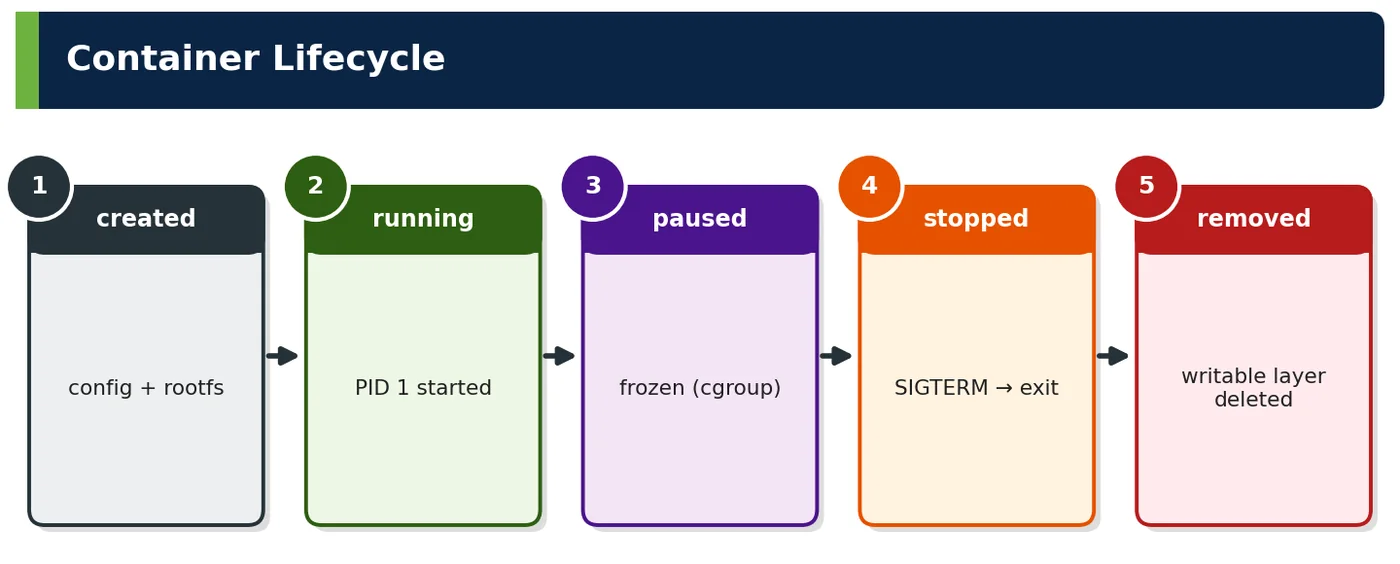
The container lifecycle is the sequence of states a container passes through: created (filesystem and config prepared), running (PID 1 executing), optionally paused, stopped/exited (process ended), and removed (writable layer deleted). Moving between states safely — especially stopping — determines whether deploys, scale-ins and node drains lose requests.
Figure 1 — Container lifecycle
Vocabulary
Meaning
SIGTERM
Polite request to terminate
SIGKILL
Immediate kill (cannot be caught)
Grace period
Time between SIGTERM and SIGKILL
Restart policy
What the runtime does when the process exits
Table 1 — Terms
2Why It Exists
Need
Lifecycle feature
Zero-downtime deploys
Graceful stop, readiness
Self-healing
Restart policies, liveness
Fast scaling
Quick create/start
Clean resources
Remove, garbage collection
Table 2 — Why
3Core Concepts — Container Lifecycle
State
Entered by
Notes
created
docker create / kubelet
Rootfs, namespaces prepared
running
start
PID 1 executing
paused
pause
cgroup freezer — rarely used
restarting
Restart policy after exit
Backoff
exited
Process ended
Exit code recorded
removed
rm
Writable layer gone
Table 3 — States
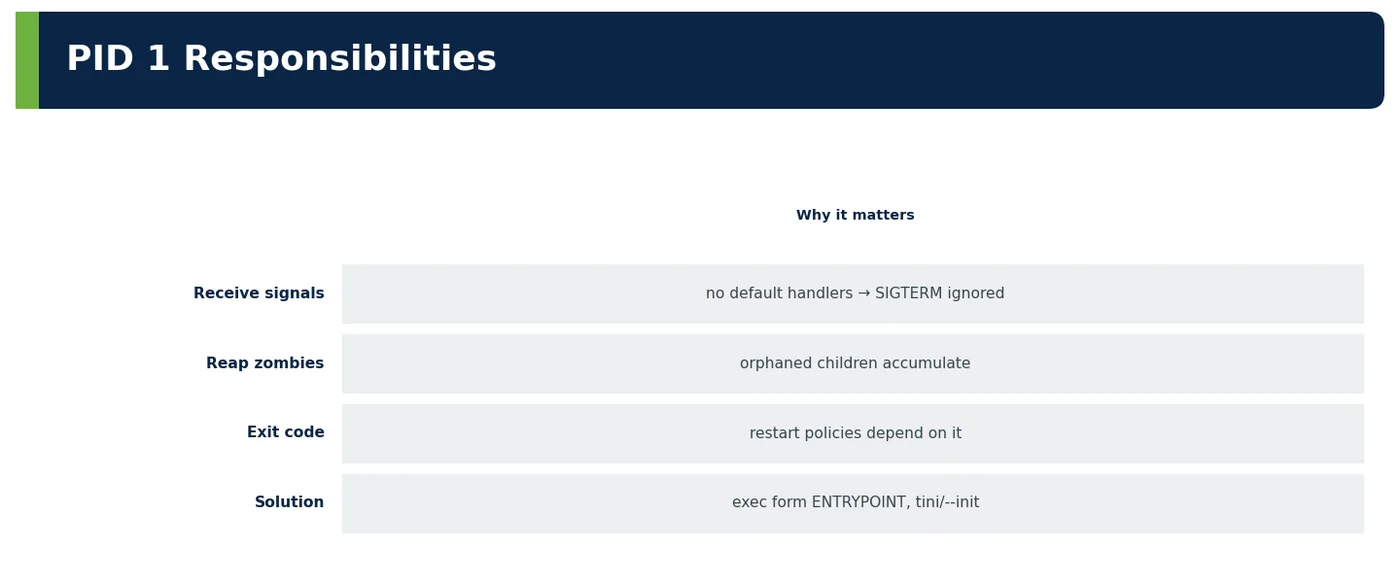
Figure 2 — PID 1 responsibilities
ENTRYPOINT form
Behaviour
Exec form ["java","-jar","app.jar"]
java is PID 1, receives SIGTERM
Shell form java -jar app.jar
/bin/sh is PID 1; signals may not reach java
Script wrapper
Must end with exec java …
Table 4 — Get signals to the app
4How It Works Internally — Graceful Shutdown
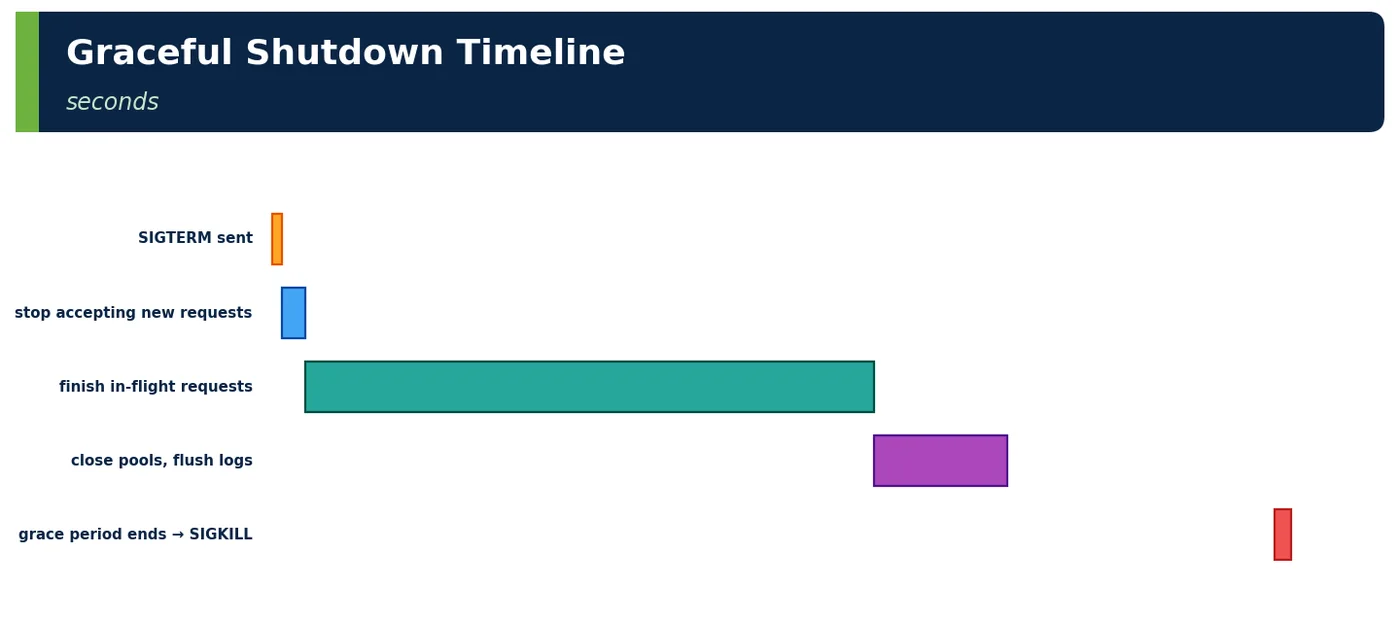
Figure 3 — Graceful shutdown timeline
Kubernetes termination sequence
Detail
1
Pod marked Terminating; removed from Service endpoints (asynchronously)
2
preStop hook runs (e.g., sleep 10 to let load balancers catch up)
Every rollout caused ~200 502 errors. The ALB kept sending traffic for a few seconds after pods received SIGTERM. A 10-second preStop sleep and graceful shutdown eliminated the errors.
6.2 Shell-form entrypoint ignored SIGTERM
A service started via sh -c "java …" never received SIGTERM; every stop waited 30 s and ended in SIGKILL. Switching to exec form fixed shutdown and halved deploy time.
6.3 Zombie processes
A container spawning ImageMagick processes accumulated zombies until PID limits were hit. Adding tini as PID 1 reaped them.
6.4 Worked example — restart policies
Policy
Docker
Kubernetes equivalent
no
Never restart
restartPolicy: Never (Jobs)
on-failure
Restart on non-zero exit
OnFailure
always / unless-stopped
Always restart
Always (Deployments)
Table 8 — Match policy to workload
6.5 Worked example — CrashLoopBackOff
Cause
Check
App fails at startup
Logs of previous container (kubectl logs --previous)
Liveness probe too aggressive
Probe timings
Missing config/secret
Events, env
Backoff
10 s → 5 min exponential
Table 9 — Diagnose restarts
6.6 Worked example — startup optimisation (Java 25)
Technique
Startup (checkout)
Baseline
9.8 s
AppCDS archive
6.1 s
AOT cache (JEP 483/515)
3.9 s
CRaC snapshot (where supported)
0.4 s
Table 10 — Faster scale-out and deploys
6.7 Worked example — interview whiteboard
Prompt
Answer outline
"How do you make container shutdown graceful?"
"Exec-form entrypoint (or tini) so the app is PID 1 and receives SIGTERM; application graceful shutdown (Spring server.shutdown=graceful with phase timeouts); preStop delay so load balancers remove the endpoint first; terminationGracePeriodSeconds longer than preStop + drain; consumers stop polling and finish work; align ALB deregistration delay; verify with zero 5xx during deploys."
Table 11 — Structured answer
6.8 Worked example — PayGrid long transactions
Issue
Handling
Authorisation calls up to 25 s to networks
Grace period 60 s; readiness false at SIGTERM
Never kill mid-journal write
Shutdown hook waits for journal ack
Table 12 — Money-safe shutdown
6.9 Worked example — exit codes table
Code
Meaning
0
Success
1
Generic error
126/127
Command not executable/not found
137
SIGKILL (OOM or grace expired)
139
Segfault
143
SIGTERM
Table 13 — Decode quickly
6.10 Worked example — anti-patterns
Anti-pattern
Effect
Shell form ENTRYPOINT
Signals lost
Grace period shorter than work
Killed mid-request
Liveness probe on dependencies
Restart storms
Background threads not stopped
Delayed exit → SIGKILL
Table 14 — Common mistakes
6.11 Worked example — health checks in Docker vs K8s
Docker HEALTHCHECK
Kubernetes
Marks container healthy/unhealthy
Startup, readiness, liveness probes
Doesn't restart by itself (Swarm does)
Liveness restarts; readiness removes from endpoints
6.23 Worked example — lifecycle in Lambda comparison
Phase
Lambda
Container
Init
Cold start
Container start
Shutdown
Extensions get SHUTDOWN event
SIGTERM
Table 27 — Similar ideas, different APIs
6.24 Worked example — checklist
Item
✔
Exec-form entrypoint / tini
✔
Graceful shutdown in app
✔
preStop + grace period tuned
✔
Startup probe for slow start
✔
Restart policy correct
✔
Exit code monitoring
✔
Table 28 — Before production
6.25 Worked example — rollout timing math
Setting
Value
Replicas
30
maxSurge / maxUnavailable
25% / 0
Pod ready time
~20 s
Termination time
~35 s
Full rollout
~4 batches × ~40 s ≈ 3 min
Table 29 — Lifecycle settings define deploy speed
6.26 Worked example — shutdown hooks in Java
Mechanism
Use
SmartLifecycle / @PreDestroy
Close pools, flush
Runtime.addShutdownHook
Non-Spring apps
Virtual threads
Interrupt and join executors on shutdown
Table 30 — Clean up in order
6.27 Worked example — lifecycle for Kafka consumers
Step
Action
SIGTERM
Stop poll loop
Commit offsets
After finishing current batch
Leave group
Trigger fast rebalance
Table 31 — No duplicate floods after deploys
7Common Problems & Mistakes
Mistake
Fix
Lost signals
Exec form, tini
Dropped requests on deploy
preStop + graceful shutdown
Premature liveness kills
Startup probes
Zombies
Init process
Table 32 — Mistakes and fixes
Several lifecycle bugs hide behind the four in the table. A shutdown hook or @PreDestroy method that blocks on a remote call, or calls System.exit, can stall the JVM until SIGKILL arrives, so every clean-up step needs its own timeout. Non-daemon threads created by hand-rolled executors keep the process alive after Spring has closed its context. A preStop hook written as exec sleep fails silently in distroless images that have no sleep binary; use the native sleep action instead. Teams also misread exit codes: 137 is reported both for an OOM kill and for an expired grace period, so check the container's last state reason before tuning the wrong setting. Finally, Jobs left on restartPolicy Always, or Deployments wrapping one-off tasks, turn a finished task into an endless restart loop.
8Performance & Production Considerations
Consideration
Practice
Startup time
CDS/AOT, small images
Termination time
Bounded drain
Restart storms
Backoff, sane probes
Table 33 — Operating lifecycle
In production, measure lifecycle timings as service-level metrics: time from pod creation to Ready, termination duration, and restarts per container from kube_pod_container_status_restarts_total, with an alert on any CrashLoopBackOff. Startup has three parts worth attacking separately. Image pull shrinks with small JRE or distroless bases, pre-pulled images on new nodes and lazy loading with SOCI. JVM start shrinks with an AOT cache produced during the build using Java 25's AOTCacheOutput option. Warm-up needs CPU, so avoid tight CPU limits during startup or let the readiness probe pass only after a warm-up request has run. For termination, keep the drain bounded by the longest legitimate request, align it with PodDisruptionBudgets during node drains, and verify after each platform upgrade that the timings still hold.
9Architecture & Design Considerations
Guideline
Detail
Design for disposability
Fast start, graceful stop
Lifecycle identical across environments
Same image and settings
Automate verification
Deploy error metrics
Table 34 — Design guidance
10Interview Questions & Answers
Q1BasicConcept
What are the main container states?
A container moves through a small set of states. Created means the runtime has prepared the root filesystem, namespaces, cgroups and configuration, but no process is running yet. Running means PID 1, the entrypoint process, is executing. Paused freezes all processes through the cgroup freezer and is rarely used in production. Restarting appears when a restart policy is bringing the container back after an exit, with backoff. Exited, or stopped, means the main process ended and its exit code is recorded. Removed means the writable layer and metadata are deleted. The transition that matters most is stopping, because it decides whether deployments, scale-ins and node drains lose in-flight requests.
Q2BasicConcept
SIGTERM vs SIGKILL?
SIGTERM is a polite request to terminate: the process can catch it, stop accepting new work, finish in-flight requests, close connections and exit cleanly. The JVM turns SIGTERM into an orderly shutdown that runs shutdown hooks, which is how Spring Boot's graceful shutdown drains requests, and the exit code is then 143. SIGKILL cannot be caught, blocked or handled: the kernel ends the process immediately, so in-flight requests fail, buffers are not flushed and locks may be left behind, with exit code 137. docker stop and Kubernetes send SIGTERM first, wait for the grace period, and only then send SIGKILL, so the application must finish within that window.
Q3IntermediateInternals
Why use exec-form ENTRYPOINT?
Exec form, written as a JSON array such as ["java","-jar","app.jar"], starts java directly as PID 1, so signals sent by Docker or the kubelet reach the JVM and trigger its shutdown hooks. Shell form, written as plain text, wraps the command in /bin/sh -c, making the shell PID 1. Many shells do not forward SIGTERM to their child, so the JVM never hears it, the runtime waits for the full grace period and then sends SIGKILL, dropping in-flight requests and slowing every deploy. In the note's example, switching to exec form halved deploy time. If you need a wrapper script, it must end with exec java so the JVM replaces the shell.
Q4IntermediateTricky
What does exit code 137 mean?
Exit code 137 means the process was killed with SIGKILL, because shells and runtimes report 128 plus the signal number, and SIGKILL is 9. In containers there are two common causes. The kernel OOM killer ended the process because the container exceeded its memory limit, which Kubernetes shows as last state reason OOMKilled. Or the grace period expired after SIGTERM and the runtime forced the kill, which points to signals not reaching the app or a drain that takes too long. The distinction matters: the first needs memory tuning, such as heap percentage plus off-heap headroom, while the second needs entrypoint and shutdown fixes. A healthy SIGTERM exit is usually 143.
Q5Senior EngineerScenario
How do you avoid dropped requests during rollout?
Make the old pod leave the load balancer before it stops serving, and let it finish what it has. Run the app as PID 1 with an exec-form entrypoint so it receives SIGTERM. Add a preStop delay of about ten seconds, because endpoint removal propagates asynchronously to kube-proxy and the ALB. Enable server.shutdown=graceful with a phase timeout above the longest request, and set terminationGracePeriodSeconds above preStop plus drain, 40 seconds for ShopNow checkout, with ALB deregistration delay aligned. On the new side, readiness probes must pass only when the pod can serve. Use maxUnavailable 0 with surge, and verify with zero 5xx responses across deploys.
Q6Senior EngineerInternals
What is PID 1's special role?
PID 1 is the init process of the container's PID namespace, and the kernel treats it specially. Signals for which PID 1 has not installed a handler are ignored rather than applying the default action, so a process that does not handle SIGTERM simply keeps running until SIGKILL. PID 1 also inherits orphaned child processes and must reap them with wait, otherwise they remain as zombies that consume PID table entries. The JVM installs a SIGTERM handler, so it shuts down correctly as PID 1, but it does not reap unrelated children. That is why a container spawning ImageMagick needs tini or docker run --init as PID 1 to forward signals and reap zombies.
Q7Technical ArchitectScenario
How do you protect slow-starting JVMs?
A slow-starting JVM must not be killed or sent traffic before it is ready. Add a startup probe whose failureThreshold multiplied by periodSeconds covers the worst observed start, for example 30 times 2 seconds; liveness and readiness probes only begin after it succeeds, so no premature restarts. Make readiness reflect real readiness, including warm-up of critical paths. Then shorten startup itself: AppCDS, the Java 25 AOT cache and lazy initialisation where safe, reducing ShopNow checkout from 9.8 to 3.9 seconds, or CRaC where supported. Give enough CPU during startup, because CPU throttling stretches class loading and JIT time, and keep the image small for faster pulls on new nodes.
Q8Technical ArchitectInternals
How does Kubernetes terminate a pod?
When a pod is deleted, the API server marks it Terminating and, in parallel, the endpoints controller removes it from Service endpoints; kube-proxy, ingress controllers and the AWS load balancer controller update asynchronously. The kubelet runs the preStop hook for each container, then sends SIGTERM to PID 1. The application stops accepting work, drains in-flight requests and closes resources. The terminationGracePeriodSeconds clock covers preStop and shutdown together; if containers are still running when it expires, the kubelet sends SIGKILL. Native sidecars stop after the main containers. Because endpoint removal and SIGTERM race each other, a short preStop delay is what prevents requests arriving at a stopping process.
Q9Solution ArchitectDesign
How do you prove shutdown is safe?
Measure it rather than trusting configuration. The primary signal is zero 5xx responses at the load balancer during rollouts, compared with a baseline, ideally checked automatically by the deployment pipeline or Argo Rollouts analysis. Next, track exit codes: pods ending with 137 should be close to zero, apart from OOM investigations, because each one means a forced kill. Track termination duration against the grace period, plus consumer metrics such as Kafka rebalance time and duplicate message rates after deploys. Then test the hard cases deliberately: node drains, Spot interruptions and deploys during load tests. ShopNow proves it with zero failed requests across 50 deploys a week.
Q10Solution ArchitectScenario
What lifecycle concerns affect Spot usage?
Spot capacity can be reclaimed with only a two-minute warning, so shutdown must be fast and automatic. An interruption handler, either Karpenter's native interruption handling through an SQS queue or the AWS Node Termination Handler, receives the notice, cordons the node and drains it, so pods go through the normal preStop and SIGTERM path. Every pod's preStop plus drain must finish well inside two minutes, which rules out long-running requests or batch steps without checkpoints. Run enough replicas across instance types and AZs, use PodDisruptionBudgets, and make startup fast so replacements become ready quickly. Work that cannot stop in time belongs on on-demand capacity.
Newsletter
Get new tutorials every week
New ArchitectMind tutorials and interview questions, once a week. No spam, unsubscribe anytime.
Your subscription could not be saved. Please try again.
Almost done! Check your inbox and click the confirmation link to complete your subscription.
Keep going in Book 9
Cloud, Containers, DevOps & Production Architecture
 Architect