 Architect

- Chapter
- Chapter 1 — AWS Global Infrastructure
- Prerequisites
- Volume I
- You will be able to
- Explain what an AWS region is and why regions are isolated, distinguish regional, global and zonal services, reason about data residency and cross-region costs, restrict and govern region usage, and connect regions deliberately when needed
- Covers
- Regions
On this page
- 1. Concept / Definition
- 2. Why It Exists
- 3. Core Concepts — Regions
- 4. How It Works Internally — Governance of Regions
- 4A. Deep Dive — ShopNow Region Footprint
- 4B. Deep Dive — What Lives Where in a Multi-Region Estate
- 5. APIs / Features / Syntax
- 6. Practical Examples
- 7. Common Problems & Mistakes
- 8. Performance & Production Considerations
- 9. Architecture & Design Considerations
- 10. Interview Questions & Answers
1Concept / Definition
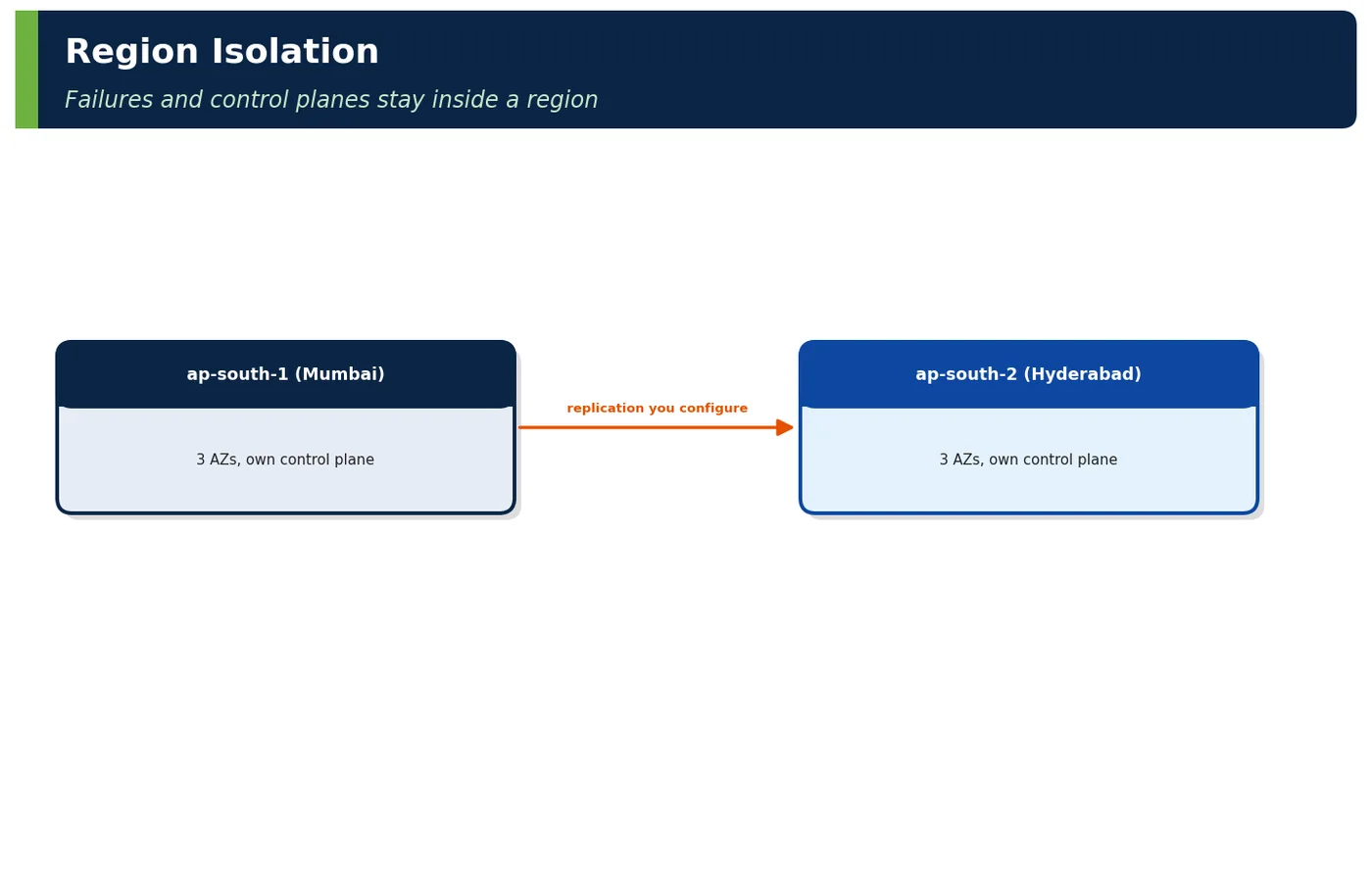
An AWS Region is a separate geographic area containing multiple, physically separated Availability Zones (at least three in newer regions). Regions are isolated from each other: they have independent control planes, independent services and independent failure domains. Data you store in a region stays there unless you explicitly copy or replicate it.

| Region fact | Architectural consequence |
|---|---|
| Independent control plane | A regional incident rarely affects others; DR in another region works |
| Separate endpoints (e.g., s3.ap-south-1.amazonaws.com) | Applications target a region explicitly |
| Data stays in region | Residency by design; replication is deliberate |
| Quotas per region | Plan capacity per region |
| Prices vary by region | Cost is a selection factor |
| Vocabulary | Meaning |
|---|---|
| Region code | e.g., ap-south-1 |
| Opt-in region | Must be enabled per account (e.g., ap-south-2, me-central-1) |
| Partition | Separate AWS universe (aws, aws-cn, aws-us-gov) |
| Local Zone | Extension of a region near a metro for low latency |
2Why It Exists
| Need | Regions provide |
|---|---|
| Low latency to users | Presence near them |
| Legal residency | Data kept in jurisdiction |
| Disaster recovery | Independent second location |
| Failure isolation | Regional incidents contained |
3Core Concepts — Regions
3.1 Service Scope
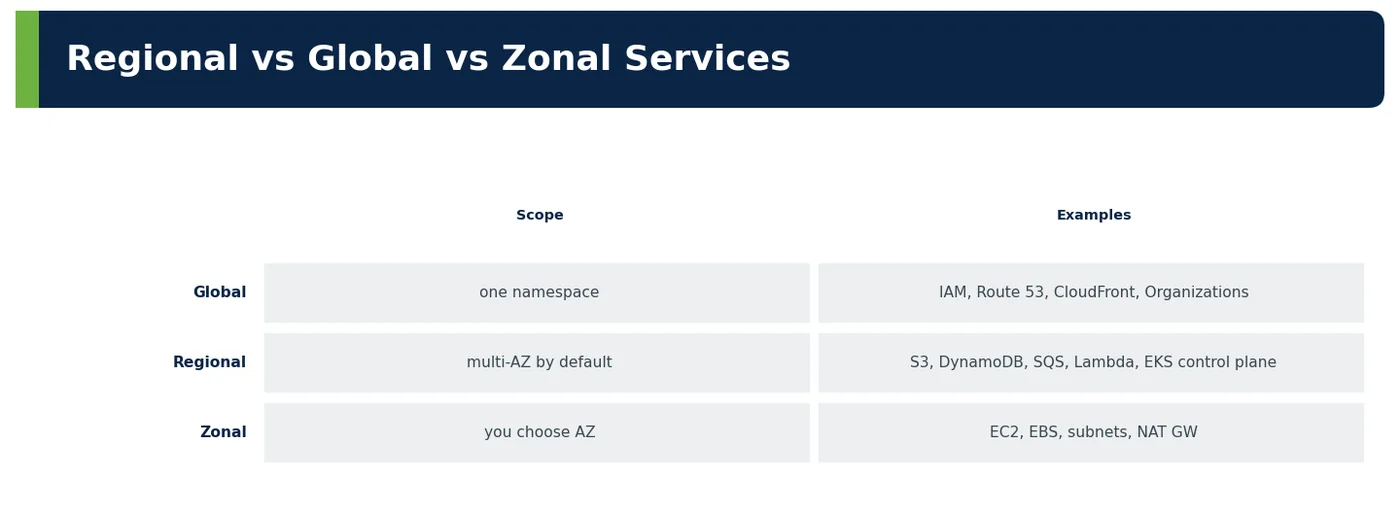
| Global service caveat | Detail |
|---|---|
| IAM | Global control plane in us-east-1; data plane regional — design for control-plane unavailability (existing roles keep working) |
| Route 53 | Data plane global and highly available; changes via control plane |
| CloudFront | Configuration changes propagate globally |
3.2 Indian Regions
| Region | Code | Typical use |
|---|---|---|
| Mumbai | ap-south-1 | Primary for most Indian workloads; broadest service coverage |
| Hyderabad | ap-south-2 | DR pair for Mumbai; in-country secondary |
3.3 Cross-Region Connectivity and Cost
| Mechanism | Use |
|---|---|
| Service-native replication | S3 CRR, Aurora Global Database, DynamoDB global tables |
| Inter-region TGW peering | Private routed connectivity |
| VPC peering (inter-region) | Few VPCs |
| Data transfer cost | Charged per GB between regions — design replication volumes |
4How It Works Internally — Governance of Regions
| Control | Implementation |
|---|---|
| Restrict allowed regions | SCP with aws:RequestedRegion condition |
| Opt-in regions | Enable only those needed |
| Region-specific quotas | Service Quotas per region |
| Logging | CloudTrail org trail covering all regions |
| Guardrails | Config aggregator across regions |
4ADeep Dive — ShopNow Region Footprint
| Region | Role | Services |
|---|---|---|
| ap-south-1 Mumbai | Primary for India | EKS, Aurora primary, MSK, S3, OpenSearch |
| ap-south-2 Hyderabad | DR (warm standby) + Indian data residency backup | Aurora Global secondary, S3 CRR, scaled-down EKS |
| me-central-1 UAE | Home region for UAE customers | Regional stack (Volume VIII 6.3) |
| ap-southeast-1 Singapore | Home region for SG | Regional stack |
| eu-central-1 Frankfurt | Home region for EU | Regional stack |
| us-east-1 | Global control planes only | CloudFront certs (ACM), IAM, Route 53 management |
4BDeep Dive — What Lives Where in a Multi-Region Estate
| Component | Mumbai (primary) | Hyderabad (DR) | Global |
|---|---|---|---|
| EKS clusters | Full scale | 20% warm | — |
| Aurora | Global primary | Global secondary | — |
| S3 critical buckets | Source | CRR destination | — |
| KMS keys | Multi-Region primary | Multi-Region replica | — |
| Secrets | Primary | Replicated (Secrets Manager replication) | — |
| IAM roles, SCPs | — | — | Organisation-wide |
| DNS / CDN | — | — | Route 53, CloudFront |
| Container images | ECR | ECR cross-region replication | — |
5APIs / Features / Syntax
# List enabled regions and opt-in status
aws account list-regions --region-opt-status-contains ENABLED ENABLED_BY_DEFAULT \
  --query 'Regions[].RegionName'
# Check if a service/feature is available in a region
aws ssm get-parameters-by-path \
  --path /aws/service/global-infrastructure/regions/ap-south-2/services \
--query 'Parameters[].Value'// Java SDK v2: always set the region explicitly — no hidden defaults
S3Client s3Mumbai = S3Client.builder().region(Region.AP_SOUTH_1).build();
DynamoDbClient ddbHyd = DynamoDbClient.builder().region(Region.of("ap-south-2")).build();{
"Sid": "DenyUnapprovedRegions",
"Effect": "Deny",
"NotAction": ["iam:*", "organizations:*", "route53:*", "cloudfront:*",
"sts:*", "support:*"],
"Resource": "*",
"Condition": { "StringNotEquals": {
"aws:RequestedRegion": ["ap-south-1", "ap-south-2", "me-central-1", "ap-southeast-1",
"eu-central-1"] } }
}6Practical Examples
6.1 Residency enforced by region
PayGrid restricts accounts to Mumbai and Hyderabad via SCP. An engineer's attempt to create a test bucket in Singapore was denied — preventing accidental payment-data placement outside India.
6.2 Regional incident contained
A Mumbai service event affected one managed service's API for 50 minutes. Hyderabad was unaffected; ShopNow's runbook evaluated failover but the degraded mode sufficed.
6.3 Cross-region transfer cost
Replicating 300 GB/day of logs to the DR region cost more than the logs' storage. Only critical data (orders, invoices) is now replicated; logs are aggregated regionally.
6.4 Worked example — service availability check
Scenario. ShopNow planned to use Hyderabad as its disaster-recovery region, assuming every service available in Mumbai would also be there.
| Service | Mumbai | Hyderabad |
|---|---|---|
| EKS, Aurora, MSK | ✔ | ✔ |
| Some newer AI/analytics features | ✔ | Later |
What it shows. The table shows the check done before deciding. Core services such as EKS, Aurora and MSK were available in both Mumbai and Hyderabad, but some newer AI and analytics features existed only in Mumbai. The DR design had to avoid depending on those features or accept reduced functionality during failover. The team kept a short list of the services each workload needs and checked it against AWS's regional services page before every design decision, repeating the check before each DR test.
Common mistake. Assuming regions offer identical services. New features often launch in some regions months before others.
Takeaway. Verify service and feature availability in every region you plan to use, before committing to a design.
6.5 Worked example — us-east-1 dependencies
Scenario. During a large incident in AWS's us-east-1 region, some of ShopNow's operations in Mumbai unexpectedly failed.
| Dependency | Why |
|---|---|
| ACM certificates for CloudFront | Must be in us-east-1 |
| Some billing/organisation APIs | Global control planes |
| Design | Don't make runtime paths depend on control-plane calls |
What it shows. Some AWS features depend on us-east-1 even for workloads elsewhere. For example, ACM certificates for CloudFront must be created in us-east-1, and some billing and organisation APIs use global control planes. The design response is to document these dependencies and avoid needing them during recovery, for example by preparing certificates in advance. ShopNow also prepared CloudFront certificates well before they expire and kept DNS changes in Route 53, which is designed to keep working during regional problems.
Common mistake. Believing that a single-region deployment depends only on that region. Hidden global dependencies can affect it.
Takeaway. List global and us-east-1 dependencies explicitly, and make sure recovery does not rely on them.
6.6 Worked example — region-scoped quotas
Scenario. In a disaster-recovery test, ShopNow tried to scale up in Hyderabad and was blocked by quotas.
| Quota | Mumbai | Hyderabad (DR) |
|---|---|---|
| On-demand vCPU | 8,000 | Raised to 4,000 (standby scale-up) |
What it shows. Quotas are set per region. Mumbai had an on-demand vCPU quota of 8,000, but Hyderabad still had the default. The team raised Hyderabad's quota to 4,000 so the standby could scale up during failover. Quotas are now part of the DR checklist. During the next DR test, the standby scaled to full production capacity in Hyderabad within the planned time.
Common mistake. Testing failover only at small scale, where quotas are never reached.
Takeaway. Raise quotas in the DR region to match the capacity you would need during failover.
6.7 Worked example — interview whiteboard
Scenario. In interviews, ShopNow asks, "What is an AWS region and how do you use regions in design?"
| Prompt | Answer outline |
|---|---|
| "What is an AWS region and how do you use regions in design?" | "A geographically separate area with ≥ 3 isolated AZs, its own control plane and services; data stays in-region unless replicated. Choose a primary region by latency, compliance, cost and service coverage; use a second region for DR or home-region residency with native replication (Aurora Global, S3 CRR, DynamoDB global tables); restrict regions with SCPs; mind cross-region transfer costs, regional quotas and hidden global dependencies such as us-east-1 for CloudFront certificates." |
Why it works. The outline defines a region as a geographically separate area with at least three isolated availability zones and its own independent services. It explains how regions are used: as failure boundaries for disaster recovery, as data-residency boundaries, and to reduce latency for distant users, and it mentions costs such as inter-region data transfer. A strong answer also mentions that regions offer different services and prices, so the choice of primary region is a real decision.
Common mistake. Confusing regions with availability zones. Zones protect against data-centre failures; regions protect against regional disasters and address residency.
Takeaway. Explain what a region is, then the three main reasons to use more than one.
6.8 Worked example — NovaBank regions
Scenario. NovaBank, migrating from its own data centre, needed a regional footprint that met regulatory and resilience requirements.
| Region | Role |
|---|---|
| ap-south-1 | Primary cells |
| ap-south-2 | DR with journal replay |
| On-prem DC | Legacy core during migration |
What it shows. The table shows the plan. ap-south-1 hosts the primary cells; ap-south-2 hosts disaster recovery with journal replay to rebuild state; and the on-premises data centre keeps the legacy core during migration. Each location has a clear role. Journal replay lets the DR region rebuild balances from the transaction journal, so data lost in replication can be recovered from authoritative records.
Common mistake. Adding regions without defining their roles. Unclear roles lead to inconsistent data and confused failover.
Takeaway. Give every region and data centre an explicit role in the architecture.
6.9 Worked example — Local Zones
Scenario. A media customer of ShopNow's platform needed very low latency for users in one city, closer than the nearest region could provide.
| Use | Example |
|---|---|
| Ultra-low latency to a metro | Gaming, media editing |
| Data processing close to users | Edge inference |
What it shows. Local Zones extend a region into specific metropolitan areas, giving single-digit millisecond latency to users there. They suit workloads such as gaming, media editing or edge inference, while the rest of the system stays in the parent region. The parent region remains the source of truth for data, while the Local Zone runs only the latency-critical processing.
Common mistake. Moving entire applications to Local Zones. They offer fewer services and are best for latency-sensitive parts only.
Takeaway. Use Local Zones selectively for the components that truly need metro-level latency.
6.10 Worked example — anti-patterns
Scenario. An audit found ShopNow resources in regions nobody had intended to use.
| Anti-pattern | Effect |
|---|---|
| Default region in SDK/CLI | Resources in wrong region |
| No region restriction | Shadow resources, residency risk |
| Replicating everything cross-region | Cost |
What it shows. The table lists region anti-patterns. Relying on default regions in SDKs and CLIs creates resources in the wrong region. Without region restrictions, shadow resources appear, creating cost and data-residency risks. Replicating everything everywhere wastes money. After an SCP restricted resources to Mumbai and Hyderabad, and SDK configurations set regions explicitly, no new stray resources appeared.
Common mistake. Fixing misplaced resources once without preventing recurrence.
Takeaway. Restrict allowed regions with policies and make region choice explicit in all tooling.
6.11 Worked example — endpoints
Scenario. ShopNow's services in Mumbai occasionally slowed down because they called AWS endpoints in other regions.
| Endpoint | Note |
|---|---|
| Regional S3 endpoint | Use regional, not legacy global |
| STS regional endpoints | Avoid us-east-1 dependency |
What it shows. Using regional endpoints keeps traffic and dependencies local. Services should use regional S3 endpoints rather than the legacy global one, and regional STS endpoints rather than the global endpoint hosted in us-east-1, which removes an unnecessary dependency. Setting the SDK's regional STS endpoint configuration is a one-line change that removes a dependency on another region entirely.
Common mistake. Leaving SDK defaults unchanged. Older defaults may route calls through global endpoints.
Takeaway. Configure regional endpoints explicitly to keep latency low and avoid cross-region dependencies.
6.12 Worked example — sovereign/partitions
Scenario. A potential government customer asked whether ShopNow's platform could run in a sovereign cloud environment.
| Partition | Use |
|---|---|
| aws-us-gov | US government |
| aws-cn | China (separate operator) |
| European Sovereign Cloud | EU sovereignty requirements |
What it shows. AWS partitions are separate environments with their own regions and accounts: aws-us-gov for US government workloads, aws-cn for China, operated separately, and the European Sovereign Cloud for EU sovereignty requirements. Workloads cannot simply move between partitions; they need separate accounts and deployments. For ShopNow, this meant the government opportunity required a separate deployment programme rather than a simple region choice.
Common mistake. Assuming any region can meet sovereignty requirements. Some customers require specific partitions.
Takeaway. Check partition and sovereignty requirements early, because they affect accounts, tooling and operations.
6.13 Worked example — cost of running two regions
Scenario. ShopNow's board asked what it would cost to keep a second region ready for disasters.
| Cost item | Monthly (ShopNow) |
|---|---|
| Warm standby compute | ₹13 L |
| Aurora Global secondary | ₹6 L |
| Replication transfer | ₹2 L |
What it shows. The table shows monthly costs: about ₹13 lakh for warm-standby compute, ₹6 lakh for the Aurora Global secondary and ₹2 lakh for replication data transfer. The total, about ₹21 lakh per month, can be compared with the cost of a regional outage. The board approved the cost after seeing that a single regional outage during a sale could cost more than a year of standby.
Common mistake. Estimating only compute costs. Database replicas and data transfer are significant parts of the total.
Takeaway. Cost multi-region designs completely and compare them with the business cost of downtime.
6.14 Worked example — region inventory
Scenario. ShopNow's operations team could not easily find all resources across regions.
| Tool | Purpose |
|---|---|
| Resource Explorer (multi-region) | Find resources anywhere |
| Config aggregator | Compliance across regions |
What it shows. AWS Resource Explorer, configured for multiple regions, finds resources anywhere in the account. An AWS Config aggregator shows compliance across regions. Together they give a single view of what exists and whether it follows policies. Weekly reports from these tools now show every resource by region, and anything unexpected is investigated.
Common mistake. Checking only the primary region's console. Resources in other regions stay invisible.
Takeaway. Use multi-region inventory and compliance tools so nothing is hidden.
6.15 Worked example — Java region configuration
Scenario. ShopNow wanted the same container image to run in Mumbai and Hyderabad without rebuilding.
| Practice | Why |
|---|---|
| Region from config (AWS_REGION) | Same image, different regions |
| Explicit client region | No surprises |
What it shows. The region comes from configuration, such as the AWS_REGION environment variable, so the same image works anywhere. AWS SDK clients are built with an explicit region from that configuration, which avoids surprises from default region lookups. The same image is promoted from staging to production and to the DR region, so all environments run identical artefacts.
Common mistake. Hard-coding region names in code. Every new region then requires a code change.
Takeaway. Keep region choice in configuration and set it explicitly on every client.
6.16 Worked example — checklist
Scenario. Before declaring its multi-region set-up ready, ShopNow reviewed it against a checklist.
| Item | ✔ |
|---|---|
| Primary region chosen by criteria | ✔ |
| Region SCP | ✔ |
| Quotas raised in DR region | ✔ |
| Global dependencies listed | ✔ |
| Replication scoped | ✔ |
What it shows. The checklist confirms that the primary region was chosen by criteria, a service control policy restricts regions, quotas are raised in the DR region, global dependencies are listed and replication is in place. Every item must be ticked. Gaps found by the checklist, such as missing quota increases, were fixed before the next DR exercise.
Common mistake. Ticking items without evidence. A checklist is only useful if each item is verified.
Takeaway. Use a regional readiness checklist with evidence before relying on a second region.
6.17 Worked example — region failure impact matrix
Scenario. ShopNow's leadership wanted to know exactly what would happen to customers if the Mumbai region failed.
| If Mumbai fails | Impact | Mitigation |
|---|---|---|
| Checkout | Down until failover | Warm standby (12 min) |
| Catalogue browse | CloudFront stale content serves | Edge caching |
| Search | Degraded | Rebuild in DR from replicated catalogue |
| Admin tools | Down | Accept (8 h RTO) |
What it shows. The impact matrix lists each capability. Checkout would be down until failover to the warm standby, about 12 minutes. Catalogue browsing would continue from CloudFront's stale content. Each capability has a known impact and mitigation. The matrix also helped prioritise investment: capabilities with the longest recovery got attention first.
Common mistake. Assuming everything fails over at the same time and speed.
Takeaway. Document regional failure impact per capability so expectations and investments match.
6.18 Worked example — image and secret replication
Scenario. During a DR test, ShopNow found that the standby region lacked the latest container images and secrets.
| Asset | Mechanism |
|---|---|
| Container images | ECR replication rules |
| Secrets | Secrets Manager multi-region replicas |
| Parameters | Terraform in both regions |
| AMIs | Image Builder distribution to both regions |
What it shows. Assets must be replicated in advance. ECR replication rules copy container images; Secrets Manager replicas copy secrets; Terraform deploys parameters and infrastructure to both regions. After the fix, ShopNow's pipeline publishes images and configuration to both regions on every release, and DR tests confirm they are present.
Common mistake. Replicating data but forgetting the images, secrets and configuration needed to run the application.
Takeaway. Replicate every asset needed to run in the DR region, not just the data.
6.19 Worked example — regional health monitoring
Scenario. ShopNow needed to know quickly whether a problem was its own or a regional AWS issue.
| Signal | Tool |
|---|---|
| AWS service events | AWS Health API / EventBridge |
| Own synthetic probes per region | CloudWatch Synthetics |
| Error budgets per region | SLO dashboards |
What it shows. Regional health monitoring combines AWS Health events through EventBridge, ShopNow's own synthetic probes in each region with CloudWatch Synthetics, and error budgets per region. Comparing them shows whether an issue is local or regional. This combination cut the time to decide whether to fail over from about 30 minutes to under 10.
Common mistake. Relying only on the provider's status page, which often updates after customers notice problems.
Takeaway. Monitor each region with your own probes as well as provider health events.
6.20 Worked example — regional naming conventions
Scenario. ShopNow engineers sometimes changed resources in the wrong region during incidents.
| Resource | Name pattern |
|---|---|
| Buckets | sn-prod-invoices-aps1 / -aps2 |
| Clusters | eks-prod-aps1 |
| Log groups | /sn/prod/aps1/checkout |
What it shows. Naming conventions include a region suffix, such as sn-prod-invoices-aps1, eks-prod-aps1 and log groups like /sn/prod/aps1/checkout, so the region is visible in every name. The convention is enforced by Terraform modules, so every new resource follows it automatically.
Common mistake. Using identical names across regions, which makes mistakes easy under pressure.
Takeaway. Include the region in resource names to prevent cross-region mistakes.
6.21 Worked example — cost allocation by region
Scenario. ShopNow found unexpected costs in a region it did not use.
| View | Use |
|---|---|
| Cost Explorer grouped by region | Spot unexpected regions |
| Budget per region | Alert on DR drift |
What it shows. Cost Explorer grouped by region quickly shows spending in unexpected regions, and a budget per region alerts when costs drift, such as the DR region growing beyond its planned standby cost. The DR region's budget alert caught a standby that had been scaled up for a test and never scaled down.
Common mistake. Viewing costs only in total, where small unexpected regional spend is invisible.
Takeaway. Treat region as a cost dimension, with budgets and alerts per region.
7Common Problems & Mistakes
| Mistake | Fix |
|---|---|
| Unrestricted regions | SCPs |
| Hidden us-east-1 dependencies | Map and design around |
| DR region without quotas | Pre-raise |
| Over-replication | Replicate only what DR needs |
8Performance & Production Considerations
| Consideration | Practice |
|---|---|
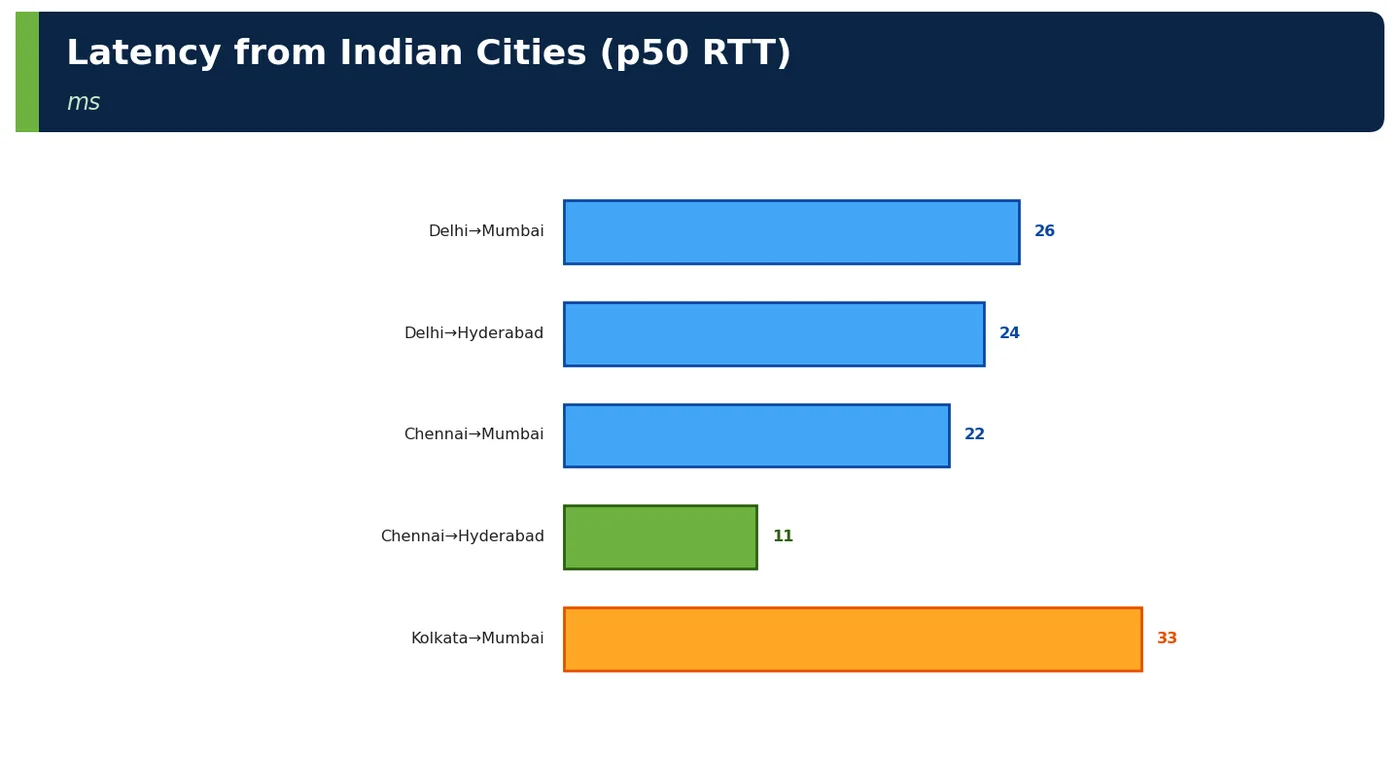
| Inter-region latency | Mumbai–Hyderabad ~20 ms |
| Replication lag monitoring | Alarms |
| Regional health | AWS Health events per region |
9Architecture & Design Considerations
| Guideline | Detail |
|---|---|
| Region per purpose | Primary, DR, home regions |
| Residency via SCP | Enforced |
| Native replication | Simpler than custom |
10Interview Questions & Answers
What is an AWS region?
An AWS region is a separate geographic area, such as Mumbai (ap-south-1) or Hyderabad (ap-south-2), containing several isolated availability zones, typically at least three. Each region runs its own independent copies of AWS services, so a failure in one region should not affect others. Regions are the primary boundary for failure isolation, data residency and control: resources and data stay in the region where you create them unless you replicate them. Architects choose regions based on latency to users, regulatory requirements, service availability and cost.
Does data leave a region automatically?
No. Data stays in the region where it is stored unless you explicitly replicate or copy it, for example with S3 cross-region replication, Aurora Global Database or DynamoDB global tables. This is important for data-residency laws, which may require personal data to stay in a specific country, and for disaster recovery, which needs data deliberately copied to another region. Some global services, such as IAM, store configuration globally, so architects should check each service's data location. Architects must therefore design replication explicitly for every dataset that needs to exist in more than one region.
Name global, regional and zonal services.
Global services operate across all regions with a single configuration, such as IAM for identities and permissions and Route 53 for DNS. Regional services run independently in each region and spread data across availability zones automatically, such as S3 and DynamoDB. Zonal services exist in one availability zone, such as an EC2 instance or an EBS volume, and you must deploy them in several zones yourself for high availability. Knowing the scope of each service tells you what failures it protects against and what you must design yourself.
What is an opt-in region?
An opt-in region is a region that is disabled by default and must be explicitly enabled in each AWS account before it can be used. Newer regions, such as Hyderabad, are often opt-in. Enabling them is an account-level action, and organisations can control it through policies. Opt-in regions help organisations avoid accidentally creating resources in unexpected locations. When planning disaster recovery or expansion, make sure the required regions are enabled in all relevant accounts in advance. Forgetting to enable an opt-in region is a common cause of failed DR tests.
How do you restrict region usage?
Use service control policies in AWS Organizations with the aws:RequestedRegion condition key to deny actions in any region not on an approved list. This applies to all accounts in the organisation, so teams cannot create resources in unapproved regions, which protects data residency and avoids shadow costs. Global services that are served from us-east-1 need exceptions in the policy. Combine this with AWS Config rules and cost alerts by region to detect anything that slips through. Review the allowed list whenever the business enters a new market.
What costs arise between regions?
Moving data between regions incurs inter-region data transfer charges per gigabyte, paid by the sender. This affects database replication, S3 cross-region replication, cross-region API calls and log shipping to a central region. The costs can become significant for data-heavy workloads. Architects should estimate replication volumes, compress where possible, replicate only what is needed and keep chatty interactions within one region. These costs must be included when evaluating multi-region designs. Monitoring transfer costs by region helps catch unexpected replication growth early.
What hidden global dependencies exist?
Some AWS operations rely on control planes hosted in us-east-1, even for workloads in other regions. Examples include creating ACM certificates for CloudFront, some IAM and Organizations operations, and certain billing APIs. The global STS endpoint is also hosted there, unless regional endpoints are used. During a us-east-1 incident, these operations may fail. Architects should identify such dependencies, avoid needing them during recovery and prefer regional endpoints wherever possible. Documenting them in the DR runbook ensures they are not discovered during a real incident.
How do you connect regions privately?
Regions can be connected privately in several ways. Transit Gateway peering connects transit gateways in different regions, providing routed connectivity between many VPCs. Inter-region VPC peering connects two VPCs directly. Many services replicate natively across regions, such as Aurora Global Database, DynamoDB global tables and S3 replication, without custom networking. Traffic stays on the AWS backbone rather than the public internet. The choice depends on scale, routing needs and which services must communicate. Whichever option is used, routing and security rules should be managed as code.
When use multiple regions?
Use multiple regions when a single region cannot meet requirements. Disaster recovery requirements, such as surviving a regional outage with a defined recovery time, need a second region. Data-residency laws in different markets may require data to stay in specific countries. Users far from the primary region may need lower latency. Multi-region designs add significant cost and complexity, such as data replication, consistency and operational overhead, so they should be justified by concrete requirements. Many organisations start with one region plus backups, and add a second region when requirements justify it.
What must a DR region have before a disaster?
A disaster-recovery region must be ready before it is needed. Quotas must be raised to support failover capacity. Networks, such as VPCs, subnets and connectivity, must exist. Data must be replicating continuously, with known lag. Infrastructure must be deployable from code, and container images, secrets and configuration must already be replicated. Runbooks must describe the failover steps, and they must be tested regularly through DR exercises, so the team knows the real recovery time. Without regular tests, the real recovery time is unknown and usually much longer than planned.