Topic 1.1; Volume II Chapter 2 (capacity relationships)
You will be able to
Decide when scaling up is the right move, identify CPU- versus memory-bound workloads, choose instance families and sizes, resize databases and caches with minimal disruption, size JVM heaps for bigger machines, and recognise the ceiling, cost and blast-radius limits of vertical scaling
Vertical scaling (scaling up) increases the capacity of a single instance — more or faster CPU, more memory, faster storage or network — instead of adding more instances.
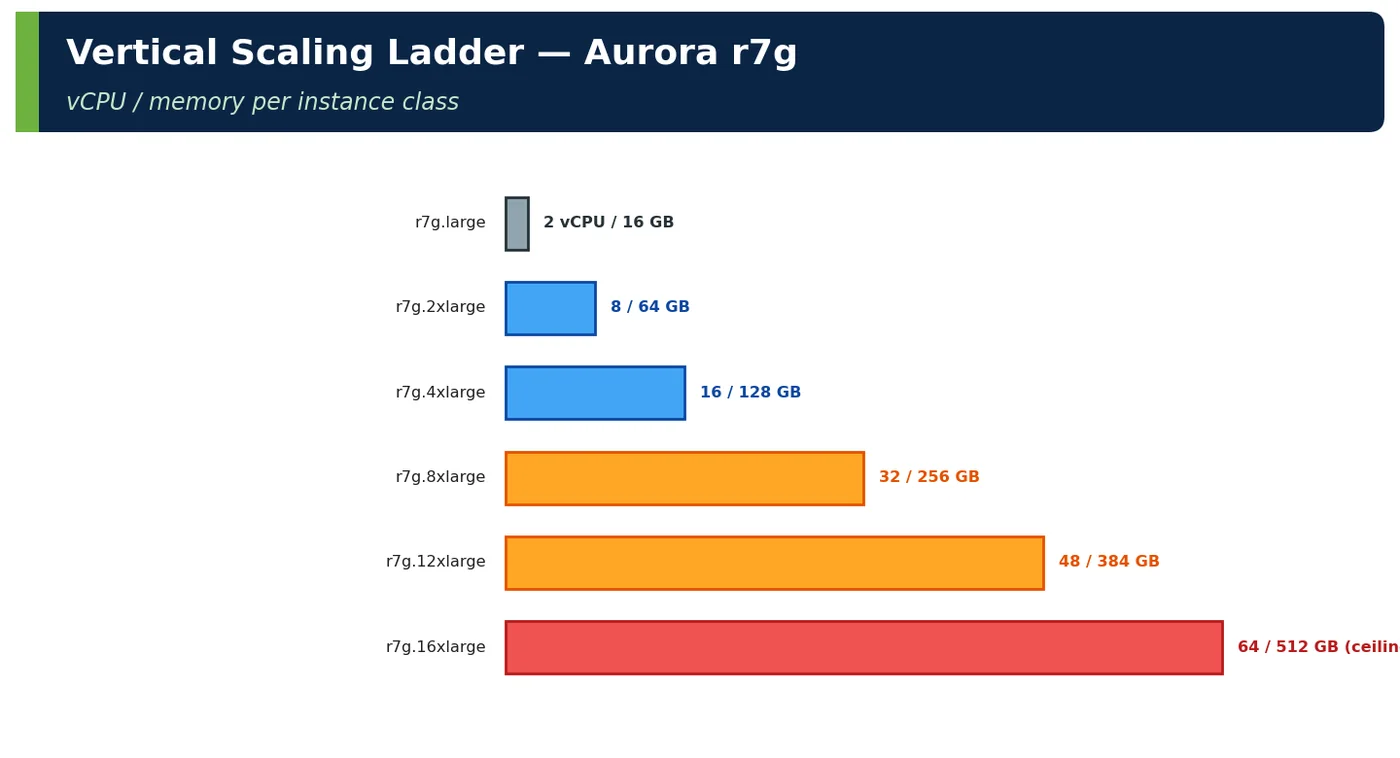
Figure 1 — Vertical scaling ladder — Aurora r7g
Resource scaled
How in AWS
Typical trigger
CPU (more vCPU, faster cores)
Larger instance, newer generation (Graviton4), compute family (c7g)
CPU-bound, high run-queue
Memory
Memory family (r7g, x2g), larger size
Working set > RAM, GC pressure, cache misses
Storage I/O
gp3/io2 IOPS, Aurora I/O-Optimized
IOPS/throughput limits
Network
Network-optimised sizes
Bandwidth or PPS limits
Pod resources
Higher requests/limits (VPA)
Container throttling, OOM
Table 1 — What vertical scaling changes
2Why It Exists
Vertical scaling requires no code changes and keeps a single copy of state, which preserves strong consistency and simplicity. For many systems — especially relational databases — it is the fastest and safest way to buy capacity.
Figure 2 — Vertical scaling — pros and cons
Workload
Why vertical fits
Relational writer
One writer holds the data; distributing writes is hard
In-memory analytics
Needs large RAM on one node
Legacy monoliths
Not stateless yet
Caches with large working sets
Fewer, larger nodes reduce shard count
Short-term event capacity
Scale up for sale week, down after
Table 2 — When vertical is natural
3Core Concepts
3.1 CPU
CPU scaling option
Effect
Watch
More vCPUs
More parallel work
Software must use them (thread pools, parallel GC)
Faster cores / newer generation
Lower per-request CPU time
Often cheapest improvement
Compute-optimised family
Higher CPU:RAM ratio
Memory may become limiting
Remove throttling (K8s limits)
Full use of allocated cores
Noisy neighbours
Table 3 — CPU scaling
CPU-bound signal
Tool
CPU > 70% sustained with rising latency
CloudWatch, Container Insights
Run-queue > cores
Enhanced Monitoring (DB), node exporter
DB load dominated by CPU wait
Performance Insights
Hot methods in profiles
JFR / async-profiler
Table 4 — Recognising CPU-bound workloads
3.2 Memory
Figure 3 — Sizing memory vertically — search pod
Memory scaling benefit
Example
Larger buffer cache
DB working set fits → fewer disk reads
Larger in-process caches
Higher hit ratio
Fewer GC cycles
More headroom per allocation burst
Fewer shards
Cache/search clusters with bigger nodes
Table 5 — Memory scaling
Figure 4 — CPU-bound vs memory-bound
4How It Works Internally — Resizing Without Downtime
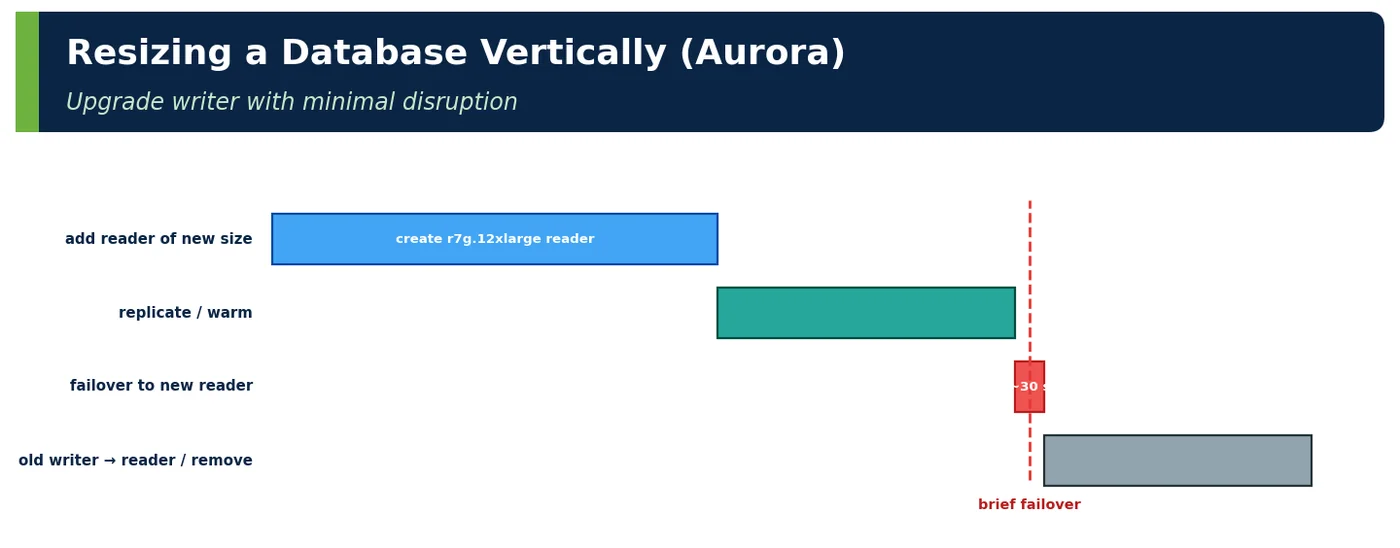
Figure 5 — Resizing a database vertically (Aurora)
Component
Resize method
Disruption
Aurora writer
Add reader of new size → failover → retire old
~30 s failover (RDS Proxy reduces impact)
Aurora reader
Modify instance class
Reader removed from endpoint during change
ElastiCache (cluster mode)
Online vertical scaling
Minimal; brief connection resets
EKS pods
Change requests/limits → rolling restart
None with surge rollout
EC2 instance
Stop, change type, start
Downtime unless behind LB with peers
Table 6 — Resize mechanics
4ADeep Dive — Bigger JVMs Need Different GC Choices
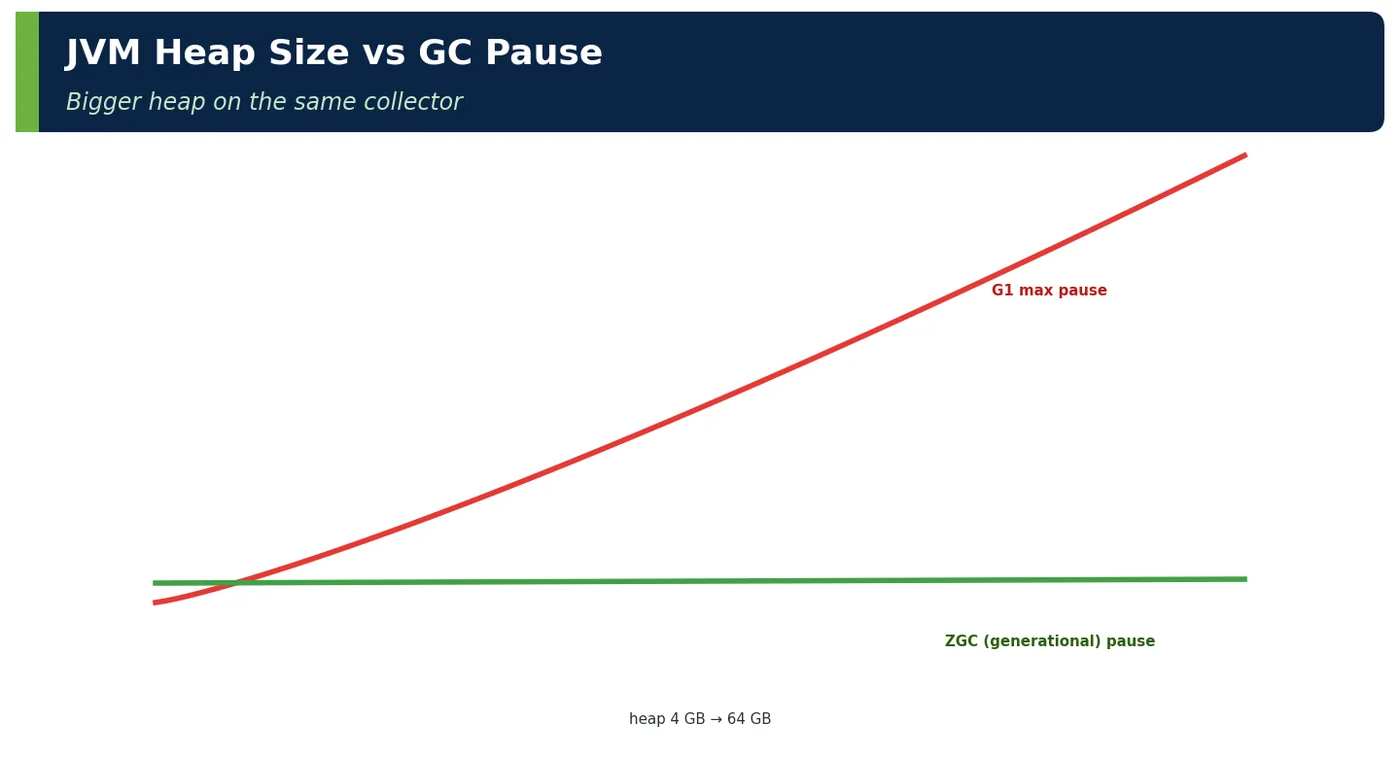
Figure 6 — JVM heap size vs GC pause
Heap size
Collector recommendation (Java 25)
≤ 4 GB
G1 default is fine
4–32 GB, latency-sensitive
Generational ZGC
> 32 GB
ZGC (compressed oops off ≥ 32 GB — size to 31 GB or much larger)
# Pod sized up for a memory-bound search serviceresources: requests: { cpu: "4", memory: 32Gi } limits: { memory: 32Gi }env: - name: JAVA_TOOL_OPTIONS value: "-XX:+UseZGC -XX:MaxRAMPercentage=70"
6Practical Examples
6.1 ShopNow orders writer: scale up before sharding
Step
Instance
Writer CPU at sale peak
2024
r7g.4xlarge (16 vCPU)
88%
After query fixes
r7g.4xlarge
71%
Scale up
r7g.8xlarge (32 vCPU)
42%
2026 growth
r7g.12xlarge (48 vCPU)
55%
Ceiling
r7g.16xlarge (64 vCPU)
≈ 2 more years → sharding plan triggered
Table 9 — Vertical first, with a known horizon
6.2 Search pods: memory-bound
Search pods (4 vCPU / 8 GB) evicted facet caches constantly (hit ratio 45%). Moving to 4 vCPU / 32 GB raised the hit ratio to 82% and cut OpenSearch CPU by 30% — a vertical memory move on a horizontally scaled service.
6.3 CPU generation upgrade
Moving checkout pods from Graviton2 to Graviton4 reduced CPU per request from 110 ms to 82 ms (−25%) at similar price — the cheapest "scale up" available.
6.4 Lock-bound database — vertical did not help
A trial move of the inventory DB to a larger instance changed nothing: DB load was 70% Lock:transactionid on hot rows. The fix was data design (sharded counters), not size.
6.5 Worked example — choose the family
Workload
Measured
Family
Checkout API
CPU-bound, 1.5 GB/vCPU
c7g / m7g
Search pods
Memory-bound caches
r7g
Orders DB
Working set 90 GB, CPU 55%
r7g (RAM for cache)
Analytics ETL
Memory-heavy joins
x2g or EMR
Table 10 — Match family to the bottleneck
6.6 Worked example — ceiling horizon
Input
Value
Writer CPU today at peak
55% on 48 vCPU
Growth
60% per year
Largest class
64 vCPU
Years until 70% on largest
≈ 1.1 years
Decision
Start sharding design now (lead time 9 months)
Table 11 — Compute when the ceiling arrives
6.7 Worked example — interview whiteboard
Prompt
Answer outline
"Our database is at 85% CPU. Scale up or out?"
"Check the bottleneck first — if it's CPU (not locks), scale up via a larger reader and failover; it's quick and preserves consistency. In parallel, remove load (query fixes, caching, read replicas) and compute when we'd hit the largest instance at current growth; if within ~18 months, start partitioning/sharding design now."
Table 12 — Structured answer
6.8 Worked example — temporary scale-up for a sale
Component
Normal
Sale week
After
Orders writer
r7g.8xlarge
r7g.12xlarge
r7g.8xlarge
Valkey nodes
r7g.large × 6
r7g.xlarge × 6
r7g.large × 6
Extra monthly-equivalent cost
—
+₹3.1 L for 10 days
—
Table 13 — Vertical scaling can be elastic on a calendar
6.9 Worked example — cache cluster: up vs out
Option for 2× Valkey memory
Shards
Failover blast radius
Cost
Scale up nodes (large → xlarge)
6
1/6 of keys per node failure
Same per GB
Scale out shards (6 → 12)
12
1/12
Same per GB, more connections
Chosen
Scale out
Smaller blast radius, more throughput
—
Table 14 — Even for stateful systems, compare up vs out
6.10 Worked example — right-sizing down
Pod
Requested
p95 used
VPA recommendation
Saving
reviews
4 vCPU / 8 GB
0.6 vCPU / 2.1 GB
1 vCPU / 3 GB
−70%
notifications
2 vCPU / 4 GB
0.3 vCPU / 1.2 GB
0.5 vCPU / 2 GB
−60%
Table 15 — Vertical scaling also means scaling down over-provisioned services
7Common Problems & Mistakes
Mistake
Fix
Scaling up a lock- or I/O-bound system for CPU
Diagnose first
Ignoring the ceiling
Compute horizon, plan next step
Same GC settings on a 4× heap
Revisit collector (ZGC)
Downtime during resize
Reader-promotion / online scaling
Paying for idle big instances year-round
Scale up for events, down after
Bigger failure domain unnoticed
Multi-AZ replicas, failover tested
Table 16 — Mistakes and fixes
8Performance & Production Considerations
Consideration
Practice
Compute Optimizer / VPA recommendations
Monthly right-sizing
Failover sizing
Replicas same class as writer
Licensing
Per-core licences can make scaling up expensive
Warm-up
Buffer cache cold after failover to new instance
Table 17 — Operating vertical scaling
Vertical sizes go stale in both directions, so review them monthly. AWS Compute Optimizer and VPA recommendations show over-provisioned instances and pods, which are common after a peak passes, and under-provisioned ones before growth catches up. Keep Aurora replicas at the same instance class as the writer, because a failover to a smaller replica turns an availability event into a performance incident. After any resize or failover, expect a cold buffer cache and slower queries for several minutes; schedule changes off-peak and pre-warm with representative queries where possible. Check licensing before scaling licensed software by cores, since per-core fees can outweigh the hardware cost. Finally, record each step in the capacity plan with the date it is expected to reach its ceiling, so the next scaling move is never a surprise.
9Architecture & Design Considerations
Guideline
Detail
Use vertical scaling for state, horizontal for compute
Typical split
Keep a documented ceiling and horizon
In the capacity plan
Design for later partitioning
Keys in tables, no cross-entity transactions
Reduce demand before scaling up
Query fixes, caching
Table 18 — Design guidance
10Interview Questions & Answers
Q1BasicConcept
What is vertical scaling?
Vertical scaling, or scaling up, means increasing the capacity of a single instance instead of adding more instances. You give one machine, database or pod more or faster CPU, more memory, faster storage or more network bandwidth. In AWS that means a larger size or a newer generation, for example Aurora r7g.8xlarge to r7g.12xlarge or Graviton2 to Graviton4, a different family such as compute-optimised c7g or memory-optimised r7g, provisioned IOPS, or higher pod requests and limits in Kubernetes. It contrasts with horizontal scaling, which adds instances and spreads the load. Most real systems use both: vertical for stateful components, horizontal for stateless compute.
Q2BasicConcept
Main advantage?
Its main advantage is simplicity: you get more capacity with no code changes and no distribution complexity, because there is still exactly one copy of the state. A relational writer that scales up keeps strong consistency, local transactions and joins; there is no sharding key to choose, no cross-shard query, no rebalancing and no distributed transaction. That makes it the fastest and safest way to buy capacity for databases, legacy monoliths and in-memory workloads. At ShopNow the orders writer went from 16 to 32 vCPUs through a reader promotion with about 30 seconds of failover, while a sharding project would have taken months of design and migration.
Q3IntermediateTrade-off
Main limitations?
There are four main limits. First, a hard ceiling: the largest instance class exists, and growth will eventually reach it, so vertical scaling only buys time. Second, a larger failure domain: one big node holds all the load, so its failure or maintenance affects everything unless replicas and failover are in place. Third, possible disruption: some resizes need a restart or failover, although reader promotion and online scaling keep this to seconds. Fourth, cost grows faster than benefit near the top, and per-core software licences make big machines expensive. Software must also use the extra cores; a single-threaded or lock-bound workload will not get faster.
Q4IntermediateInternals
How do you resize an Aurora writer with minimal downtime?
Use reader promotion rather than modifying the writer in place. Add a new Aurora replica with the target instance class to the cluster at promotion tier 0, and wait until it is available; because Aurora replicas share the cluster storage volume, there is no data copy and replica lag is typically milliseconds. Then trigger a failover to that replica, which usually takes around 30 seconds, while RDS Proxy keeps client connections open and reduces errors during the switch. Finally remove the old writer, or keep it as a reader. Expect a cold buffer cache on the new instance, so do it off-peak and keep the replicas the same class as the writer.
Q5Senior EngineerScenario
How do you know if a workload is CPU- or memory-bound?
Look at what saturates as load rises. A CPU-bound workload shows sustained CPU above about 70% with latency rising, a run queue longer than the number of cores, database load dominated by CPU in Performance Insights, and hot methods in JFR or async-profiler flame graphs. A memory-bound workload shows a working set larger than RAM: falling buffer or cache hit ratios, more disk reads, frequent GC that reclaims little memory, evictions or OOM kills, while CPU stays moderate. Check container throttling too, because a CPU limit can look like CPU-bound behaviour. The diagnosis picks the family: compute-optimised c7g for CPU, memory-optimised r7g or x2g for memory.
Q6Senior EngineerTricky
When doesn't scaling up help?
Scaling up does not help when the bottleneck is not a resource the bigger machine adds. The common case is contention: lock waits on hot rows, a single synchronized section or a single-threaded process, where extra cores simply sit idle. ShopNow moved its inventory database to a larger instance and nothing changed, because 70% of database load was transaction-ID lock waits on hot SKUs; the fix was sharded counters. It also fails when the limit is external, such as a slow dependency, network latency, a connection limit on a partner API, or an inefficient algorithm whose cost grows faster than the hardware. Diagnose the bottleneck before buying capacity.
Q7Technical ArchitectInternals
What JVM changes accompany bigger heaps?
A bigger heap changes GC behaviour, so the collector and sizing need revisiting. G1 is fine up to about 4 GB, but larger latency-sensitive heaps should use generational ZGC, the only ZGC mode in Java 25, whose pauses stay below a millisecond regardless of heap size. Watch the 32 GB boundary: above it compressed object pointers are switched off and references take twice the space, so size to about 31 GB or go much larger. In containers, set -XX:MaxRAMPercentage to around 65 to 75 to leave room for metaspace, thread stacks, direct buffers and the OS, set memory requests equal to limits, and avoid tight CPU limits.
Q8Technical ArchitectTrade-off
What is the cheapest vertical upgrade?
Often a newer CPU generation at the same size. Each generation gives more work per core for a similar price, so the CPU time per request falls without any architectural change. When ShopNow moved checkout pods from Graviton2 to Graviton4, CPU per request dropped from 110 to 82 ms, about 25% less, at a similar hourly cost. The move needs an arm64 container image and a quick check of native libraries, but Java code runs unchanged. Right-sizing over-provisioned services using VPA or Compute Optimizer recommendations is the other cheap move, because it frees money and node capacity for the services that really need to scale up.
Q9Solution ArchitectEstimation
How do you plan beyond vertical scaling?
Compute the ceiling horizon and start the next step before you reach it. Take today's peak utilisation, the growth rate and the largest instance class available, and work out when peak utilisation on that largest class would cross your threshold, usually around 70%. ShopNow's orders writer runs at 55% of 48 vCPUs at peak and grows 60% a year; even on the 64-vCPU class it reaches 70% in about 1.1 years. Sharding needs about nine months of lead time, so design starts now. Meanwhile, reduce demand with query fixes, caching and read replicas, and design data for later partitioning, with partition keys and no cross-entity transactions.
Q10Solution ArchitectDesign
When would you scale up only temporarily?
When the extra demand is predictable and short, such as a Diwali sale week, a product launch or month-end batch processing. Scaling up for the event and back down afterwards avoids paying for a large instance all year and avoids a risky architectural change for a peak that lasts days. ShopNow moves its orders writer from r7g.8xlarge to r7g.12xlarge and its Valkey nodes up one size for sale week, for about ₹3.1 lakh extra, then reverses both. Schedule the change days before the event using reader promotion and online scaling, warm the caches, load-test at the new size, and make scaling down an explicit part of the plan.
Newsletter
Get new tutorials every week
New ArchitectMind tutorials and interview questions, once a week. No spam, unsubscribe anytime.
Your subscription could not be saved. Please try again.
Almost done! Check your inbox and click the confirmation link to complete your subscription.
 Architect