Scale services by adding identical instances, satisfy the prerequisites (statelessness, load balancing, scalable shared state, automation, idempotency), distribute instances across AZs, predict where horizontal gains stop, and plan horizontal scaling for every tier
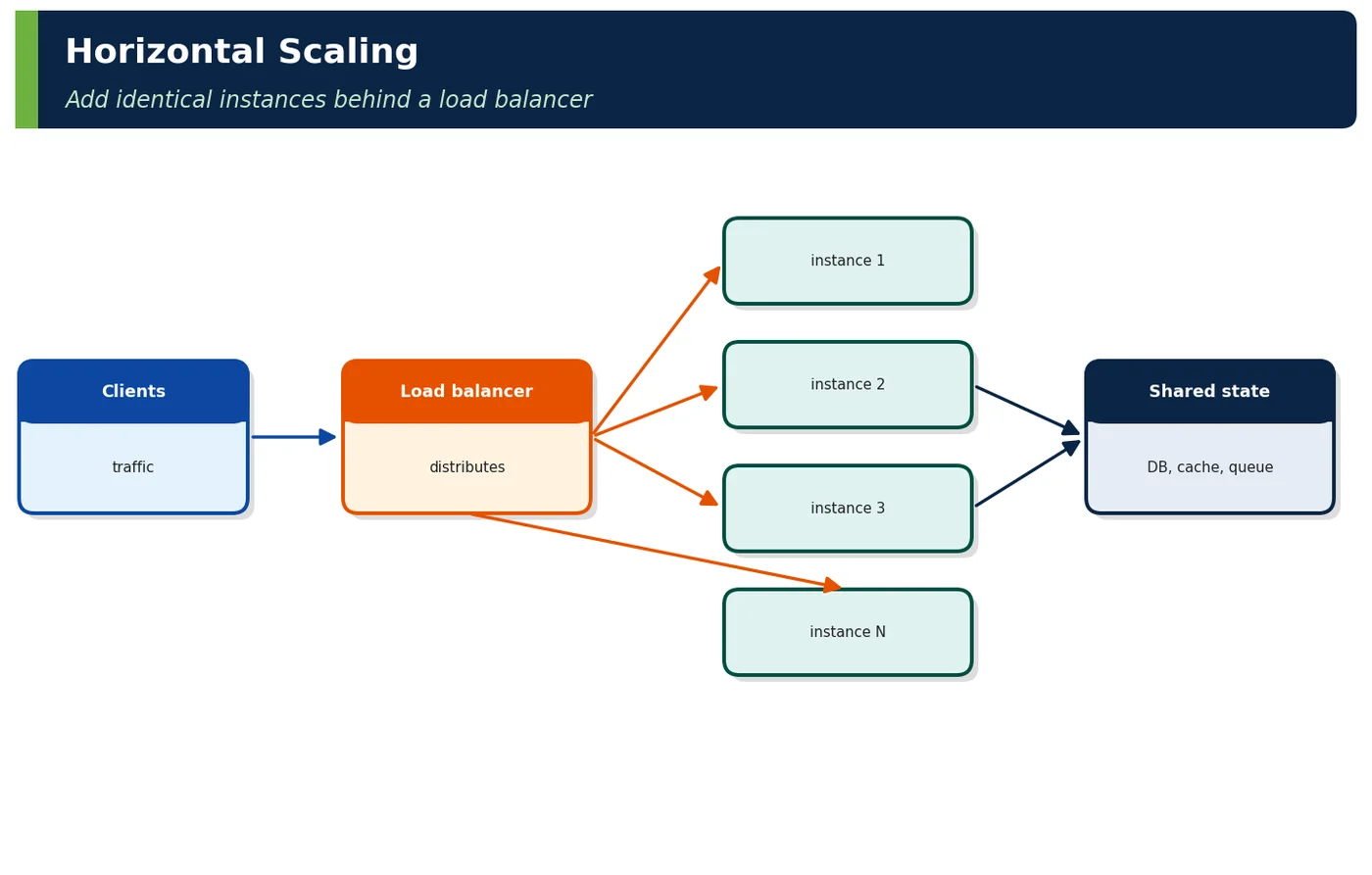
Horizontal scaling (scaling out) adds more instances of a component and spreads work across them, usually behind a load balancer. Capacity grows with instance count rather than instance size.
Databases, caches, queues accessed by all instances
Automation
Adds/removes instances (Chapter 4)
Table 1 — Parts of horizontal scaling
2Why It Exists
Every instance has a ceiling; fleets do not. Horizontal scaling also gives redundancy (losing one of 60 instances costs 1.7% of capacity), allows scaling in with demand, and uses cheaper commodity or spot capacity.
Figure 2 — Horizontal scaling — pros and cons
Benefit
Example
Capacity beyond one machine
Search at 22k req/s on 40–110 pods
Redundancy
Pod or node loss invisible
Elasticity
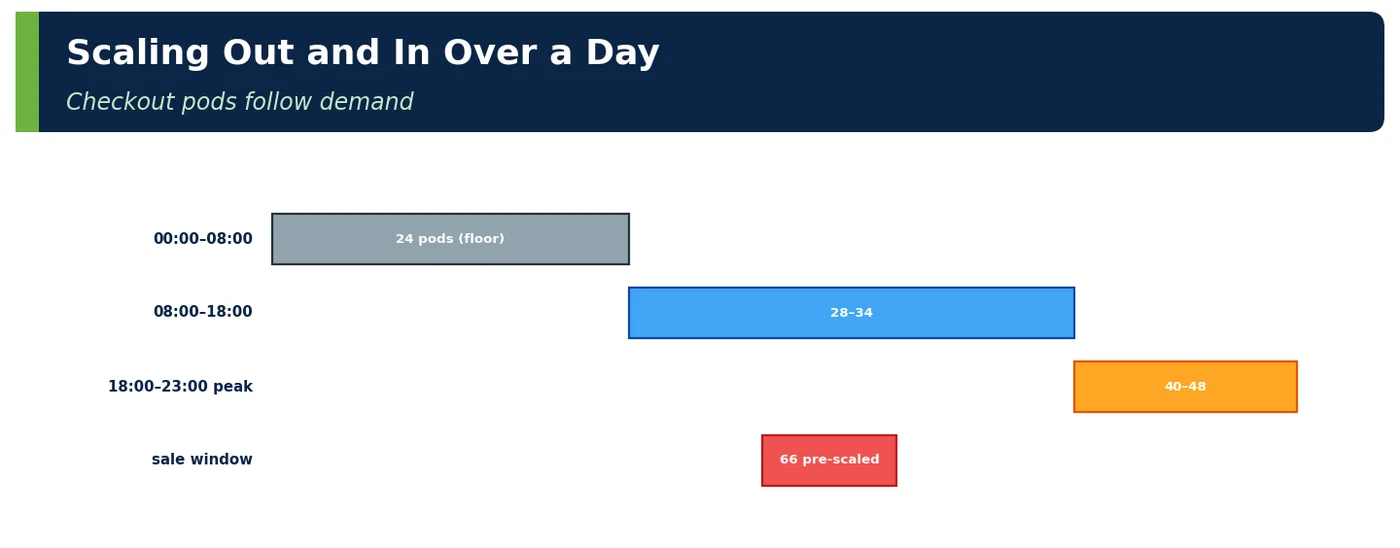
24 pods at night, 66 at sale
Cost
Spot/Graviton nodes, scale-in off-peak
Deployment safety
Rolling updates and canaries across instances
Table 2 — Why scale out
3Core Concepts
3.1 More Instances
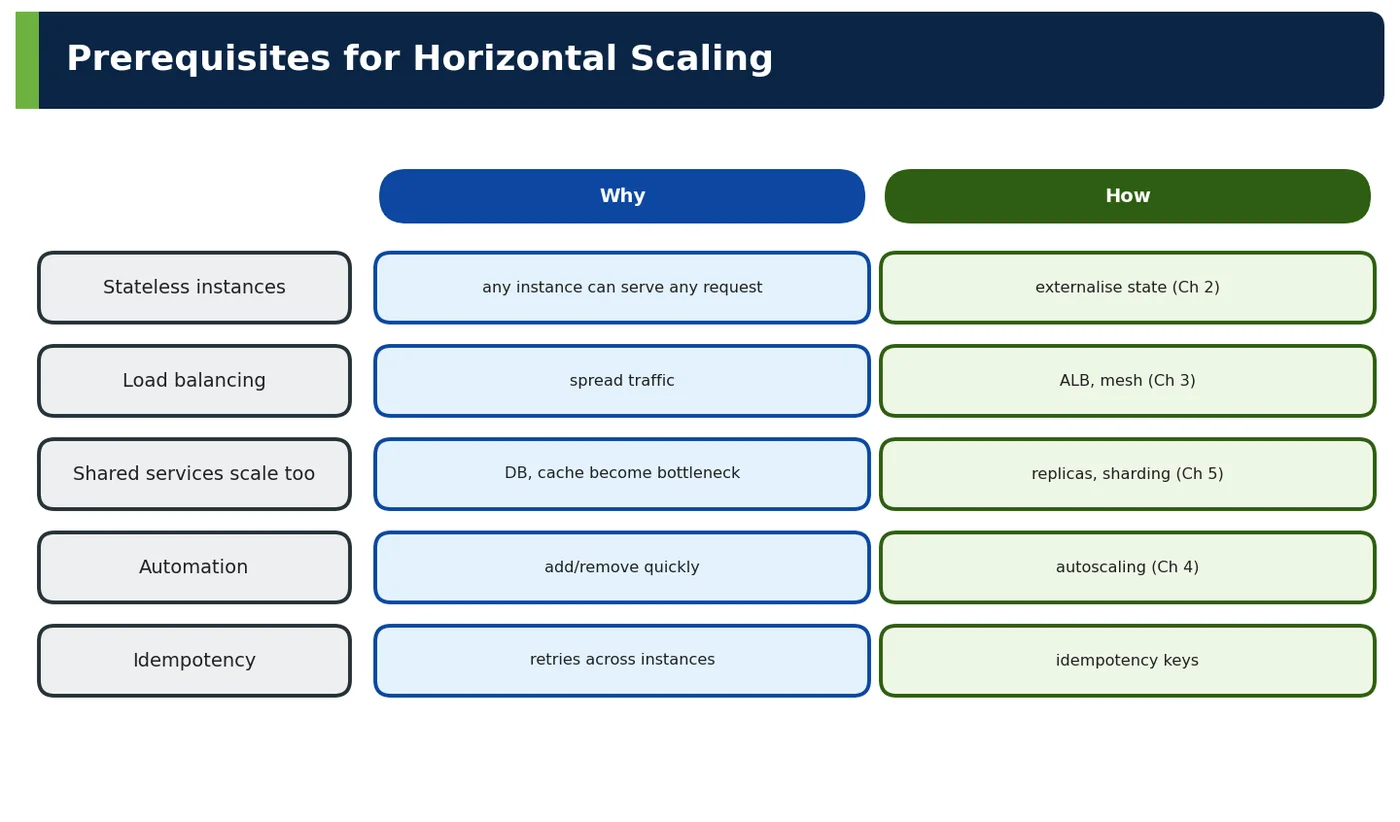
Figure 3 — Prerequisites for horizontal scaling
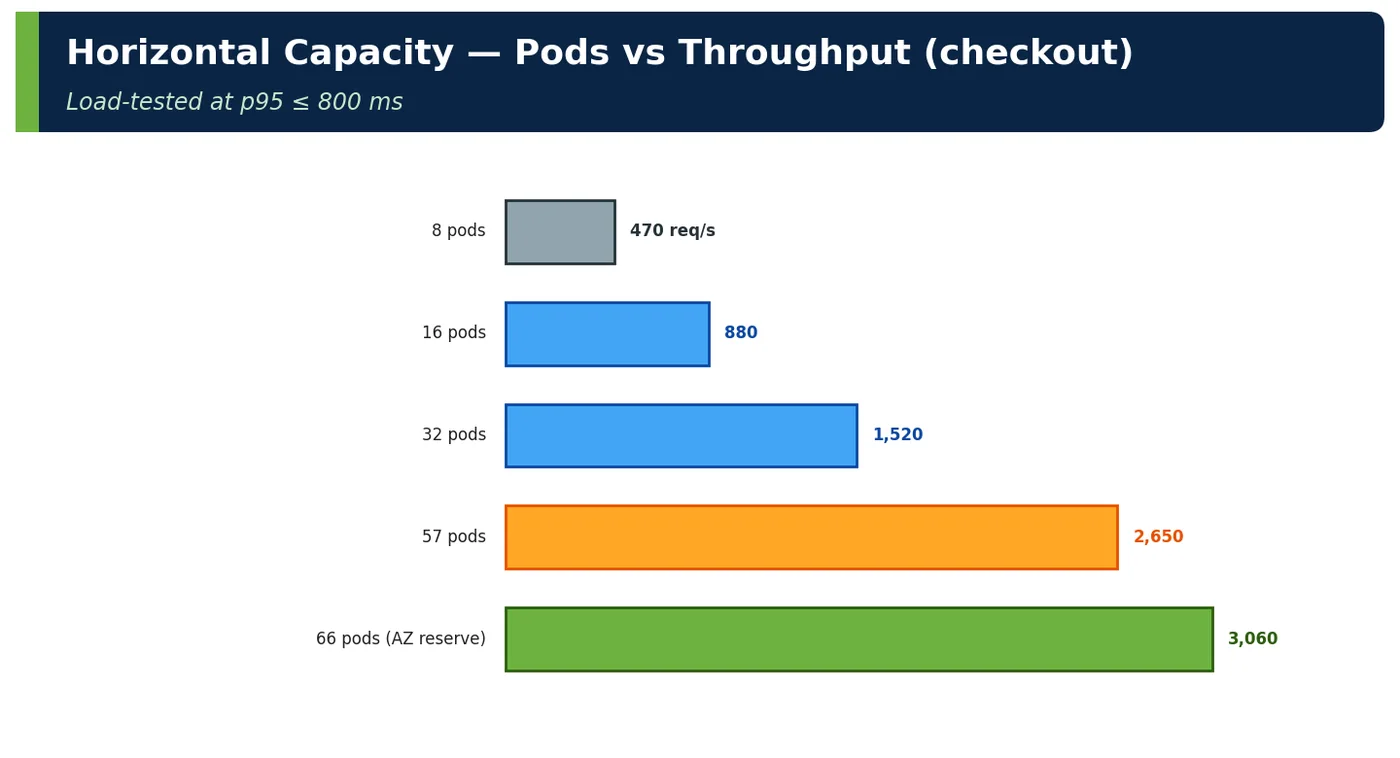
Figure 4 — Horizontal capacity — pods vs throughput
Instance placement rule
Reason
Spread across 3 AZs (topology spread)
AZ failure tolerance
Anti-affinity across nodes
Node failure tolerance
PodDisruptionBudgets
Maintenance can't remove too many at once
Identical config/images
Interchangeability
Graceful shutdown
No dropped in-flight requests on scale-in
Table 3 — Placing instances
3.2 Load Balancing
Role in horizontal scaling
Detail
Entry point
One address for N instances
Distribution
Spread load evenly (algorithms, Chapter 3.2)
Health
Only route to healthy instances (3.3)
Elastic membership
Register/deregister as instances come and go
Connection draining
Finish in-flight requests on removal
Table 4 — Load balancing makes instances invisible to clients
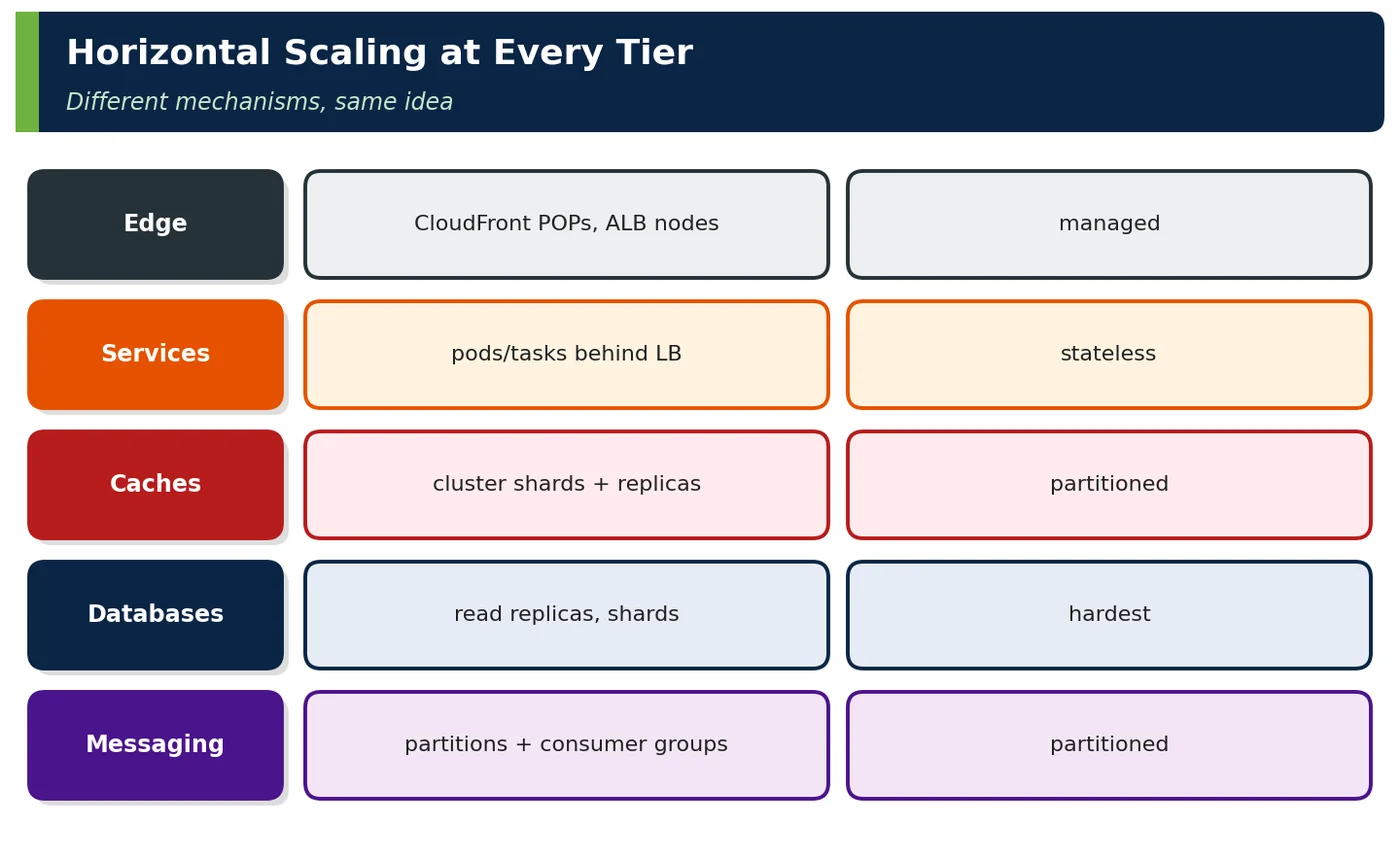
Figure 5 — Horizontal scaling at every tier
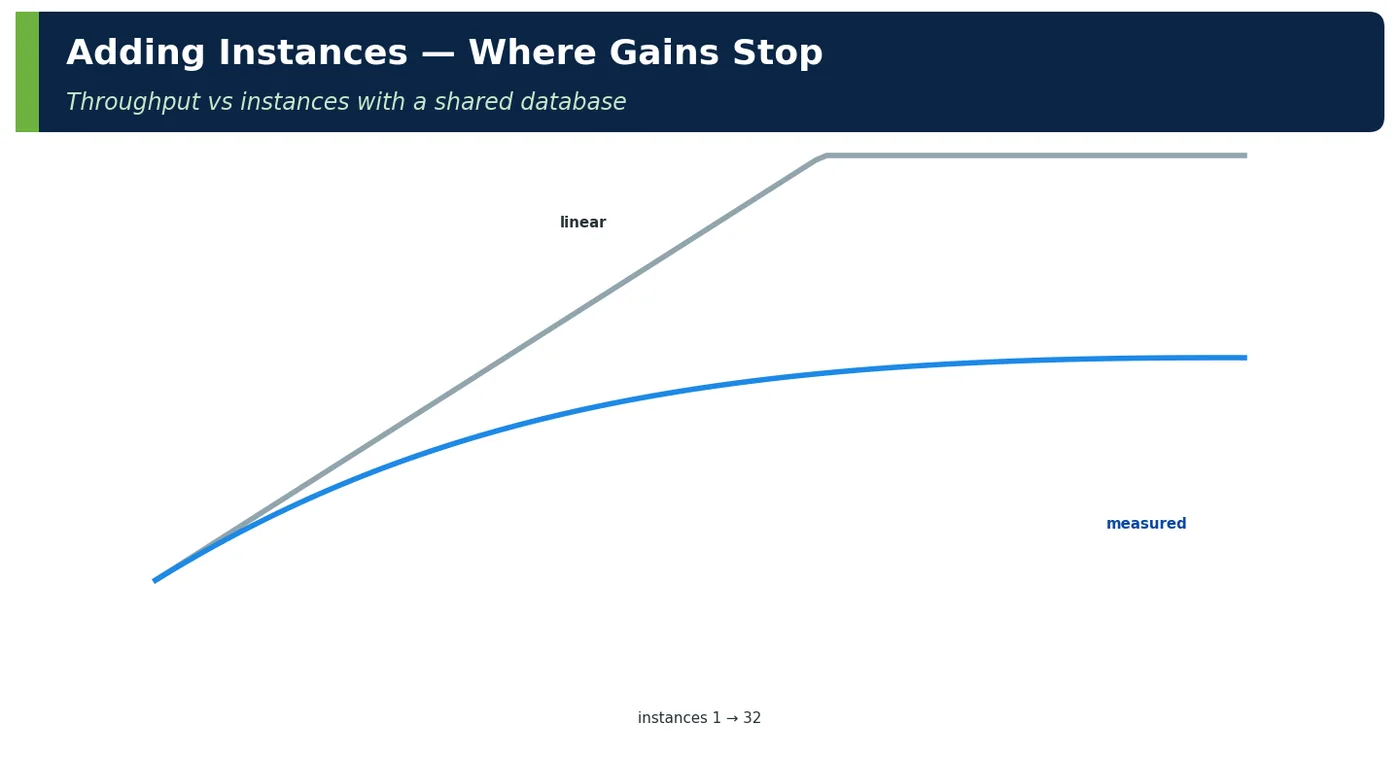
4How It Works Internally — Where Gains Stop
Figure 6 — Adding instances — where gains stop
Shared bottleneck
Symptom when scaling out
Fix
DB writer
Throughput flattens, DB CPU/locks rise
Batch writes, partition (Z)
DB connections
Pool × pods > max_connections
Proxy, budgets
Cache hot keys
One shard saturates
L1 cache, key splitting
Downstream quota
Partner TPS limit
Second provider, queueing
Kafka partitions
Consumers idle beyond partition count
More partitions
Coordination (locks, leader)
Coherence overhead
Partitioned ownership
Table 5 — Shared bottlenecks
Signal that horizontal scaling is working
Signal that it is not
Throughput per pod roughly constant as pods increase
Throughput per pod falls steadily
p95 flat after scale-out
p95 unchanged or worse after adding pods
Shared-tier utilisation grows proportionally
One shared resource saturates (writer, shard, partner)
Scale-in without errors
5xx spikes on scale-in
Table 6 — Reading scale-out results
4ADeep Dive — Scale-Out Mechanics in Kubernetes
Figure 7 — Scaling out and in over a day
Step
Time
Metric crosses target (HPA)
15–30 s evaluation
Pods created
seconds (if nodes available)
Nodes provisioned (Karpenter)
60–120 s
Image pull, JVM start, readiness
20–60 s (+ warm-up)
Registered in LB target group
≈ 10–20 s after readiness
Scale-in: deregistration + drain
30 s deregistration delay, graceful shutdown
Table 7 — Where the minutes go (details in Chapter 4)
# Spring Boot 4: graceful shutdown so scale-in never drops requestsserver: shutdown: gracefulspring: lifecycle: timeout-per-shutdown-phase: 30s
JAVA
// Idempotent handler: retries may land on a different instance@PostMapping("/orders")ResponseEntity<OrderRef> place(@RequestHeader("Idempotency-Key") String key,@RequestBody PlaceOrder cmd) {// stored result, any instancereturn idempotency.execute(key, () -> orders.place(cmd)) .map(ResponseEntity::ok).orElseThrow();}
6Practical Examples
6.1 ShopNow checkout scale-out
Pods
Throughput (p95 ≤ 800 ms)
Efficiency
8
470 req/s
98%
16
880
94%
32
1,520
81%
57
2,650
79%
66
3,060
79% (AZ reserve)
Table 8 — Near-linear until the writer contention (fixed by batching)
6.2 Hidden state blocked scaling
A rate limiter kept counters in pod memory; scaling from 20 to 60 pods tripled the effective limit and partners exceeded their quotas. Moving counters to Valkey restored correct limits regardless of pod count.
6.3 Consumers limited by partitions
The inventory consumer group was scaled from 12 to 24 pods, but orders.events had 12 partitions — 12 pods idled. Partitions were increased to 48 before the next sale.
6.4 Worked example — prerequisites audit
Prerequisite
Checkout
Seller portal (legacy)
Stateless
✔
✘ in-memory sessions → Spring Session + Valkey
Behind LB
✔ ALB
✔ ALB with stickiness (to remove)
Shared state scales
✔ proxy, replicas
✘ single DB pool of 10
Autoscaling
✔ HPA
✘ fixed 4 VMs
Idempotent writes
✔
Partly
Table 9 — Audit before scaling out
6.5 Worked example — capacity loss per instance
Fleet size
Capacity lost per instance failure
3
33%
10
10%
60
1.7%
Table 10 — More, smaller instances make failures cheaper
6.6 Worked example — horizontal plan per tier
Tier
Scale-out unit
Current
Next step
Checkout
pod (8 vCPU)
24–89
max 110
Search
pod (4 vCPU)
40–110
OpenSearch shards 18
Valkey
shard (xlarge)
6
12 shards
Orders DB reads
Aurora reader
2
auto-scaling 2–5
Kafka
partition + consumer
48 / 24
—
Table 11 — Every tier has its own unit
6.7 Worked example — interview whiteboard
Prompt
Answer outline
"How would you scale this API horizontally?"
"Make it stateless (tokens, external session/cart), put it behind an L7 load balancer, spread replicas across AZs with PDBs, add HPA/Karpenter, graceful shutdown and idempotency keys. Then check shared tiers: DB connections via a proxy, read replicas, cache sharding, partitions — and measure scaling efficiency to find the next bottleneck."
Table 12 — Structured answer
6.8 Worked example — spot capacity for stateless tiers
6.11 Worked example — memory and connections scale with instances
Pods
Hikari connections (20/pod)
Valkey connections (8/pod)
Via proxy to DB
24
480
192
~120
66
1,320
528
~220
110
2,200
880
~260 (proxy limit 30% of max_connections)
Table 16 — Every scale-out multiplies connections to shared tiers — budget them
6.12 Worked example — scheduled jobs in a scaled-out service
Problem
Fix
@Scheduled cleanup ran on all 66 pods (66× DB load)
ShedLock (DB/Valkey lock) or a dedicated CronJob
Report generation per pod
Single job queue consumed by workers
Table 17 — Horizontal scaling multiplies anything each instance does on its own
7Common Problems & Mistakes
Mistake
Fix
Scaling stateful instances
Externalise state first
Forgetting shared tiers
Scale DB, cache, partitions too
All replicas in one AZ
Topology spread
Dropped requests on scale-in
Graceful shutdown, preStop, draining
Non-idempotent retries across instances
Idempotency keys
Local counters/limits
Shared stores
Table 18 — Mistakes and fixes
8Performance & Production Considerations
Consideration
Practice
Efficiency dashboard
Throughput per pod vs count
Quotas
EC2 vCPU, EKS IPs, ALB targets
Spot capacity
For stateless tiers with PDBs and diversification
Cost
Scale-in off-peak; right-size pods
Table 19 — Operating scale-out
Scaling out in production is limited as often by platform quotas as by application design, so check them before every peak. EC2 vCPU limits per instance family, IP addresses available to the VPC CNI in each subnet, ALB targets per target group and Aurora max_connections all cap how far a fleet can grow, and raising a service quota can take days. Track scaling efficiency on a dashboard, plotting throughput per pod against pod count: a falling curve means a shared tier is binding long before latency alarms fire. Use spot capacity only for stateless, interruption-tolerant tiers, with several instance types and a PodDisruptionBudget so a reclaim wave cannot remove too many replicas at once. Finally, scale in deliberately off-peak and right-size pod requests, because an over-provisioned fleet of 110 pods costs the same whether or not traffic arrives.
9Architecture & Design Considerations
Guideline
Detail
Design stateless by default
Chapter 2
Partition shared state early
Keys, tenants
Plan per-tier scaling units
Pods, shards, partitions, readers
Test with instance loss
Chaos: kill pods under load
Table 20 — Design guidance
10Interview Questions & Answers
Q1BasicConcept
What is horizontal scaling?
Horizontal scaling, or scaling out, adds more identical instances of a component and spreads work across them, usually behind a load balancer, so capacity grows with the number of instances rather than the size of each one. In Kubernetes that means more pods of a Deployment, managed by the HPA and with nodes added by Karpenter; in ECS, a higher desired task count. ShopNow's search runs 40 to 110 pods and serves 22,000 requests per second. Beyond capacity, it gives redundancy, because losing one of 60 pods costs only 1.7% of capacity, elasticity to scale in at night, and the ability to use cheaper spot or Graviton capacity.
Q2BasicConcept
What is its main prerequisite?
The main prerequisite is stateless, interchangeable instances: any instance must be able to serve any request, so nothing a client needs may live only in one instance's memory or disk. Sessions, carts, rate-limit counters, uploaded files and scheduled-job ownership must move to shared stores such as Valkey, a database or S3, and identity should travel in tokens. If that is not done, the load balancer needs sticky sessions, scale-in loses user state and pod failures log people out. ShopNow's legacy seller portal kept sessions in memory and moved them to Spring Session with Valkey before it could scale. The other prerequisites are load balancing, scalable shared state, automation and idempotency.
Q3IntermediateConcept
Why is a load balancer required?
A load balancer gives clients one stable address while the set of instances behind it changes constantly. It spreads requests across instances with an algorithm such as round robin or least outstanding requests, routes only to instances that pass health checks, and registers and deregisters instances as the autoscaler adds or removes them. During scale-in or deployments it drains connections so in-flight requests complete. Without it, clients would need to know every instance and react to failures themselves. At ShopNow an ALB fronts the services, with target groups fed by the AWS Load Balancer Controller, and inside the cluster Kubernetes Services do the same job for internal calls.
Q4IntermediateInternals
Where does horizontal scaling stop helping?
Horizontal scaling stops helping when the bottleneck moves to something all instances share. The usual culprits are the database writer, whose CPU and locks rise while throughput flattens; database connections, where pool size multiplied by pod count exceeds max_connections; hot cache keys that saturate one Valkey shard; partner API quotas; Kafka partition counts that leave extra consumers idle; and coordination such as distributed locks or leader election. The Universal Scalability Law describes this: contention and coherence costs make throughput per instance fall as you add instances. The signal is falling throughput per pod or flat p95 after scale-out, and the fix is to scale or partition the shared tier, not to add pods.
Q5Senior EngineerScenario
How do you avoid dropping requests when scaling in?
Make removal a coordinated sequence so the load balancer stops sending traffic before the application stops accepting it. When Kubernetes terminates a pod, the endpoint removal and the SIGTERM happen in parallel, so a preStop hook that sleeps about ten seconds gives the ALB and kube-proxy time to deregister the pod. Spring Boot's graceful shutdown then stops accepting new requests and lets in-flight ones finish within a phase timeout such as 30 seconds, and terminationGracePeriodSeconds must exceed the total. Align the ALB deregistration delay with it. At ShopNow, scaling from 60 to 24 pods under load produced 0.7% 502 and 504 errors before these fixes and 0.01% after.
Q6Senior EngineerTricky
Why are idempotency keys needed?
Idempotency keys are needed because in a scaled-out system a retry may land on a different instance from the original request, so no instance can rely on its own memory to recognise a duplicate. A client times out, retries the order placement, and without protection two orders or two payment captures are created. With an Idempotency-Key header, the first instance records the key and the result in a shared store, and any instance that receives the retry returns the stored result instead of repeating the side effect. Store keys with a time-to-live matching the retry window, and make the record and the business change atomic, for example in the same database transaction.
Q7Technical ArchitectDesign
How do you place instances for resilience?
Spread instances so that no single failure domain removes too many of them. Use topology spread constraints with the zone key and a maxSkew of one so replicas are balanced across three Availability Zones, and pod anti-affinity or a hostname spread so replicas do not share a node. A PodDisruptionBudget limits voluntary disruptions, such as node drains during upgrades or Karpenter consolidation, to, say, 10% of replicas at once. Size the fleet so that losing a whole zone still leaves enough capacity; ShopNow keeps an AZ reserve, which is why its checkout efficiency at 66 pods is 79%. Finally, run chaos tests that kill pods and simulate a zone loss under load.
Q8Technical ArchitectInternals
How do Kafka partitions limit scale-out?
Within a Kafka consumer group, each partition is assigned to exactly one consumer, so the number of active consumers can never exceed the number of partitions. Any extra consumer receives no assignment and sits idle while still costing memory and a slot. ShopNow scaled the inventory consumer group from 12 to 24 pods during a sale, but orders.events had 12 partitions, so half the pods did nothing and consumer lag kept growing. The fix is to provision partitions for future peak parallelism, here 48, ahead of time, because adding partitions later changes key-to-partition mapping and can break ordering for keyed events. Autoscalers such as KEDA should cap replicas at the partition count.
Q9Solution ArchitectDesign
How do you plan horizontal scaling for a whole system?
Plan it tier by tier, because each tier scales out in a different unit and has its own ceiling. For every tier, define the scale-out unit, the current range, the hard limit and the next step: checkout pods from 24 to 89 with a maximum of 110, search pods plus OpenSearch shards, Valkey shards from six to twelve, Aurora readers auto-scaling from two to five, Kafka partitions and consumers. Then budget what scale-out multiplies, especially connections through a proxy and memory per pod. Load test to measure scaling efficiency, find the next shared bottleneck and fix it before the sale, and check cloud quotas such as vCPU limits, subnet IPs and ALB targets.
Q10Solution ArchitectTricky
What hidden state commonly breaks horizontal scaling?
The common culprits are in-memory HTTP sessions, local rate-limit counters, files written to local disk, in-process caches used as a source of truth, and scheduled jobs that run on every pod. Each works on one instance and breaks silently on many. ShopNow's rate limiter kept counters in pod memory, so scaling from 20 to 60 pods tripled the effective limit and partners exceeded their quotas until counters moved to Valkey. A @Scheduled cleanup ran on all 66 pods and multiplied database load 66 times until it used ShedLock or a dedicated CronJob. Sticky sessions on the load balancer often hide such state, so audit for them before scaling out.
Newsletter
Get new tutorials every week
New ArchitectMind tutorials and interview questions, once a week. No spam, unsubscribe anytime.
Your subscription could not be saved. Please try again.
Almost done! Check your inbox and click the confirmation link to complete your subscription.
 Architect