 Architect

- Chapter
- Chapter 1 — Event-Driven Architecture
- Prerequisites
- Volume V Topic 3.2 (asynchronous communication)
- You will be able to
- Define events precisely and distinguish them from commands and messages, design producers that publish reliably, build consumers that react independently, explain what a broker adds and choose among brokers, and describe the coupling benefits and costs of event-driven design
- Covers
- Event; Producer; Consumer; Broker
On this page
- 1. Concept / Definition
- 2. Why It Exists
- 3. Core Concepts
- 4. How It Works Internally — Decoupling Dimensions
- 4A. Deep Dive — The Costs of Events
- 5. APIs / Features / Syntax
- 6. Practical Examples
- 7. Common Problems & Mistakes
- 8. Performance & Production Considerations
- 9. Architecture & Design Considerations
- 10. Interview Questions & Answers
1Concept / Definition
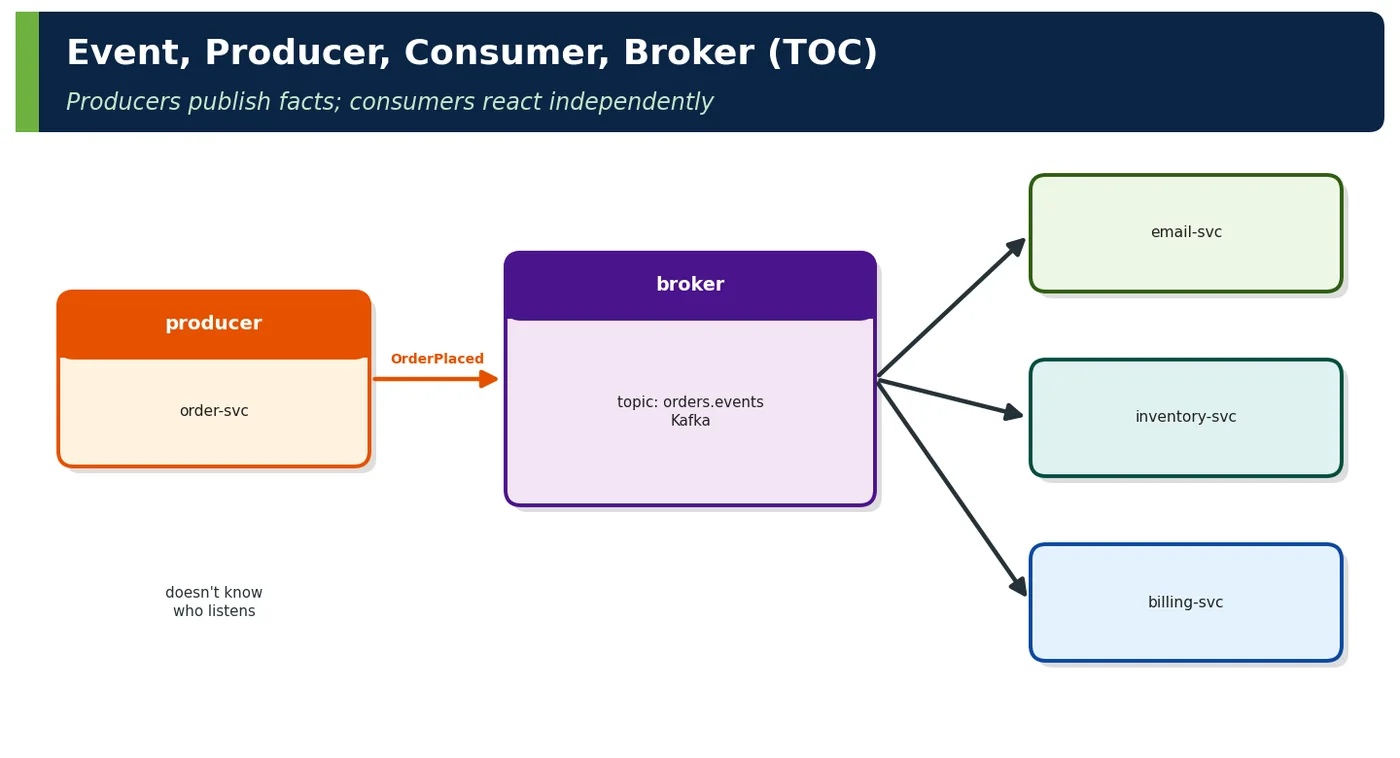
In event-driven architecture (EDA), components communicate by publishing and reacting to events — immutable records that something happened. Producers publish events without knowing who will react; consumers subscribe and act independently; a broker stores and distributes events between them, decoupling both sides in time and location.
| TOC element | Definition |
|---|---|
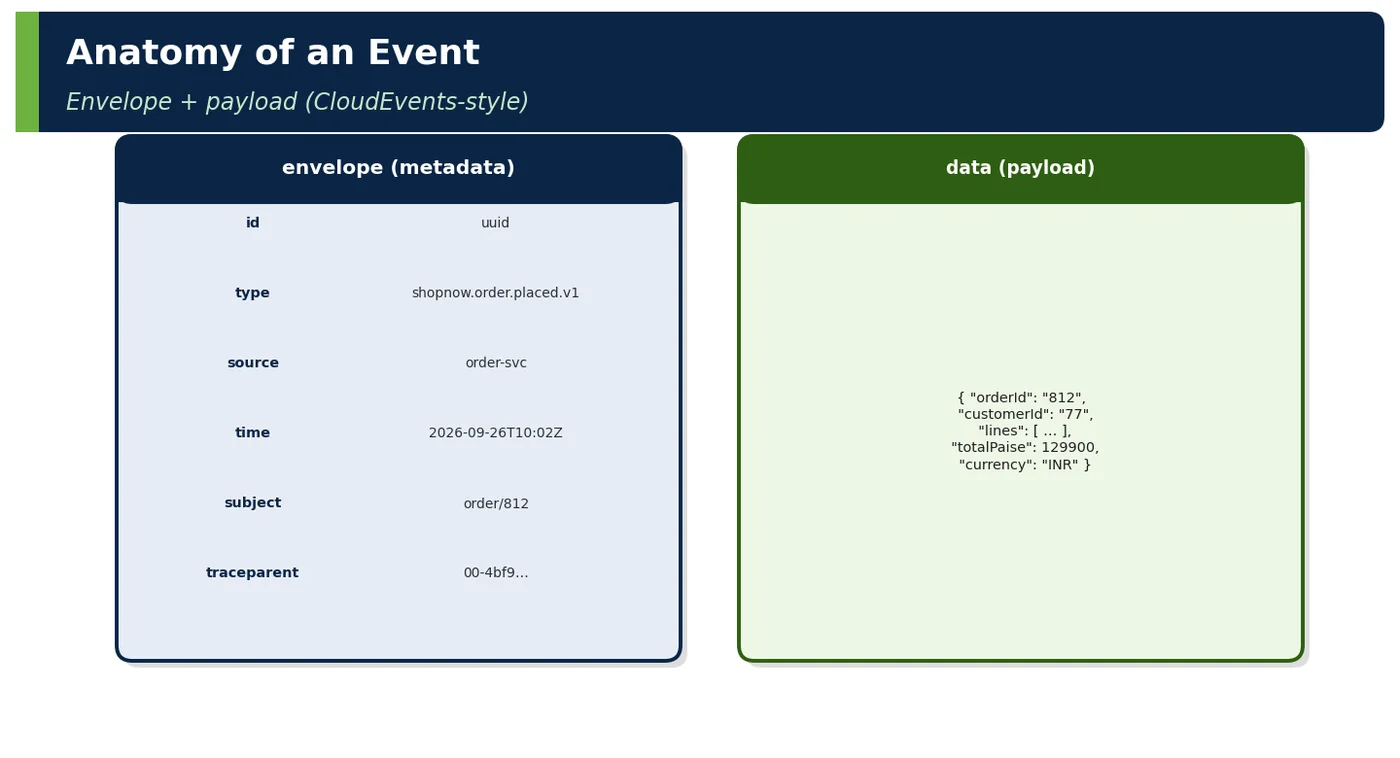
| Event | An immutable, past-tense fact about something that happened in a domain (OrderPlaced, PaymentCaptured), with an identity, a type, a time, a source and a payload |
| Producer | The component that detects the fact — usually the owner of the state that changed — and publishes the event reliably, without depending on who consumes it |
| Consumer | A component that subscribes to event types it cares about and reacts by updating its own state, triggering work or publishing further events, at its own pace |
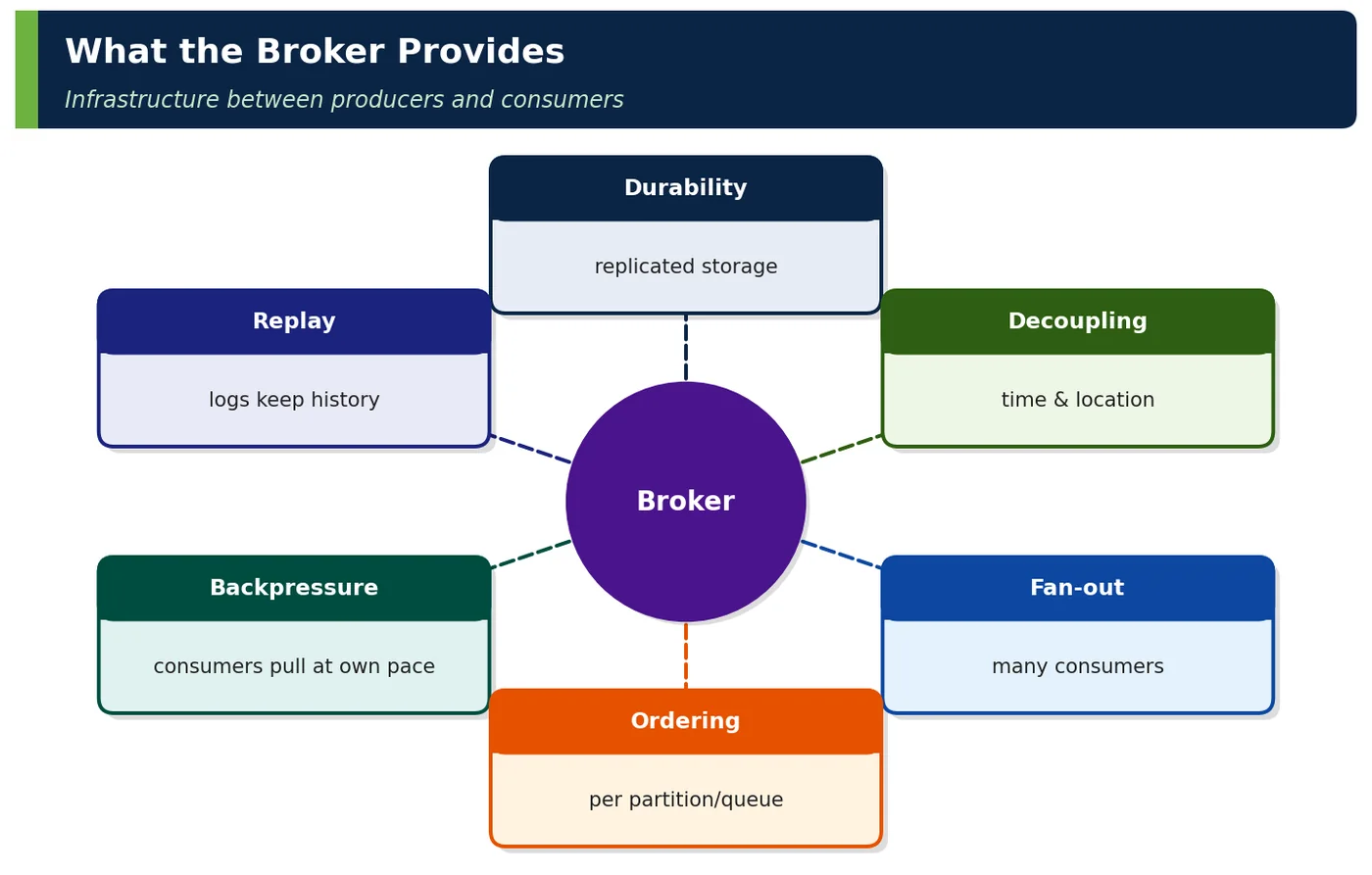
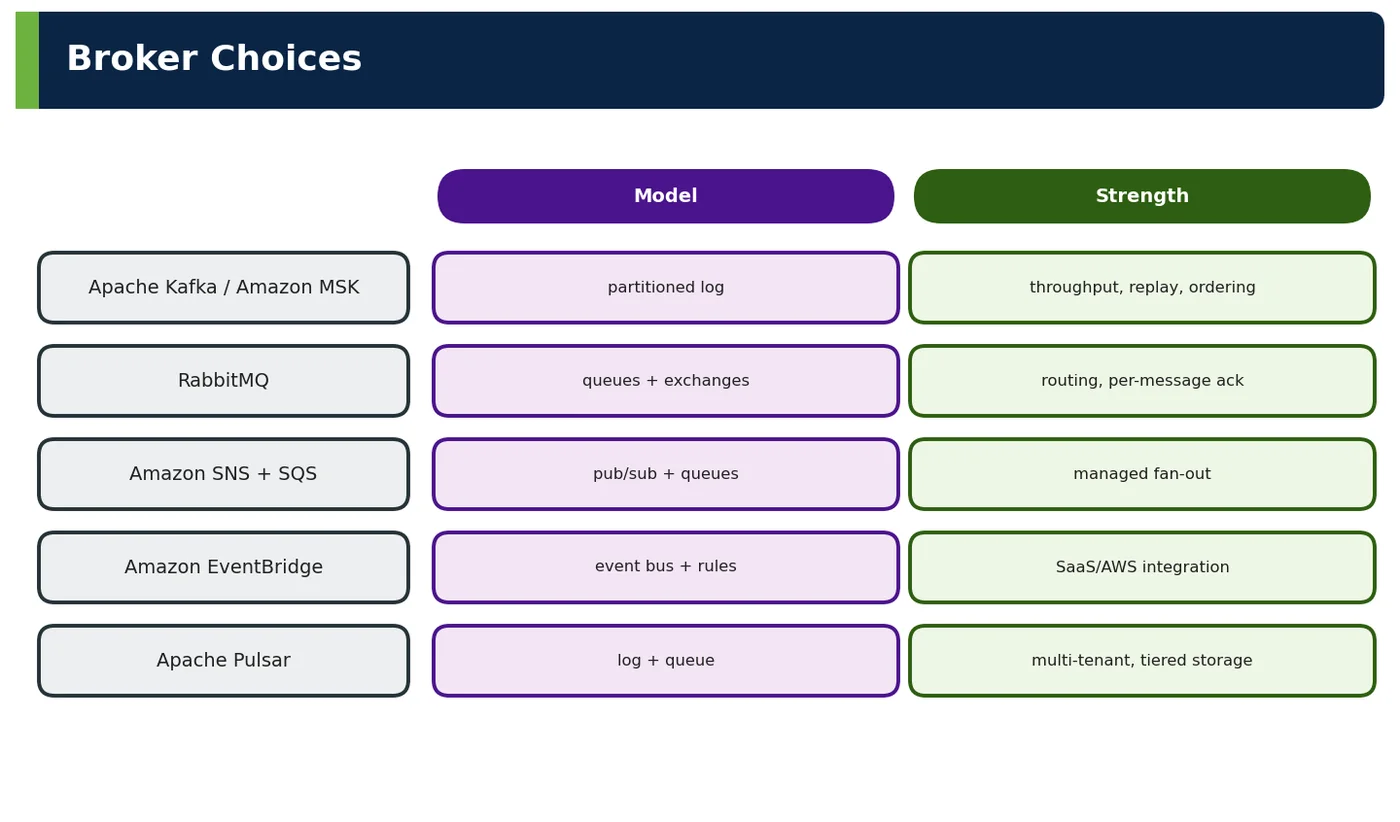
| Broker | Middleware (Kafka, RabbitMQ, SNS/SQS, EventBridge) that durably accepts events from producers and delivers them to consumers, providing buffering, fan-out, ordering and sometimes replay |
2Why It Exists
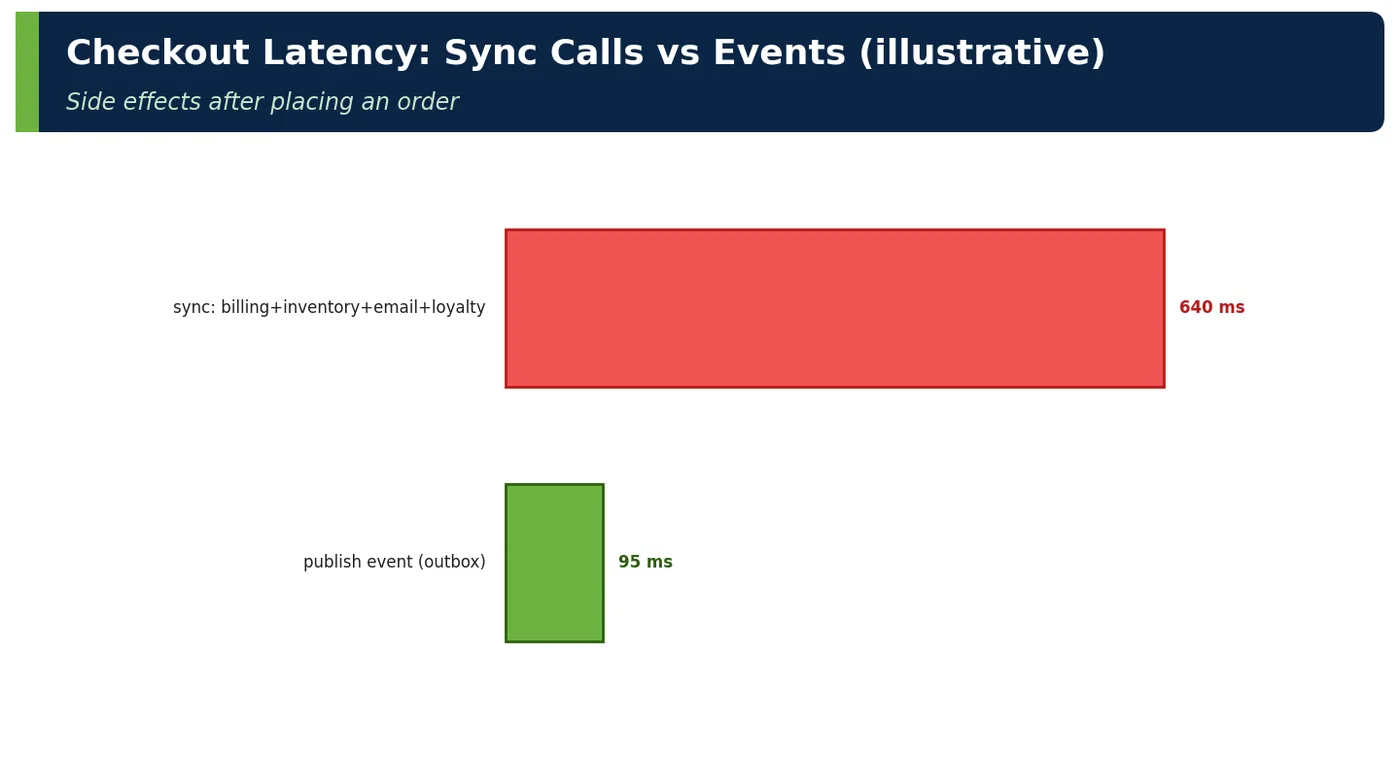
With synchronous calls, placing an order means calling billing, inventory, email and loyalty in the request path: every new reaction changes order-svc, and any slow service slows checkout. Publishing OrderPlaced once lets each reaction live in its own service.
3Core Concepts
3.1 Event
// A published (integration) event: immutable, past tense, versioned type
public record OrderPlaced(
        String eventId,          // unique, for idempotency
        String orderId,
        String customerId,
        List<Line> lines,
        long totalPaise,
        String currency,
        Instant occurredAt) {
    public record Line(String sku, int qty, long pricePaise) {}
}| Property | Rule |
|---|---|
| Immutable | Never "update" an event; publish a new one |
| Past tense | OrderPlaced, not PlaceOrder |
| Identified | eventId for dedupe; subject/key for ordering |
| Timestamped | occurredAt (business time) vs publish time |
| Self-describing | Type + schema version |
3.2 Producer
// Reliable publishing: write state + outbox in one local transaction (Topic 3.2 of Vol V)
@Transactional
public OrderId place(PlaceOrder cmd) {
    Order order = orders.save(Order.place(cmd));
    outbox.save(OutboxRecord.of("orders.events.v1", order.id().value(),
            "shopnow.order.placed.v1", mapper.toJson(OrderPlaced.from(order))));
    return order.id();
}
// A relay (Debezium CDC or polling publisher) sends outbox rows to Kafka| Producer responsibility | Why |
|---|---|
| Publish only after state commits | No events for rolled-back changes |
| Never lose events | Outbox / transactional publishing |
| Choose key | Ordering per entity (Topic 2.3) |
| Own the schema | Versioned, compatible evolution |
| Don't wait for consumers | Temporal decoupling |
3.3 Consumer
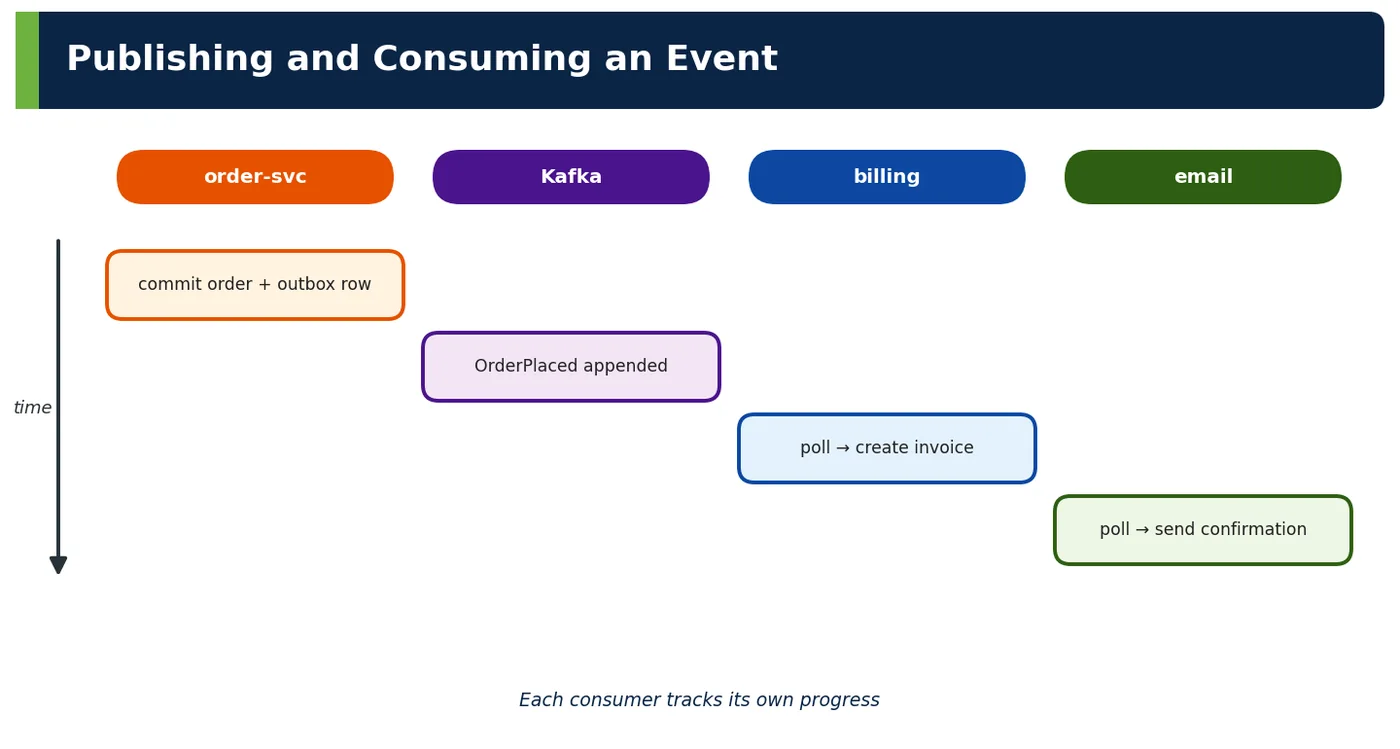
@KafkaListener(topics = "orders.events.v1", groupId = "billing-svc")
void on(OrderPlaced e) {
    // idempotent
    invoices.createDraftIfAbsent(e.orderId(), e.customerId(), e.totalPaise());
}| Consumer responsibility | Why |
|---|---|
| Own its reaction and state | Autonomy |
| Tolerate duplicates | At-least-once delivery (Topic 3.3) |
| Tolerate unknown fields/types | Producer evolution |
| Handle failures without blocking | Retries, DLT (Topic 3.4) |
| Track its own progress | Consumer group offsets |
3.4 Broker
4How It Works Internally — Decoupling Dimensions
| Dimension | Synchronous call | Event via broker |
|---|---|---|
| Time | Both must be up | Consumer may be down; catches up later |
| Location | Caller knows address | Producer knows only the topic |
| Knowledge | Caller knows callee's API | Producer doesn't know consumers |
| Load | Caller's rate hits callee | Broker buffers; consumers pull |
| Result | Caller gets response | No response; outcomes are new events |
4ADeep Dive — The Costs of Events
| Cost | Mitigation |
|---|---|
| Eventual consistency | Design UX and processes for it (Chapter 5) |
| Hidden flows | Event catalog, tracing (Topic 4.1) |
| Duplicates and reordering | Idempotent consumers, keys (Ch 3, 2.3) |
| Schema coupling | Registry + compatibility rules (Chapter 6) |
| Debugging across hops | Trace context in headers |
| Operating a broker | Managed services (MSK, EventBridge) |
5APIs / Features / Syntax
| Need | Tooling |
|---|---|
| Produce/consume | Spring Kafka KafkaTemplate, @KafkaListener |
| Binder abstraction | Spring Cloud Stream (Kafka, Rabbit, SQS) |
| Reliable publish | Outbox + Debezium, Spring Modulith externalisation |
| Envelope standard | CloudEvents SDK for Java |
| Managed brokers | Amazon MSK, SNS/SQS, EventBridge |
6Practical Examples
6.1 Removing synchronous side effects
ShopNow's checkout called four services after saving the order. Replacing those calls with one OrderPlaced event via outbox cut checkout p99 from 640 ms to 95 ms and made email outages invisible to customers.
6.2 Adding a consumer without touching the producer
The data team needed order data for fraud models. They subscribed a new consumer group to orders.events.v1; order-svc required no change or deployment.
6.3 Worked example — naming
| Bad | Good |
|---|---|
| UpdateOrder | OrderAddressChanged |
Scenario. ShopNow's order service published an event called UpdateOrder whenever an address changed. Consumers could not tell what had actually happened, and some treated it as an instruction to update their own data.
Walkthrough. Events record facts that have already happened, so they are named in the past tense with business meaning. UpdateOrder sounds like a command and says nothing about what changed. OrderAddressChanged states a specific fact, carries the old and new address, and lets each consumer decide how to react: shipping recalculates the route, while billing ignores it.
Result. Consumers subscribed only to the facts they cared about, and the event catalogue became readable by non-developers.
Common mistake. Using generic names such as OrderUpdated with a changed-fields list. Consumers must inspect the payload to understand what happened, and the business meaning is lost.
Takeaway. Name events as specific business facts in the past tense. If the name sounds like an instruction, it is probably a command in disguise.
6.4 Worked example — command disguised as event
| Smell | Fix |
|---|---|
| SendEmailEvent | Publish OrderPlaced; email-svc decides |
Scenario. ShopNow's order service published SendEmailEvent after each order. When marketing wanted a different email flow, the orders team had to change their code, although email was not their responsibility.
Walkthrough. An event that tells a specific consumer what to do is a command disguised as an event, and it couples the producer to that consumer. The fix was to publish the business fact, OrderPlaced, and let the email service decide which emails to send. Other services, such as loyalty and analytics, now react to the same fact without any change to the producer.
Result. Marketing changed the email flow inside the email service alone, and the orders team stopped receiving requests about emails.
Common mistake. Adding one new event per consumer need, such as SendSmsEvent and SendPushEvent. The producer slowly becomes an orchestrator of other teams' work.
Takeaway. Producers should publish facts, not instructions. Each consumer decides what to do, which keeps the producer independent of downstream behaviour.
6.5 Worked example — CloudEvents headers
| Header | Value |
|---|---|
| ce_type | shopnow.order.placed.v1 |
| ce_source | /order-svc |
Scenario. ShopNow's teams each designed their own event envelope, with different names for the event type, the source and the timestamp. Every consumer needed custom parsing code for every producer.
Walkthrough. CloudEvents is a standard envelope for event metadata. Fields such as ce_type, here shopnow.order.placed.v1, ce_source, here /order-svc, ce_id and ce_time travel as message headers, while the business payload stays in the body. Libraries for Kafka, HTTP and AWS understand these headers, so routing, logging and tracing work the same way for every event.
ce_specversion: 1.0
ce_type:   shopnow.order.placed.v1
ce_source: /order-svc
ce_id:     6f1c2e4a-...
ce_time:   2026-11-08T10:15:30Z
content-type: application/json
Result. Consumers handled events from all producers with one generic envelope parser, and tooling could filter events by type without reading their payloads.
Common mistake. Putting envelope metadata inside each team's payload under different names. Generic tools cannot route or trace events without understanding every schema.
Takeaway. Standardise event metadata with CloudEvents or a similar envelope, and include a version in the event type. Consistency across producers saves effort in every consumer.
6.6 Worked example — publish after commit
| Approach | Risk |
|---|---|
| send() inside @Transactional | Event for rolled-back tx |
| Outbox | Safe |
Scenario. ShopNow's order service sent OrderPlaced to Kafka inside a @Transactional method. When the database insert later failed and rolled back, consumers had already received an event for an order that did not exist.
Walkthrough. Writing to the database and sending to Kafka are two separate systems, so they cannot commit atomically: this is the dual-write problem. With the transactional outbox pattern, the service writes the event to an outbox table in the same database transaction as the order. A relay, such as Debezium or a scheduled publisher, then sends outbox rows to Kafka after commit, retrying until it succeeds.
BEGIN;
INSERT INTO orders (id, customer_id, total) VALUES (:id, :customer, :total);
INSERT INTO outbox (id, aggregate_id, type, payload)
     VALUES (:eventId, :id, 'OrderPlaced', :json);
COMMIT;   -- both rows or neither
Result. Events are now published only for committed orders, and no event is lost if Kafka is briefly unavailable.
Common mistake. Sending the event first and then saving, hoping both succeed. A crash between the two steps publishes events for data that was never stored, or the reverse.
Takeaway. Never send events directly inside a database transaction. Use an outbox so the state change and the event are committed together.
6.7 Worked example — fan-out
| Consumers of OrderPlaced | 4 groups |
|---|
Scenario. When ShopNow placed an order, four teams needed to react: payments, inventory, email and analytics. Previously, the order service called each of them directly.
Walkthrough. With an event, the order service publishes OrderPlaced once, and four consumer groups each receive their own copy from the broker. Each group processes at its own speed and can be scaled independently. Adding a fifth consumer, such as loyalty points, requires no change to the order service.
Result. The order service's code shrank, checkout no longer waited for four downstream calls, and the loyalty team joined without involving the orders team.
Common mistake. Letting one slow consumer share a consumer group with others. Each reacting service needs its own group, so it reads every event at its own pace.
Takeaway. Use events for fan-out: one publication, many independent reactions. The producer stays the same however many consumers are added.
6.8 Worked example — consumer down
| Email down 20 min | Effect |
|---|---|
| Events wait in Kafka | Sent when back |
Scenario. ShopNow's email service was down for 20 minutes during a deployment problem. In the old synchronous design, checkout would have failed or skipped confirmation emails.
Walkthrough. Because OrderPlaced events are stored in Kafka, the email service simply resumed from its last committed offset when it came back. The events had waited in the topic, and all confirmation emails were sent, just 20 minutes late. Checkout itself was never affected, because it did not depend on the email service being available.
Result. Customers received their emails slightly delayed, nobody lost an order, and no manual recovery was needed.
Common mistake. Setting topic retention shorter than the longest realistic outage. Events expire before the consumer returns, and data is silently lost.
Takeaway. Events give temporal decoupling: producers and consumers do not need to be available at the same time. Size topic retention to cover the longest outage you expect.
6.9 Worked example — RabbitMQ vs Kafka
| Need | Choice |
|---|---|
| Replay, ordering, high volume | Kafka |
| Complex routing, per-message TTL | RabbitMQ |
Scenario. ShopNow's platform team had to choose a broker for two new needs: an order event stream that analytics wanted to replay, and a notification system with complex routing rules and per-message expiry.
Walkthrough. The two needs favour different brokers. Kafka stores events durably in an ordered log, supports replay from any offset and handles very high volume, which suits the order stream. RabbitMQ offers flexible routing with exchanges and bindings, per-message time-to-live and priorities, which suits notifications.
Result. ShopNow used Kafka for the order stream and RabbitMQ for notifications, each where it fits best, and documented the choice in an ADR.
Common mistake. Choosing a broker because it is already installed, without checking replay, ordering or routing needs. The wrong fit leads to workarounds that are harder to run than a second broker.
Takeaway. Choose a broker by the properties you need: replay, ordering and volume point to Kafka; rich routing and per-message handling point to RabbitMQ.
6.10 Worked example — EventBridge
| Use | Why |
|---|---|
| SaaS/AWS service events to Lambdas | Managed rules |
Scenario. ShopNow wanted to react to AWS service events, such as an S3 upload or a scheduled rule, and to events from a SaaS partner, without running more infrastructure.
Walkthrough. Amazon EventBridge is a managed event bus. It receives events from AWS services, SaaS integrations and custom applications, and routes them to targets such as Lambda functions using declarative rules that match on event content. There are no brokers to operate, and rules can be managed as infrastructure code.
{
  "source": ["aws.s3"],
  "detail-type": ["Object Created"],
  "detail": { "bucket": { "name": ["shopnow-supplier-feeds"] } }
}
Result. Supplier feed uploads now trigger a Lambda that starts the import, without any polling or custom infrastructure.
Common mistake. Pushing very high-volume streams through a managed event bus designed for routing. Costs and throughput limits become problems that a streaming platform would avoid.
Takeaway. Use managed event buses such as EventBridge for cloud-service and SaaS events. They remove operational work, though they are less suited to high-volume streams that need replay.
6.11 Worked example — business time
| Field | Meaning |
|---|---|
| occurredAt | When order was placed |
Scenario. A finance report used the Kafka message timestamp as the time each order was placed. Orders replayed after an outage showed the wrong day.
Walkthrough. The broker's timestamp records when the message was written to the topic, which can differ from when the business event occurred, especially after retries, outbox delays or replays. The event payload should carry occurredAt, the business time the order was placed, set by the producer. Reports and business logic use occurredAt, not broker time.
Result. Reports became correct even for events published late, and replays no longer distorted daily figures.
Common mistake. Deriving business dates from broker or consumer clocks. Replays and delays then change reports, even though the business facts did not change.
Takeaway. Every event should carry its business time in the payload. Broker timestamps describe transport, not business facts.
6.12 Worked example — no response expected
| Need a result? | Use request/reply or command |
|---|
Scenario. A developer published a CheckStock event and then waited for a StockChecked event to decide whether checkout could continue. Latency and timeouts made checkout unreliable.
Walkthrough. Events are one-way notifications, not remote procedure calls. When the producer needs a result to continue, it should call the service synchronously with request/reply, or send a command whose reply is handled asynchronously by design. Here, checkout needed the answer immediately, so a synchronous stock-check API with a timeout and fallback was the right choice.
Result. Checkout latency became predictable, and the event stream was used only for facts that other services react to later.
Common mistake. Waiting synchronously for a reply event inside an HTTP request. Latency becomes unpredictable, and timeouts leave the outcome unclear.
Takeaway. Do not use events as disguised RPC. If you need a result now, use request/reply; use events for facts that others may react to in their own time.
6.13 Worked example — consumer reacts with event
| Consumer | Emits |
|---|---|
| inventory | StockReserved |
Scenario. After receiving OrderPlaced, ShopNow's inventory service reserves stock. Other services, such as shipping, need to know when the reservation succeeds.
Walkthrough. A consumer that changes its own state can publish its own fact. Inventory consumes OrderPlaced, reserves the stock in its database and publishes StockReserved, again through its outbox. Shipping reacts to StockReserved. This creates a chain of reactions in which each service owns its step, without a central coordinator.
Result. Each step is independent and visible as an event. Topic 4.1 discusses when such choreography becomes hard to follow and orchestration is better.
Common mistake. Publishing follow-up events directly instead of through the consumer's own outbox. The same dual-write problem then appears at every step of the chain.
Takeaway. Consumers can become producers of new facts, forming event chains. Keep each step's ownership clear and monitor the whole chain end to end.
6.14 Worked example — trace context
| Header | Purpose |
|---|---|
| traceparent | End-to-end traces |
Scenario. An order was paid but never shipped. Logs existed in five services, but nobody could link them to follow the order across the asynchronous flow.
Walkthrough. Distributed tracing needs the trace context to travel with each event. Adding the W3C traceparent header to every message, which Spring Kafka and OpenTelemetry do automatically when observation is enabled, lets the tracing system connect the producer's span with each consumer's processing span.
spring:
  kafka:
    template:
      observation-enabled: true
    listener:
      observation-enabled: true
Result. The stuck order's trace showed that shipping had received StockReserved but failed on a validation error, which was fixed within the hour.
Common mistake. Starting a new trace in each consumer. The flow appears as unrelated fragments, and the cause of a stuck process cannot be found.
Takeaway. Propagate trace context through events as well as HTTP calls. Without it, asynchronous flows are almost impossible to debug.
6.15 Worked example — event catalog
| Entry | Content |
|---|---|
| orders.events.v1 | Owner, schema, consumers |
Scenario. New teams at ShopNow did not know which events existed, who owned them or what their schemas were, so they asked around or subscribed to the wrong topics.
Walkthrough. An event catalogue lists every published topic with its owner, schema, version and consumers, for example orders.events.v1 owned by the orders team. ShopNow describes its event APIs with AsyncAPI documents stored next to the code, and generates the catalogue from them.
Result. Teams discovered events through the catalogue, and owners could see who would be affected by a schema change.
Common mistake. Documenting events only in a wiki page that nobody updates. Schemas drift, and consumers rely on fields that no longer exist.
Takeaway. Make events discoverable with a catalogue built from AsyncAPI or similar specifications. Events nobody can find are hard to reuse safely.
6.16 Worked example — ordering need
| Events | Key |
|---|---|
| Order lifecycle | orderId |
Scenario. Shipping occasionally received OrderCancelled before OrderPlaced for the same order and tried to cancel a shipment that did not exist yet.
Walkthrough. Kafka guarantees order only within a partition. The producer had used random keys, so events for one order landed in different partitions. Using the order ID as the message key sends all events for one order to the same partition, so consumers see them in the order they were published.
Result. Out-of-order processing for the same order stopped, while different orders still spread across partitions for parallelism.
Common mistake. Increasing partitions later without considering keys. Existing keys can move to different partitions, briefly breaking per-entity ordering.
Takeaway. Choose message keys by the ordering you need. Usually that is per entity, such as order ID, rather than global ordering.
6.17 Worked example — in-process events
| Scope | Mechanism |
|---|---|
| Within one service | Spring ApplicationEvent / Modulith |
Scenario. A team proposed introducing Kafka to decouple two modules inside the same Spring Boot application.
Walkthrough. Within one service, a broker adds infrastructure without much benefit. Spring's ApplicationEvent, or Spring Modulith's transactional event publication, gives in-process events with asynchronous listeners and retry through a publication registry. Kafka becomes useful when events must cross service boundaries or be replayed.
Result. The team used Modulith events inside the service and published only selected events externally, keeping operations simple.
Common mistake. Adding a broker for in-process decoupling. The team takes on operations, monitoring and failure modes it does not need.
Takeaway. Use in-process events for decoupling inside one service, and introduce a broker only when events must leave the process.
6.18 Worked example — cost of eventual consistency
| UI after checkout | Shows |
|---|---|
| "Invoice being prepared" | Honest status |
Scenario. After checkout, customers saw "Invoice not found" for a few seconds, because the invoice was created asynchronously by billing in response to OrderPlaced.
Walkthrough. Eventual consistency is a user-experience issue as well as a technical one. The confirmation page was changed to show an honest status, "Your invoice is being prepared", and to update automatically when the invoice became available.
Result. Support tickets about missing invoices disappeared, although the technical delay was unchanged.
Common mistake. Showing errors such as "not found" for data that is simply not processed yet. Users assume something failed and contact support.
Takeaway. Design the user experience for eventual consistency. Showing pending states honestly is often better than trying to hide short delays.
6.19 Worked example — ADR
| Decision | Rationale |
|---|---|
| OrderPlaced via outbox to Kafka | Decoupling, reliability |
Scenario. A new architect asked why ShopNow publishes OrderPlaced through an outbox to Kafka instead of calling billing and shipping directly.
Walkthrough. The decision is recorded in an ADR. It states the context, the decision to publish OrderPlaced through an outbox to Kafka, and the rationale: decoupling producers from consumers, reliable delivery of events for committed orders, and replay for analytics. It also records the consequences: eventual consistency and the need for idempotent consumers.
Result. The new architect understood the reasoning in minutes, and later discussions about changing the design started from the recorded trade-offs.
Common mistake. Recording only the decision and its benefits. Without consequences such as eventual consistency, later teams are surprised by its costs.
Takeaway. Record event-driven design decisions in ADRs, including their costs. The reasons behind an architecture are as important as the architecture itself.
6.20 Worked example — review checklist
| Check | ✔ |
|---|---|
| Events are facts | ✔ |
| Reliable publish | ✔ |
| Idempotent consumers | ✔ |
| Catalogued, schema'd | ✔ |
Scenario. ShopNow reviews every new event-driven integration with a short checklist before it goes to production.
How to use it. Each item addresses a common failure. Events are facts, not commands in disguise. Publication is reliable, through an outbox rather than dual writes. Consumers are idempotent, because brokers can deliver duplicates. Events are catalogued with an owner and a registered schema. A design that cannot tick every item is sent back with specific actions.
Effect. Duplicate-processing incidents and lost events dropped sharply after the checklist was introduced.
Common mistake. Treating the checklist as a formality ticked by the author alone. It works best when a reviewer checks each item with evidence.
Takeaway. A short, specific checklist catches most event-driven design mistakes before they reach production.
6.21 Worked example — interview answer
| Element | Answer |
|---|---|
| Event | Immutable fact |
| Producer | Publishes reliably |
| Consumer | Reacts independently |
| Broker | Stores & distributes |
Scenario. In interviews, ShopNow asks candidates to explain the basic elements of event-driven architecture.
How to answer. A clear answer defines four elements and how they fit. An event is an immutable fact about something that happened. A producer publishes events reliably, without knowing consumers. A consumer reacts independently and must be idempotent. A broker stores events and distributes them, enabling temporal decoupling and, in Kafka's case, replay.
How to finish. Adding one real example, such as OrderPlaced triggering payment and email, and naming one cost, eventual consistency, makes the answer convincing.
Common mistake. Listing technologies such as Kafka and RabbitMQ instead of explaining the concepts. Interviewers look for understanding of roles and trade-offs, not product names.
Takeaway. Explain each element in one sentence, connect them with a real flow and mention the main trade-off.
7Common Problems & Mistakes
- Commands disguised as events.
- Publishing before commit (dual writes).
- Assuming exactly-once delivery.
- Publishing internal models.
- Expecting responses from events.
- No catalog of events and consumers.
8Performance & Production Considerations
| Aspect | Guideline |
|---|---|
| Reliability | Outbox, acks=all, idempotent producer |
| Throughput | Batching, compression |
| Consumers | Scale via groups/partitions |
| Visibility | Tracing, catalog |
| Operations | Managed brokers, monitoring lag |
9Architecture & Design Considerations
- Publish facts owned by the producer.
- Keep producers ignorant of consumers.
- Design for eventual consistency and duplicates.
- Choose brokers by replay, ordering and routing needs.
10Interview Questions & Answers
What is an event?
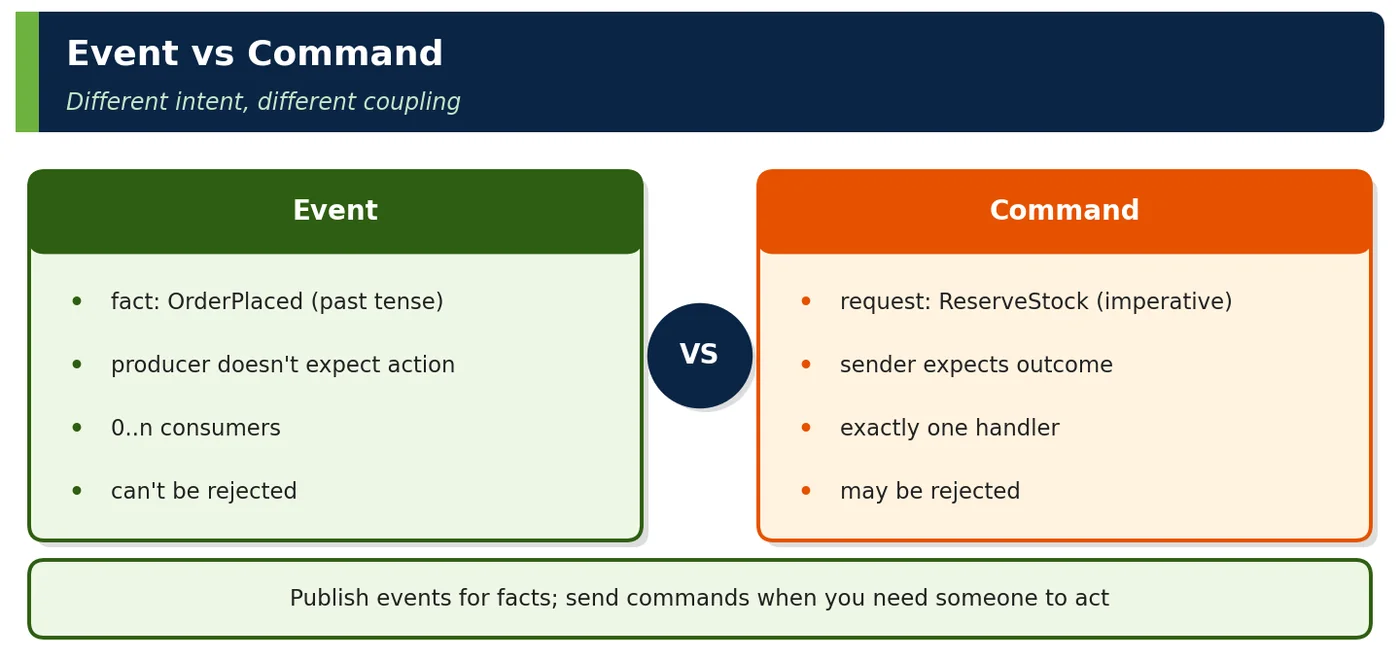
An event is an immutable record that something happened in the business, such as OrderPlaced or PaymentCaptured. It is named in the past tense and carries the facts about the occurrence: identifiers, relevant data and the time it happened. Because it describes the past, it cannot be rejected or changed; consumers can only decide how to react. Events are published without knowing who will consume them, which decouples producers from consumers. They differ from commands, which ask a specific receiver to do something and may be refused.
What does a broker do?
A broker sits between producers and consumers. It receives events from producers, stores them durably and delivers them to consumers, so the two sides never talk directly and do not need to be available at the same time. Depending on the product, a broker also provides routing, such as topics and exchanges, ordering within partitions, retention and replay, consumer groups for scaling, and dead-letter handling. Kafka, RabbitMQ and Amazon EventBridge are common examples. Because many systems depend on it, a broker must be highly available, monitored and secured.
How does an event differ from a command?
An event states a fact that has already happened, such as OrderPlaced, and is broadcast to any interested consumer; the producer does not know or care who reacts, and the fact cannot be rejected. A command asks one specific handler to perform an action, such as ReserveStock, is addressed to that handler, and may be rejected if the action is not possible. Commands usually go to queues; events usually go to topics. Mixing them, for example an event that expects one particular consumer to act, creates hidden coupling.
Why should producers not know consumers?
If producers know their consumers, every new consumer or change in a consumer's needs requires changing the producer, which brings back the coupling events are meant to remove. When producers simply publish facts, new consumers such as analytics or loyalty can subscribe without the producer's involvement, and existing consumers can change their behaviour independently. The producer team can focus on its own domain. The trade-off is that the overall flow is less visible, so event catalogues, tracing and monitoring become important. In large organisations, this independence is what lets many teams evolve their services in parallel.
How do you publish events reliably?
The core problem is the dual write: saving state to the database and sending the event to the broker are two separate operations that cannot commit atomically. With the transactional outbox pattern, the service writes the event into an outbox table in the same database transaction as the state change. A separate relay, for example Debezium reading the database log or a scheduled publisher, then sends outbox entries to the broker and marks them as sent, retrying until it succeeds. Events are thus published only for committed changes and never lost, though possibly duplicated, so consumers must be idempotent.
What does temporal decoupling mean?
Temporal decoupling means producers and consumers do not need to be running at the same time. The producer publishes an event to the broker and continues; the broker stores it until the consumer is available and ready to process it. If the email service is down for twenty minutes, order events wait in the topic and are processed when it returns, and checkout is unaffected. This improves resilience and lets each side scale and deploy independently. The cost is eventual consistency: the consumer's view is updated later, and monitoring of consumer lag becomes essential.
When would you choose RabbitMQ over Kafka?
Choose RabbitMQ when you need flexible message routing and per-message handling rather than a replayable log. RabbitMQ's exchanges and bindings support routing by keys, patterns and headers; it offers per-message time-to-live, priorities, delayed delivery through plugins and straightforward work queues with acknowledgements. That suits task distribution, notifications and integration with many routing rules. Kafka is better when you need durable, ordered streams, very high throughput, long retention and the ability to replay events, such as event sourcing or analytics pipelines. Many organisations run both for different purposes.
What are the main costs of event-driven design?
Event-driven design trades immediate consistency and visible control flow for decoupling. Data becomes eventually consistent, so users and services see intermediate states. Business flows are spread across many consumers, which makes them harder to understand and debug without tracing and documentation. Brokers can deliver duplicates and, across partitions, out-of-order messages, so consumers must be idempotent and order-tolerant. Event schemas become long-lived contracts that need versioning and governance. And brokers are critical infrastructure that must be operated, monitored and secured. These costs are worthwhile when decoupling and scalability matter.