 Architect

- Chapter
- Chapter 1 — Monolithic Architecture
- Prerequisites
- Volume I
- You will be able to
- Define a monolith by its deployment unit rather than its code quality, describe the internal module structure of a well-built monolith, explain what "shared runtime" means for memory, threads, connections, classpath and failure, reason about in-process versus network interactions, and recognise the architectural consequences of choosing a monolith
- Covers
- Single deployable unit; Internal modules; Shared runtime
On this page
- 1. Concept / Definition
- 2. Why It Exists
- 3. Core Concepts
- 4. How It Works Internally — In-Process Interaction
- 4A. Deep Dive — Isolation Inside a Shared Runtime
- 5. APIs / Features / Syntax
- 6. Practical Examples
- 7. Common Problems & Mistakes
- 8. Performance & Production Considerations
- 9. Architecture & Design Considerations
- 10. Interview Questions & Answers
1Concept / Definition
A monolith is an application that is built, deployed and run as a single unit: one artefact, one process (possibly replicated), usually one database. Internally it may be well structured or not — "monolith" describes deployment topology, not quality.
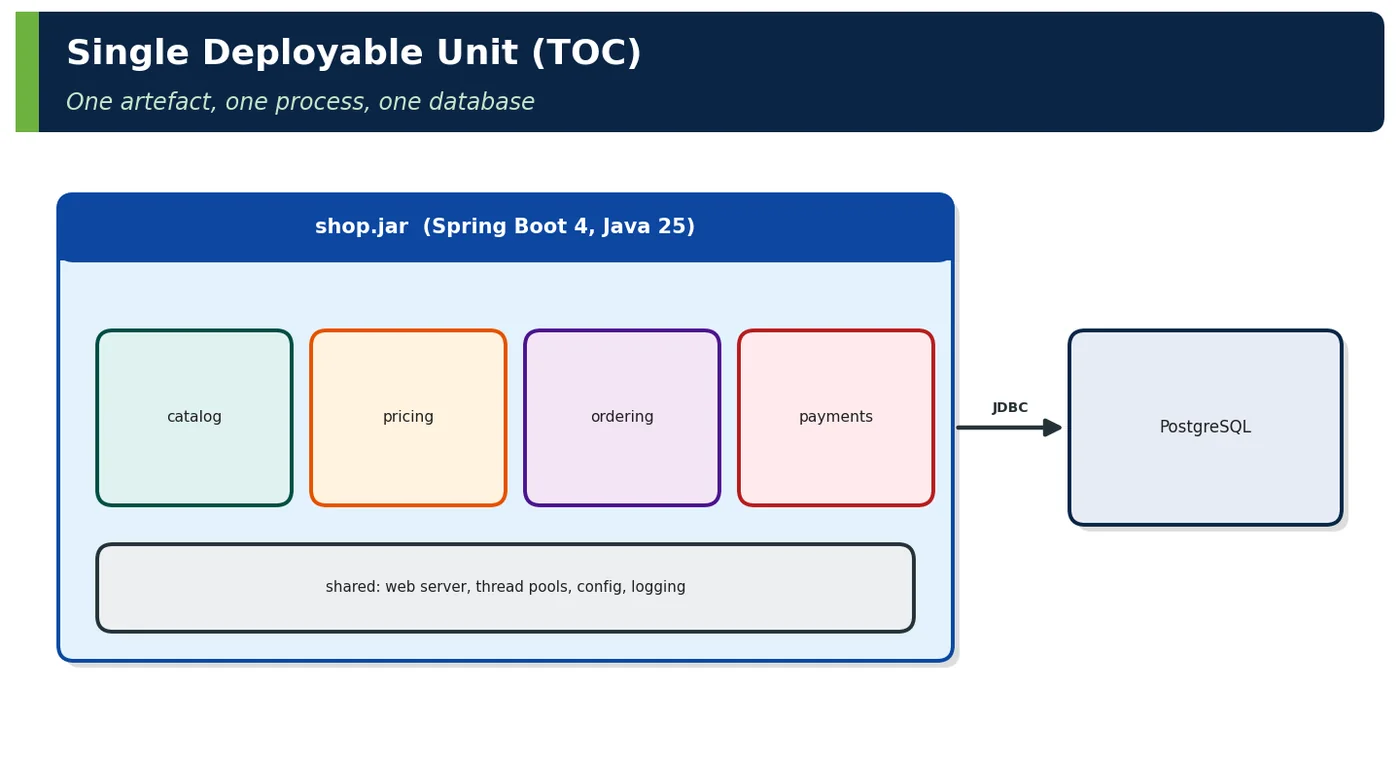
| TOC concept | Definition |
|---|---|
| Single deployable unit | All functionality ships in one artefact (JAR, WAR, container image) with one version and one release; replicas are identical copies |
| Internal modules | The logical parts inside the deployable — packages, modules, components — which may have clear boundaries (modular) or none (mud) |
| Shared runtime | All modules run in the same process: one JVM heap, thread pools, connection pool, classpath, configuration and lifecycle |
2Why It Exists
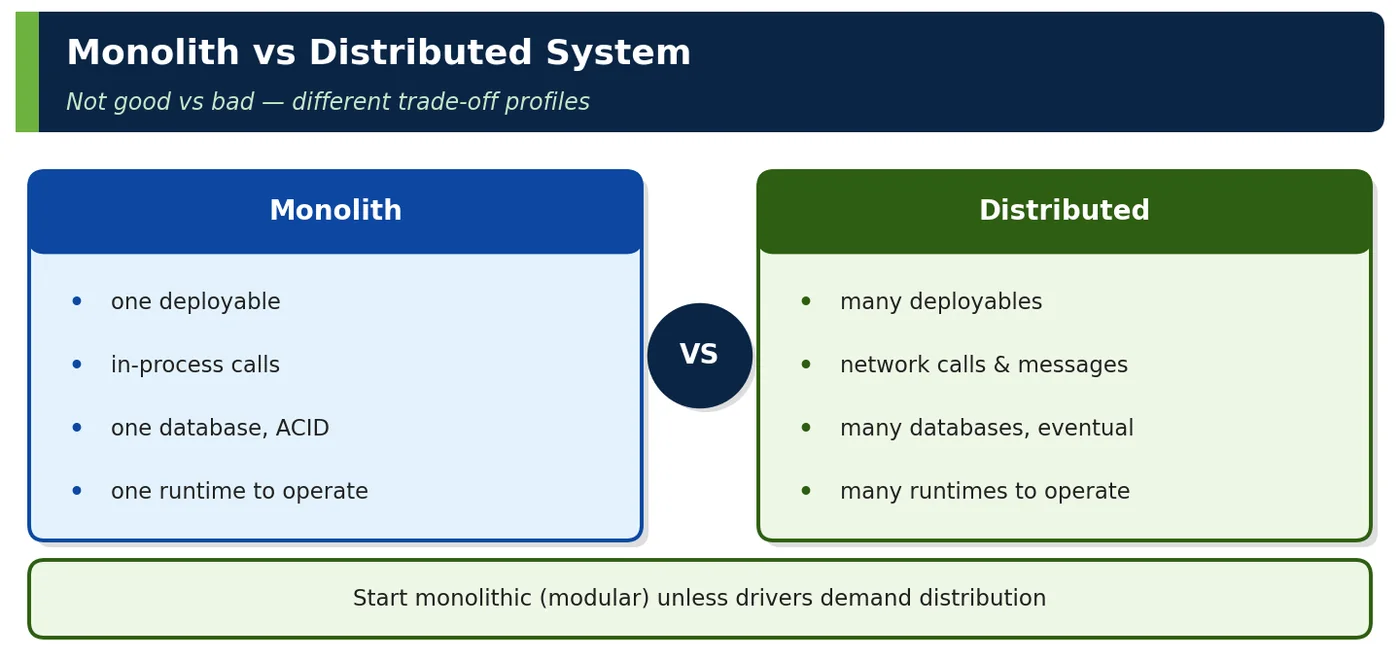
A monolith is the natural starting point: one codebase, one build, one deployment, local calls and local transactions. For many teams and domains, its simplicity outweighs the independence that distribution provides.
3Core Concepts
3.1 Single deployable unit
# One artefact → one image → N identical replicas
FROM eclipse-temurin:25-jre
COPY target/shop-2026.3.1.jar /app/shop.jar
ENTRYPOINT ["java", "-XX:MaxRAMPercentage=75", "-jar", "/app/shop.jar"]| Property | Consequence |
|---|---|
| One version number | All features release together |
| One pipeline | Simple CI/CD |
| Identical replicas | Horizontal scaling = more copies of everything |
| One startup | Startup time grows with size |
3.2 Internal modules
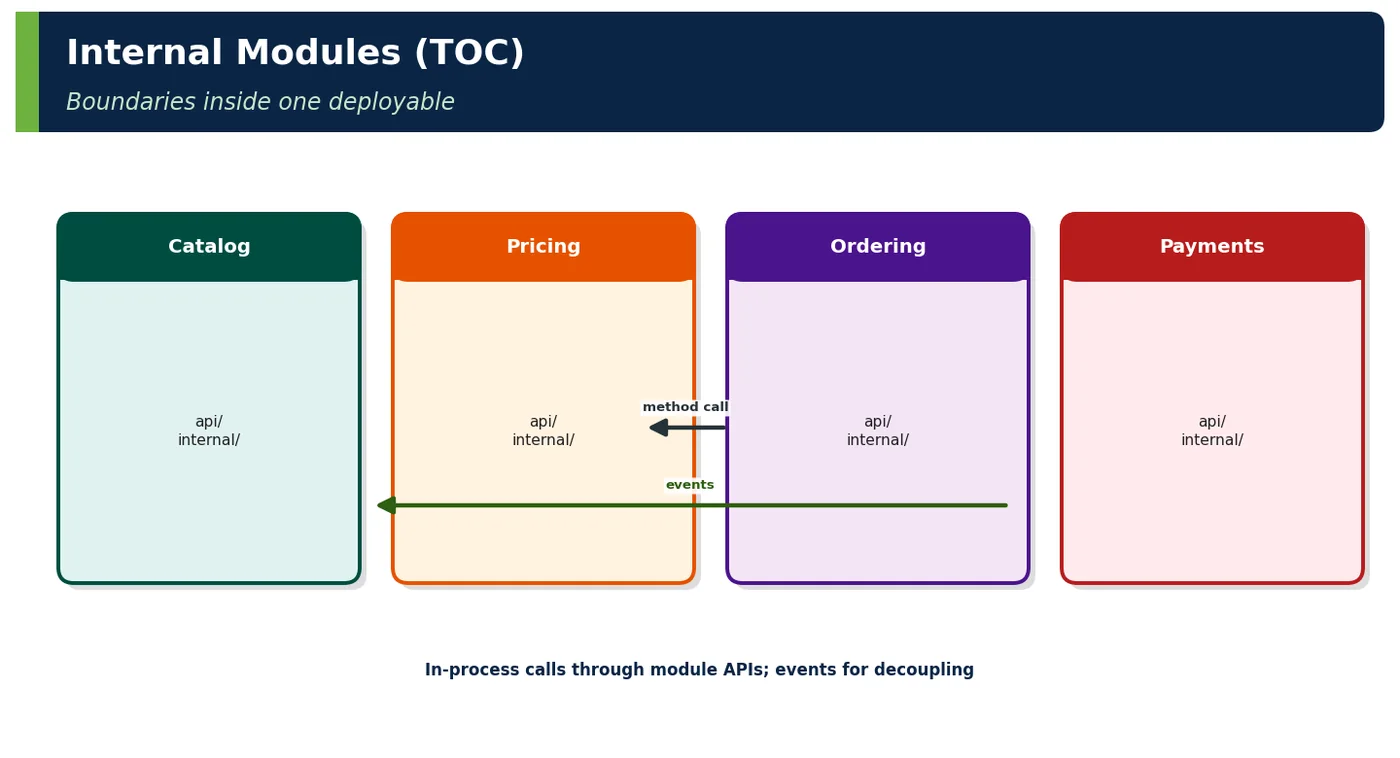
// Spring Modulith: modules are top-level packages; verify() enforces boundaries
com.shop.catalog      // CatalogApi + internal
com.shop.pricing      // PricingApi + internal
com.shop.ordering     // uses PricingApi, publishes OrderPlaced
com.shop.payments     // listens to OrderPlaced

@Test
void verifyModules() { ApplicationModules.of(ShopApplication.class).verify(); }
3.3 Shared runtime
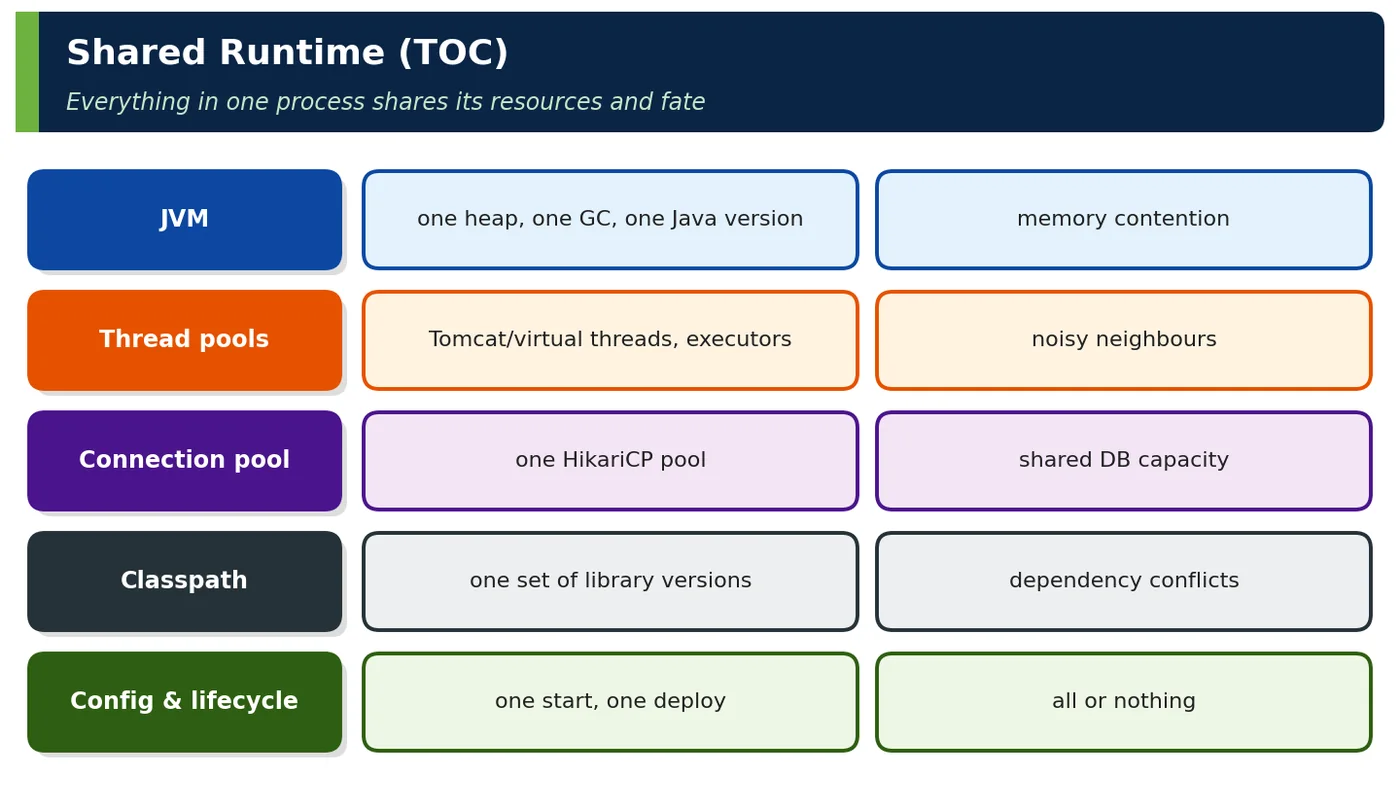
| Shared resource | Risk | Mitigation |
|---|---|---|
| Heap | One module's leak kills all | Memory profiling, limits per cache |
| Thread pools | Slow module starves others | Bulkheads, separate executors, virtual threads |
| DB connection pool | Batch job exhausts pool | Separate pool for batch, limits |
| Classpath | Library conflicts | Dependency management, BOMs |
| Process fate | Crash = total outage | Replicas, health checks |
4How It Works Internally — In-Process Interaction
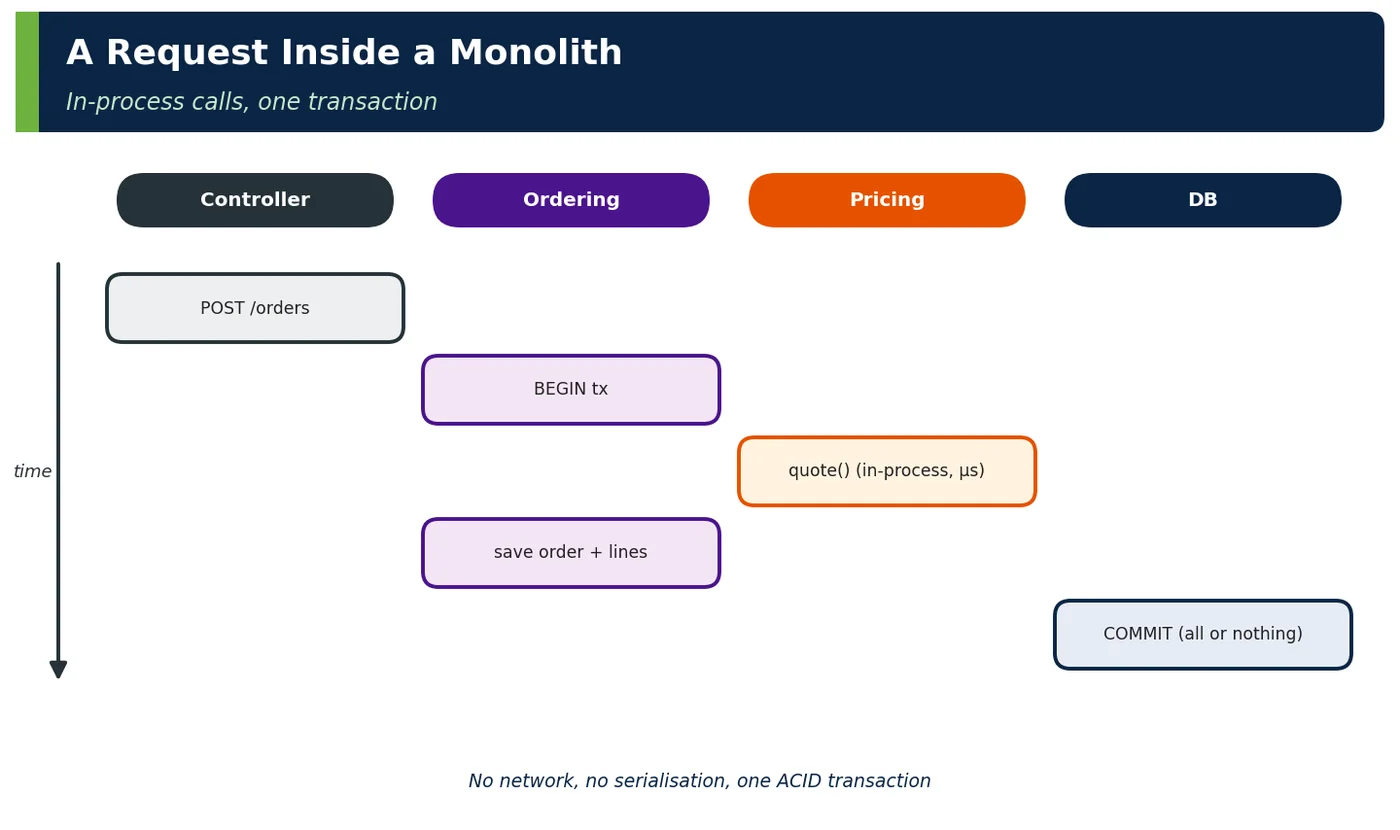
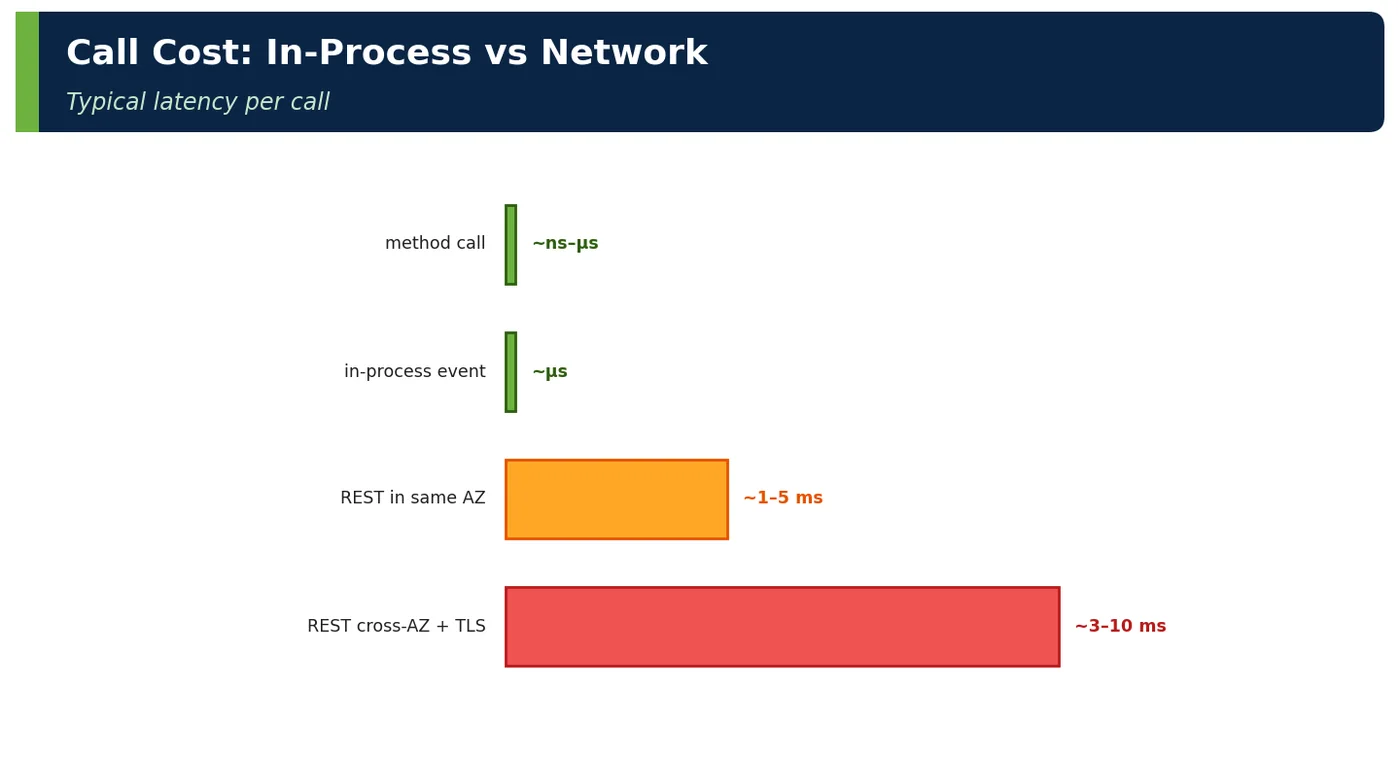
| Interaction | Monolith | Distributed |
|---|---|---|
| Call | Method call | HTTP/gRPC/message |
| Failure modes | Exceptions | Timeouts, partial failure |
| Transaction | Local ACID | Saga/outbox |
| Contract change | Compiler checks | Versioning, contract tests |
4ADeep Dive — Isolation Inside a Shared Runtime
// Bulkhead: give the slow reporting module its own bounded executor
@Bean(name = "reportingExecutor")
Executor reportingExecutor() {
    return new ThreadPoolTaskExecutorBuilder().corePoolSize(4).maxPoolSize(4)
            .queueCapacity(100).threadNamePrefix("reporting-").build();
}

@Async("reportingExecutor")
public CompletableFuture<Report> generate(ReportRequest r) { … }# Separate connection pool for batch/reporting so OLTP is protected
reporting:
datasource:
url: jdbc:postgresql://db/shop
hikari: { maximum-pool-size: 5, pool-name: reporting }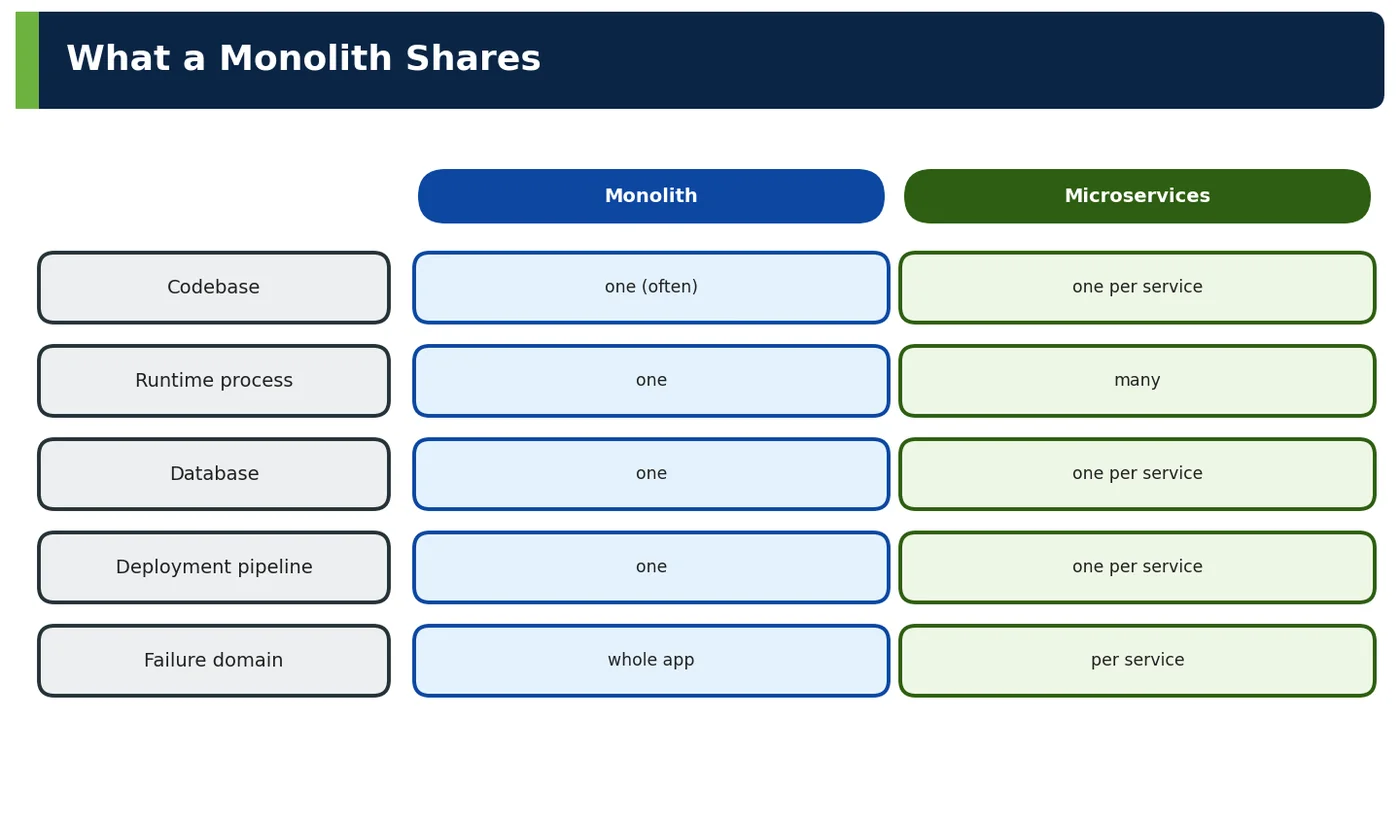
5APIs / Features / Syntax
| Tool | Monolith use |
|---|---|
| Spring Boot 4 executable JAR / Buildpacks | Single artefact |
| Spring Modulith | Modules, events, verification, docs |
| Virtual threads | High concurrency in one process |
Micrometer per-module metrics (@Observed) | Visibility inside the monolith |
| ArchUnit | Structure rules |
| Kubernetes Deployment + HPA | Replicas of the whole app |
6Practical Examples
6.1 Successful monolith at scale
An Indian e-commerce company ran checkout as a modular Spring monolith handling 3,000 orders/min with 25 engineers; releases went out daily. Only search was extracted, for independent scaling.
6.2 Shared runtime incident
A reporting feature loaded a year of orders into memory; the JVM ran out of heap and every instance crashed, taking down checkout. Moving reports to a separate executor, streaming queries and a read replica isolated the risk.
6.3 Worked example — deployable inventory
| Artefact | Contents |
|---|---|
| shop.jar | catalog, pricing, ordering, payments, admin |
| Database | PostgreSQL with 5 schemas |
| Replicas | 4 pods behind ALB |
Scenario. A new architect joined ShopNow and was told the shop "is a monolith". Before forming any opinion, she listed exactly what was deployed and how.
Walkthrough. The inventory shows one artefact, shop.jar, containing the catalog, pricing, ordering, payments and admin modules. It runs as four identical pods behind an AWS Application Load Balancer, all connected to one PostgreSQL database with five schemas, one per module. Every release builds and deploys the whole jar, and every pod contains every module.
Result. The inventory made the system's real properties visible: simple deployment and local transactions, but shared release cadence, shared scaling and a shared failure domain. It also showed that schemas were already separated per module, a good starting point for clearer boundaries.
Takeaway. Describe a monolith by its deployable units, runtime instances and data stores before judging it. "Monolith" describes deployment, not quality, and the details decide which improvements make sense.
6.4 Worked example — module API
package com.shop.pricing;
public interface PricingApi {
    Quote quote(QuoteRequest request);
}
Scenario. The ordering module in ShopNow's monolith called pricing's internal classes directly, including a repository and several helper classes. Every pricing refactoring broke ordering.
Walkthrough. The pricing team introduced a single public interface, PricingApi, in the module's root package, exposing one operation: quote a price for a request. Everything else moved into internal sub-packages. Spring Modulith treats the root package as the module's API and flags any access to internal packages from other modules as a violation in its verification test.
Result. Ordering now depends only on PricingApi and its Quote and QuoteRequest types. Pricing can restructure its internals freely, and the dependency is small enough that pricing could later become a separate service by replacing the in-process implementation with a remote client.
Takeaway. Give each module in a monolith a small, explicit API and hide everything else. A module boundary is only real when other modules cannot reach past it.
6.5 Worked example — in-process event
@ApplicationModuleListener
void on(OrderPlaced e) { payments.authorise(e.orderId(), e.total()); }
Scenario. When an order was placed, the ordering module called payments, loyalty, notifications and analytics directly. Ordering had to know about all of them, and a failure in analytics could break order placement.
Walkthrough. Ordering now publishes an OrderPlaced event inside its transaction, and interested modules react to it. Spring Modulith's @ApplicationModuleListener runs the listener asynchronously after the publishing transaction commits, in its own transaction, and records the event in an event publication registry so it can be retried if the listener fails. Here, payments authorises the payment for the order when it receives the event.
Result. Ordering no longer depends on its downstream modules, new reactions can be added without changing ordering, and a failure in one listener does not roll back the order. The same events can later be externalised to Kafka if modules are extracted.
Takeaway. Use in-process events to decouple modules inside a monolith. Asynchronous, transactional listeners give much of the decoupling of messaging without the operational cost of a broker.
6.6 Worked example — scaling math
| Load | Pods |
|---|---|
| Normal (500 rps) | 3 |
| Sale (3,000 rps) | 12 (each with all modules) |
Scenario. During ShopNow's annual sale, traffic rose from 500 to 3,000 requests per second. Only the catalog and checkout were under real pressure, yet the infrastructure bill quadrupled.
Walkthrough. A monolith scales by running more copies of the whole application. Normal traffic needs three pods; the sale needs twelve. Each pod contains every module, so admin, reporting and every other rarely used module were also replicated twelve times, each copy consuming memory, database connections and start-up time.
Result. The cost was acceptable for a few days a year, so the team kept the monolith but added a cache for catalog reads, which reduced the pods needed at peak to eight. Only if one module's load profile diverged permanently would extraction be worth it.
Takeaway. Scaling a monolith multiplies everything, so scale costs grow with the whole application's footprint. First reduce load on hot paths, with caching or read models, before considering extraction.
6.7 Worked example — startup time
| Size | Startup |
|---|---|
| Small | 4 s |
| Large (400 beans+) | 45 s |
| With CDS/AOT | ~15 s |
Scenario. As ShopNow's monolith grew past 400 beans, start-up time climbed to 45 seconds. Rolling deployments became slow, and autoscaling reacted too late during traffic spikes.
Walkthrough. Start-up time grows with the number of classes, beans and eager initialisation. The team measured where time went, made rarely used beans lazy, removed unnecessary classpath scanning and enabled class-data sharing, and then the AOT cache of recent JDKs, so that class loading and linking work is reused across runs.
# Training run: record classes and profiles into an AOT cache (JDK 25)
java -XX:AOTCacheOutput=app.aot -Dspring.context.exit=onRefresh -jar shop.jar
# Production: start with the cache
java -XX:AOTCache=app.aot -jar shop.jar
Result. Start-up fell to about 15 seconds. Deployments finished in a third of the time, and new pods joined during traffic spikes before latency degraded.
Takeaway. Large monoliths need deliberate start-up optimisation. Measure first, then reduce eager work and reuse start-up work across runs with CDS or AOT caches.
6.8 Worked example — module-level observability
@Observed(name = "pricing.quote", contextualName = "pricing-quote")
public Quote quote(QuoteRequest r) { … }
Scenario. ShopNow's monolith dashboards showed only overall latency and error rates. When checkout slowed down, nobody could tell whether pricing, payments or inventory was responsible.
Walkthrough. Adding Micrometer's @Observed to each module's API methods, such as pricing's quote method, creates a timer metric and a tracing span named after the module operation. Dashboards can now show latency and errors per module operation, and traces show how much of each request is spent in each module, even though everything runs in one process.
Result. The next checkout slowdown was traced in minutes to pricing's quote call, which had started loading promotions from the database on every request. A cache fixed it.
Takeaway. Observe a monolith at module level, not only as a whole. Module-level metrics and spans make a monolith as diagnosable as a set of services.
6.9 Worked example — failure blast radius
| Failure | Impact |
|---|---|
| OOM in reporting | All modules down |
| Pricing bug | Checkout affected |
Scenario. A finance user started a large report export that loaded millions of rows into memory. The JVM ran out of memory, and every pod serving that request crashed, taking checkout down with it.
Walkthrough. In a monolith all modules share one process, so they share its fate: an out-of-memory error, a thread leak or a crashing native library in one module stops every module in that instance. Similarly, a bug in the pricing module directly affects checkout, because checkout calls it in-process.
Result. The team moved report generation to a separate deployment of the same code, running only the reporting profile, and added memory limits and streaming to the export. Checkout was no longer exposed to reporting's resource use.
Takeaway. Remember that modules in a monolith share a failure domain. Isolate resource-heavy or risky workloads into separate processes or deployments, even if they share the code base.
6.10 Worked example — one database, many schemas
| Schema | Owner module |
|---|---|
| catalog | Catalog |
| ordering | Ordering |
Scenario. ShopNow's monolith used one PostgreSQL database. Without rules, every module queried every table, so any schema change could break code anywhere in the application.
Walkthrough. Each module now owns its own schema: the catalog module owns the catalog schema, ordering owns ordering, and so on. Each module's code accesses only its own schema, enforced by tests that check repository packages and by separate database roles in production. Data owned by another module is obtained through that module's API or events.
Result. Schema changes became local decisions of the owning module. When ordering was later extracted into a service, its schema moved to a new database with almost no changes to other modules.
Takeaway. Apply data ownership inside the monolith with one schema per module. It costs little now and makes later extraction, or simply safe change, far easier.
6.11 Worked example — health checks
| Probe | Meaning |
|---|---|
| liveness | process alive |
| readiness | DB reachable, ready for traffic |
Scenario. A database outage made every monolith pod fail its liveness probe. Kubernetes restarted all pods repeatedly, which turned a short database blip into a long, noisy outage.
Walkthrough. Liveness and readiness answer different questions. Liveness asks whether the process is alive and able to make progress; it should not depend on external systems, or a database failure will cause restart storms. Readiness asks whether the instance can serve traffic now, and it can include critical dependencies such as the database, so traffic is withheld until they recover.
management:
  endpoint:
    health:
      probes: { enabled: true }
      group:
        liveness:  { include: livenessState }
        readiness: { include: readinessState, db }
Result. During the next database blip, pods stayed running but were marked not ready; traffic paused briefly and resumed as soon as the database returned, without restarts.
Takeaway. Keep liveness probes about the process itself and put dependencies into readiness. Badly designed health checks can turn small incidents into large ones.
6.12 Worked example — monolith vs "distributed monolith"
| Property | Monolith | Distributed monolith |
|---|---|---|
| Deploy together | Yes (one unit) | Yes (many units!) |
| Network calls | No | Yes |
Scenario. ShopNow split its monolith into eight services, but every release still required deploying several of them together, in a specific order, with a shared database.
Walkthrough. Compared property by property, the new system was worse than the monolith it replaced. It still deployed together, so it had no release independence, but it now made network calls between parts, adding latency, partial failures and operational complexity. This is a distributed monolith: distribution without independence.
Result. The team merged the tightly coupled services back into two deployable units with clear module boundaries, and extracted only one service, payments, which genuinely needed independence.
Takeaway. Distribution only pays off when it brings independent deployment and change. If services must still be released together, a well-modularised monolith is usually the better choice.
6.13 Worked example — horizontal scaling requirements
| Requirement | Why |
|---|---|
| Stateless web tier | Any pod serves any request |
| Sessions in Redis/JWT | No sticky sessions |
Scenario. ShopNow's monolith originally stored HTTP sessions in memory and relied on sticky load-balancer sessions. Scaling out caused users to lose their carts whenever a pod was replaced.
Walkthrough. To scale horizontally, any pod must be able to handle any request. The web tier was made stateless: sessions moved to Redis through Spring Session, and API clients use JWTs that carry identity in each request. Caches either moved to Redis or became safe to lose. Sticky sessions were removed from the load balancer.
Result. Pods can now be added, removed and replaced freely during scaling and deployments, and users no longer lose carts. The monolith scales horizontally like any service.
Takeaway. Monoliths scale horizontally too, as long as instances hold no user state. Externalise sessions and shared caches before relying on scaling out.
6.14 Worked example — configuration
| Config | Scope |
|---|---|
application.yml with module sections | One config for all |
| Feature flags | Toggle module features |
Scenario. A feature in ShopNow's monolith needed to be enabled for the marketing team before the rest of the release was ready, but all modules shared one release and one configuration file.
Walkthrough. Configuration in a monolith is shared: one application.yml with a section per module, overridden per environment. Feature flags add finer control, so a module's new behaviour can be deployed switched off and enabled independently of the release. The team used a flag for the new promotion engine, with a property per module feature and a flag service for runtime changes.
pricing:
  promotions:
    engine: v2          # module section
features:
  pricing.promotion-engine-v2: false   # enabled later via the flag service
Result. The code shipped with the regular release, and marketing enabled the feature a week later without a deployment. Rolling back was also a flag change.
Takeaway. Organise shared configuration by module and use feature flags to decouple release from deployment. Flags give monolith teams some of the independence services offer.
6.15 Worked example — team structure
| Teams | Model |
|---|---|
| 1–3 teams | Module ownership inside one repo |
| > 5 teams | Consider extraction where contention appears |
Scenario. ShopNow's single monolith was developed by two teams in its early years. As the company grew to seven teams, merge conflicts, queueing for releases and unclear ownership slowed everyone down.
Walkthrough. The table summarises the fit. With one to three teams, a monolith with clear module ownership inside one repository works well: coordination is cheap and refactoring is easy. With more than about five teams, contention appears in the shared code base, build and release process. The team identified where contention was worst, payments and catalog, and extracted only those modules into services with their own teams.
Result. Release queues shortened, and the remaining modules continued in the monolith with clear owners. The extraction was driven by measured team contention rather than by fashion.
Takeaway. Match the architecture to team structure. Extract services where team contention is real and measured, not as a general policy once a team count is reached.
6.16 Worked example — dependency management
<dependencyManagement>
  <dependencies>
    <dependency><groupId>org.springframework.boot</groupId>
      <artifactId>spring-boot-dependencies</artifactId>
      <version>4.0.0</version><type>pom</type><scope>import</scope></dependency>
  </dependencies>
</dependencyManagement>
Scenario. Over the years, ShopNow's monolith accumulated conflicting library versions: two JSON libraries, three versions of a logging bridge and incompatible Spring modules, which caused subtle runtime errors.
Walkthrough. A monolith has one classpath, so every module must agree on library versions. Importing Spring Boot's dependency BOM in dependencyManagement aligns hundreds of library versions to a tested set. Modules then declare dependencies without versions, and the build fails on conflicting versions through Maven Enforcer rules.
Result. Version conflicts disappeared, and upgrades became one change to the Boot version, tested once for the whole application. Dependency updates were automated with Renovate.
Takeaway. In a monolith, dependency management is a shared responsibility. Use a single BOM, ban per-module version overrides and automate upgrades to keep the classpath consistent.
6.17 Worked example — when a module needs isolation
| Signal | Action |
|---|---|
| Different scaling profile | Extract or separate read model |
| Different release cadence | Extract |
| Resource hog | Bulkhead or separate process |
Scenario. ShopNow's monolith had three modules with very different needs: catalog search with high read load, a reporting module that consumed large amounts of memory, and a pricing module that needed releases several times a day.
Walkthrough. The table matches each signal to an isolation option rather than assuming extraction. Catalog's different scaling profile was handled with a separate read model and cache. Reporting, a resource hog, ran in a separate process from the same code base, acting as a bulkhead. Only pricing, with its different release cadence, was extracted as a service with its own pipeline.
Result. Each problem was solved with the lightest isolation that worked. Only one new service was created, and the monolith stayed simpler to operate than a full microservice split.
Takeaway. When a module needs isolation, choose the lightest option that fits the signal: caching, separate processes or extraction. Extraction is the most expensive option, not the default.
6.18 Worked example — interview answer
| Point | Answer |
|---|---|
| Definition | Single deployable unit |
| Structure | Internal modules (ideally enforced) |
| Runtime | Shared process & resources |
| Consequence | Simple, but fate- and scale-coupled |
Scenario. In an interview, a candidate was asked to explain what a monolith is and whether it is bad. Many candidates answered with opinions rather than properties.
How to answer. A structured answer covers four points. Definition: an application built and deployed as a single unit. Structure: internally it should consist of modules with enforced boundaries. Runtime: all modules share one process, with its memory, threads and connection pools. Consequence: it is simple to develop, test and deploy, with local transactions, but modules share their fate, their scaling and their release cadence.
How to finish. Ending with when you would choose a monolith, for example a modular monolith for a small or medium team with an evolving domain, shows judgement rather than ideology.
Takeaway. Answer architecture questions with properties and trade-offs. Interviewers look for understanding of consequences, not a verdict on whether monoliths are good or bad.
6.19 Worked example — monolith runtime sizing
| Resource | Setting | Reason |
|---|---|---|
| Heap | -XX:MaxRAMPercentage=75 on 2 GiB pods | Container-aware JVM |
| HTTP concurrency | Virtual threads | Blocking I/O without huge pools |
| OLTP pool | Hikari 20 per pod | DB max_connections budget |
| Reporting pool | 5 per pod | Protect OLTP |
| Pods | 3–12 (HPA on CPU/RPS) | Scale replicas |
Scenario. ShopNow's monolith ran in Kubernetes pods with default settings. Under load, pods were OOM-killed, request threads ran out and the database refused connections.
Walkthrough. The team sized each runtime resource deliberately. The heap uses -XX:MaxRAMPercentage=75 on 2 GiB pods, so the JVM respects container limits and leaves room for non-heap memory. Virtual threads handle blocking I/O without large platform thread pools. Each pod has a HikariCP pool of 20 connections, chosen so that pods at peak stay within PostgreSQL's max_connections.
spring:
  threads.virtual.enabled: true
  datasource.hikari:
    maximum-pool-size: 20
    connection-timeout: 2s
# JAVA_TOOL_OPTIONS=-XX:MaxRAMPercentage=75 (2 GiB pod limit)
Result. OOM kills stopped, the service handled peak traffic with fewer pods, and database connection errors disappeared.
Takeaway. Size a monolith's runtime as a whole: memory, threads and connections must fit together and fit the shared database. Defaults are rarely right for production.
6.20 Worked example — module dependency view
catalog   ← pricing ← ordering → payments (events)
                         ↓
shipping (events)| Rule | Check |
|---|---|
| No cycles | verify() |
| Only API packages used | Modulith named interfaces |
| Events for side effects | Code review + Modulith docs |
Scenario. ShopNow's architects wanted to see, at a glance, how modules in the monolith depended on each other and whether that matched the intended design.
Walkthrough. The module dependency view shows catalog used by pricing, pricing used by ordering, and ordering notifying payments and shipping through events rather than direct calls. Two checks keep it true: Spring Modulith's verify() fails the build on any dependency cycle, and named interfaces restrict which packages of a module others may use.
Result. When a developer added a call from catalog to ordering, the build failed with a cycle error, and the team instead published a catalog event. The dependency view remained accurate.
Takeaway. Keep a simple dependency view of your modules and enforce it with verification. Direction of dependencies is as important as their existence.
6.21 Worked example — database connection budget
| Item | Value |
|---|---|
| PostgreSQL max_connections | 400 |
| Pods at peak | 12 |
| Per pod (OLTP + reporting) | 25 |
| Total | 300 (+ headroom for admin/CDC) |
Scenario. After scaling the monolith to 12 pods for a sale, ShopNow's database started rejecting connections, although each pod's pool was modest.
Walkthrough. Connections must be budgeted across all instances. PostgreSQL allows 400 connections. At peak, 12 pods each use up to 25 connections, 20 for transactions and 5 for reporting, for a total of 300. The remaining headroom covers administrators, migrations and change-data-capture tools. Before the fix, pods used the default pool size plus a separate reporting pool, exceeding the limit at peak.
Result. With explicit budgets, the sale ran without connection errors, and the team added a PgBouncer connection pooler as the next step to support further scaling.
Takeaway. A shared database needs capacity planning across all instances: multiply pool sizes by the maximum number of pods and keep headroom. Autoscaling without a connection budget will eventually exhaust the database.
7Common Problems & Mistakes
- Equating monolith with bad design.
- No internal module boundaries.
- No isolation of resource-hungry modules.
- Stateful instances blocking horizontal scaling.
- Ignoring startup time growth.
- Distributing prematurely into a distributed monolith.
8Performance & Production Considerations
| Aspect | Guideline |
|---|---|
| Structure | Enforced modules (Modulith) |
| Runtime | Bulkheads, separate pools for heavy work |
| Scaling | Stateless, replicas, HPA |
| Startup | CDS/AOT, lazy init where safe |
| Observability | Per-module metrics and traces |
9Architecture & Design Considerations
- Choose a monolith for simplicity, then keep it modular.
- Isolate resource-intensive modules within the runtime.
- Keep instances stateless to scale horizontally.
- Treat modules as future service candidates.
10Interview Questions & Answers
What is a monolith?
A monolith is an application that is built, deployed and run as a single unit. All its functionality, for example catalog, pricing, ordering and payments, is packaged together, often as one jar or war, and released together. At run time it typically executes as one process per instance, and instances are identical copies. A monolith often uses one database, ideally with clear ownership of tables or schemas by modules. The term describes how the software is deployed, not how well it is structured: a monolith can be cleanly modular or a tangled big ball of mud.
Does monolith mean badly designed?
No. "Monolith" describes the deployment model, a single deployable unit, not the quality of the design. A monolith can be well designed, with clear modules, enforced boundaries, explicit APIs and data ownership per module; this is called a modular monolith. Many successful systems run this way for years because it is simpler to develop, test, deploy and operate than a distributed system. The bad reputation comes from monoliths without internal structure, where everything depends on everything. The real question is whether the internal boundaries are clear, not whether the system is deployed as one unit.
What does shared runtime mean?
All modules run inside the same operating-system process and share its resources: the heap and memory, the threads and thread pools, database connection pools, the classpath with one version of each library, configuration, and the application's life cycle, so they start, stop and are deployed together. Shared runtime makes communication cheap, using method calls and local transactions, but it also means modules share their fate. A memory leak or thread exhaustion in one module affects all of them, and every module scales and restarts together. Bulkheads and resource limits can reduce, but not remove, that coupling.
How do modules communicate in a monolith?
Modules communicate in-process. The most direct way is a method call on another module's public API, such as an interface like PricingApi, which is fast and type-checked. Modules can also publish in-process events, for example with Spring application events or Spring Modulith's event publication, so the publisher does not depend on the consumers. Both can participate in local database transactions, giving strong consistency without distributed transactions. To keep modules decoupled, calls should use only published API types, never internal classes, and modules should not query each other's tables directly.
How do you prevent one module from starving others?
Use bulkheads to separate shared resources. Give resource-intensive modules their own executors or thread pools and their own database connection pools, so they cannot exhaust capacity needed by others. Apply limits, such as timeouts, maximum result sizes and rate limits on expensive operations. Use streaming instead of loading large data sets into memory. Monitor per-module metrics to find which module is consuming resources, and profile under realistic load. When a module's resource use is fundamentally different, as with heavy reporting, run it in a separate process or deployment, even if the code base stays shared.
How does a monolith scale?
A monolith scales horizontally by running more identical instances behind a load balancer, such as additional Kubernetes pods. For this to work, instances must be stateless: user sessions are stored in Redis or carried in tokens, caches are shared or safe to lose, and scheduled jobs run once rather than on every instance. It can also scale vertically with larger instances, and read load can be reduced with caching, read replicas or separate read models. The limitation is that every instance contains every module, so the whole application scales together, and the shared database must be sized for the total.
What is a distributed monolith?
A distributed monolith is a system split into multiple services that still cannot be changed or deployed independently. Typical causes are shared databases, shared domain libraries, chatty synchronous calls and API changes that require coordinated releases. It combines the downsides of both worlds: the coordination and release coupling of a monolith with the latency, partial failures and operational overhead of a distributed system. It often results from splitting a system by technical layers or too early, before boundaries are understood. The fix is either to consolidate tightly coupled services or to establish true independence.
When would you recommend a monolith?
Recommend a monolith, ideally a modular monolith, when the team is small to medium, the domain is still evolving so boundaries are uncertain, and strong consistency through local transactions is valuable. It is also a good choice when operational maturity for distributed systems, such as automated delivery and observability, is limited. Design it with clear modules, explicit APIs, data ownership per module and enforced boundaries, so that individual modules can be extracted later when there is a concrete need, such as independent scaling, a separate team or a different release cadence.