Describe the four classic integration styles and their mechanics, compare them on timeliness, coupling, encapsulation, availability and volume, implement each in the Spring ecosystem, recognise hybrid approaches such as CDC, and choose the right style for each integration
An integration style is the fundamental mechanism by which two applications share data or behaviour. Hohpe and Woolf identify four.
Figure 1 — The four integration styles
TOC style
Mechanism
File transfer
One application writes a file; another reads it later (batch)
Database
Applications share a database — reading and/or writing the same tables
API
Remote procedure invocation: one application calls another's interface and waits for a result
Messaging
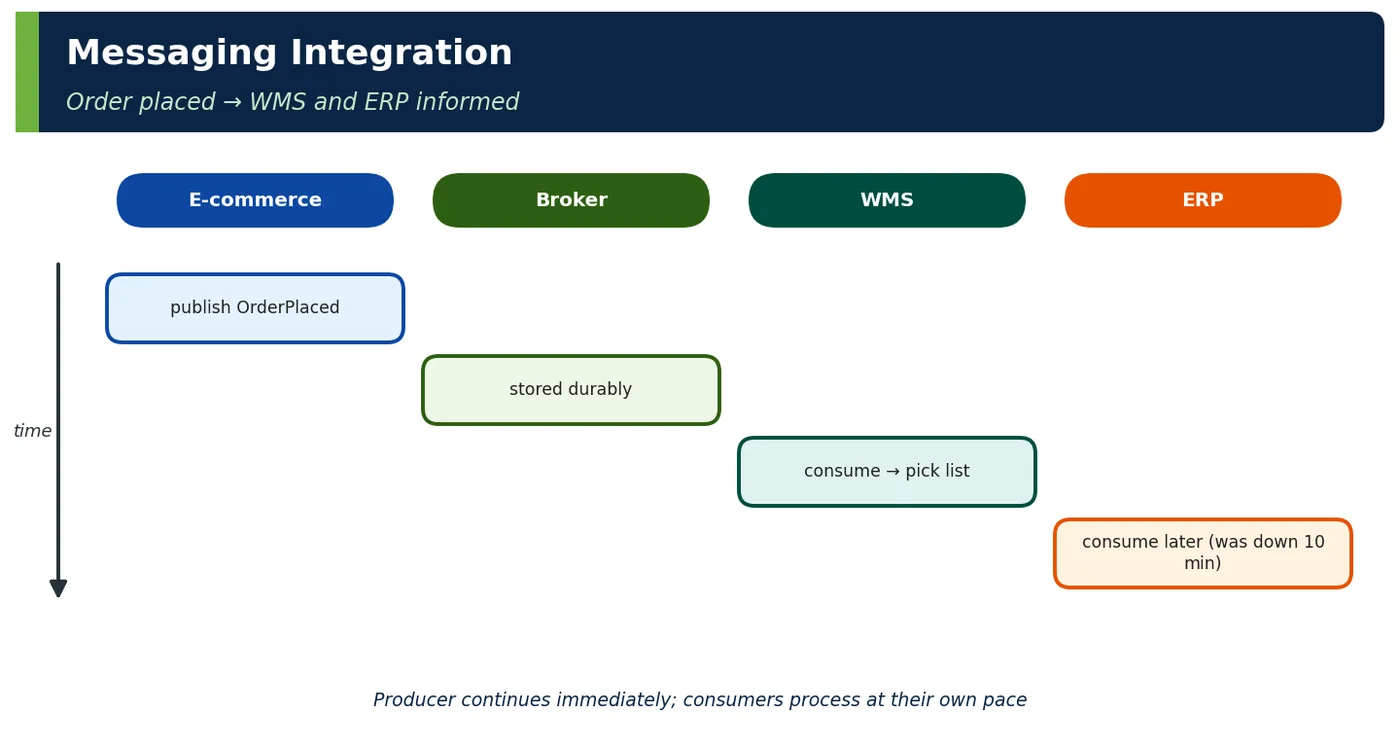
Applications exchange messages asynchronously through a broker
Table 1 — The four TOC styles
2Why It Exists
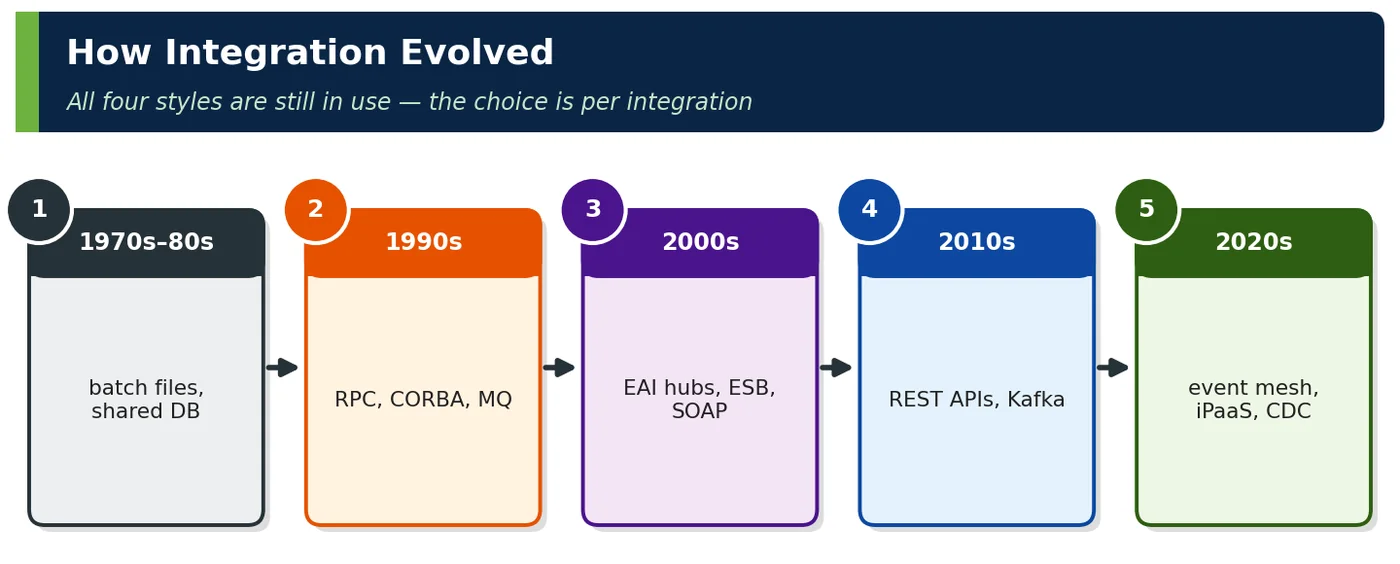
Integration styles evolved with technology: batch files in the mainframe era, shared databases in client/server, RPC and APIs with distributed computing, and messaging for reliable asynchronous exchange. Each solves problems the previous one created; none is obsolete.
4ADeep Dive — Hybrids: CDC and Files over Messaging
Hybrid
How
Benefit
CDC (database → messaging)
Debezium reads WAL/binlog → Kafka events
Database-owned apps emit events without code change
Claim check (file + message)
Large file in S3, message carries reference
Messaging semantics, bulk payload
API + events
Command via API, state changes as events
Immediate response + decoupled propagation
Batch over events
Consumers aggregate events into periodic loads
Real time where needed, batch downstream
Table 8 — Real landscapes blend styles
JAVA
// Claim check: message carries a reference, not the 2 GB filerecord CatalogFileReady(String bucket, String key, long sizeBytes, String sha256) { }kafka.send("catalog.files.v1", new CatalogFileReady("erp-exports", "products/2026-09-26.csv.gz", 2_147_483_648L, checksum));
5APIs / Features / Syntax
Style
Spring ecosystem
File transfer
Spring Batch, Spring Integration SFTP/file adapters, S3 events
Database
JdbcClient/Spring Data, database views, Debezium
API
@RestController, RestClient, Spring gRPC
Messaging
Spring JMS, Spring AMQP, Spring Kafka, Spring Cloud Stream
Contracts
OpenAPI (APIs), AsyncAPI (messaging), file specs
Table 9 — Implementation toolkit
6Practical Examples
6.1 Shared database outage
Five applications wrote to a shared customers table. A new index added for one application caused lock contention and slowed all five; a column rename broke two overnight batch jobs. Moving to a customer service with an API plus CustomerChanged events removed shared-schema coupling.
6.2 Files that arrived half-written
An import job read a CSV while the ERP was still writing it, importing 60% of products and deleting the rest as "discontinued". A .done marker file and checksum validation fixed the race.
6.3 Worked example — choosing styles for one landscape
Integration
Style
Reason
ERP → shop product catalogue
File (nightly) + events for price changes
Bulk + timely deltas
Shop → payment
API
Immediate answer
Shop → WMS order
Messaging
Decoupled, reliable
Reporting
DB replica / CDC
Analytical queries
Table 10 — Style per integration
6.4 Worked example — safe file handoff
Rule
Implementation
Write to temp name, rename atomically
products.csv.tmp → products.csv
Completion marker
products.csv.done with row count & checksum
Idempotent import
Track processed file names
Archive and error folders
processed/, error/
Table 11 — File transfer done properly
6.5 Worked example — read-only database views
SQL
CREATE VIEW reporting.v_orders ASSELECT o.id, o.status, o.total_amount, o.currency, o.placed_atFROM orders o; -- stable contract; internal tables can changeGRANT SELECT ON reporting.v_orders TO reporting_role;
6.6 Worked example — API vs messaging for the same need
6.9 Worked example — database integration exit plan
Phase
Action
1
Inventory who reads/writes which tables
2
Introduce views/API for readers
3
Route writes through owning service API
4
Emit events (CDC or outbox)
5
Revoke direct table grants
Table 14 — Strangling a shared database
6.10 Worked example — B2B partner integration
Partner capability
Style
Modern API platform
REST + webhooks
EDI provider
EDI files via AS2/SFTP
Small supplier
CSV via SFTP
Table 15 — Partners dictate style — adapters absorb it
6.11 Worked example — failure behaviour by style
Failure
File
DB
API
Messaging
Receiver down
File waits
—
Call fails
Message waits
Sender down
No file
—
—
No messages
Bad data
Batch rejects/skips
Constraint errors
4xx
DLQ
Table 16 — Failure semantics differ fundamentally
6.12 Worked example — decision record
Section
Content
Context
WMS needs orders within 1 min, may be down during upgrades
Options
API push, shared DB, messaging
Decision
Messaging via Kafka orders.v1
Consequences
Idempotent consumer, DLQ, AsyncAPI contract
Table 17 — ADR for integration style
6.13 Worked example — Spring Integration file flow
JAVA
@BeanIntegrationFlow productFiles() {return IntegrationFlow .from(Files.inboundAdapter(new File("/data/inbound")) .patternFilter("*.csv"), // only completed files e -> e.poller(Pollers.fixedDelay(Duration.ofSeconds(30)))) .filter(File.class, f -> new File(f.getPath() + ".done").exists()) .split(Files.splitter().markers()) // line by line .transform(ProductCsv::parse) .handle(productService, "upsert") .get();}
Element
EIP pattern (Chapter 4)
Inbound adapter
Channel adapter
.filter
Message filter
.split
Splitter
.transform
Message translator
Table 18 — File transfer implemented with integration patterns
6.14 Worked example — cost of change per style
Change: add field ecoLabel to product
File
Shared DB
API
Messaging
Producer effort
Add column
ALTER TABLE
Add field
Add field
Consumer impact
Parsers may break
Queries OK, ORMs may break
Tolerant readers OK
Tolerant readers OK
Coordination
Spec update
DBA + all apps
Contract version
Schema registry check
Table 19 — Evolution costs differ
7Common Problems & Mistakes
Shared databases as the default integration mechanism.
Files without completion markers or checksums.
Synchronous APIs for fan-out propagation.
Messaging for everything, including simple queries.
Undocumented contracts for files and messages.
Ignoring failure semantics of the chosen style.
8Performance & Production Considerations
Aspect
Guideline
Files
Atomic handoff, validation, idempotent import
Database
Views/CDC over shared writes
API
Timeouts, retries, contracts
Messaging
Idempotency, DLQs, schemas
All
Monitoring and ownership
Table 20 — Operational guidelines
9Architecture & Design Considerations
Choose styles per integration with ADRs.
Prefer encapsulation (API/messaging) over shared databases.
Use hybrids (CDC, claim check) to bridge constraints.
Document contracts with OpenAPI and AsyncAPI.
10Interview Questions & Answers
Q1BasicConcept
What are the four integration styles?
Hohpe and Woolf's Enterprise Integration Patterns define four fundamental styles. File transfer: one application writes a file and another reads it later, usually in batches over SFTP or object storage. Shared database: applications integrate by reading and writing the same tables. Remote procedure invocation, today usually a REST or gRPC API: one application calls another and waits for a response. Messaging: applications exchange messages asynchronously through a broker such as Kafka, RabbitMQ or a JMS provider. They differ in timeliness, coupling and failure behaviour, and each solved problems the previous one created. None is obsolete; real landscapes mix all four, plus hybrids such as change data capture and claim check.
Q2BasicTrade-off
What is the main drawback of file transfer?
The main drawback is latency: data moves in batches, often nightly or hourly, so receivers work on stale data and anything that needs near-real-time updates cannot use it. Errors also surface late. A malformed record, a missing file or a half-written file is discovered only when the import runs, possibly hours after the source produced it, and the batch may fail partially. Contracts such as CSV layouts are often undocumented, and duplicates or reprocessing need explicit handling. The strengths are real: simple, decoupled in technology and time, and ideal for bulk volumes and partners with limited capabilities. So the drawback matters when timeliness or early error feedback is a requirement.
Q3IntermediateConcept
Why is shared-database integration risky?
Because the schema becomes a public contract between all applications using it, but nobody manages it as one. Any change, a column rename, a new constraint, even an index, can break or slow other applications, so the schema freezes and every change needs cross-team coordination. Business rules are not encapsulated: each application writes the tables directly, so validation and invariants are duplicated or bypassed, and it is unclear who owns the data. Runtime coupling is high too: one application's heavy query or lock causes contention for all of them, as in this note's outage example. Read-only views or replicas reduce the damage; APIs, events or CDC are the long-term exit.
Q4IntermediateTrade-off
When is an API better than messaging?
An API is better when the caller needs an immediate answer to continue: a price quote, a stock check, a payment authorisation or a validation result, or when a user is waiting for a read. Request-response over REST or gRPC gives the answer directly, with simple error handling and debugging, whereas request-reply over a broker adds correlation ids, reply queues and latency for no benefit. APIs also suit queries over data another service owns when copying it is not justified. The price is temporal coupling: the provider must be available and fast, so callers need timeouts, retries for idempotent calls and circuit breakers. For propagation to many consumers, messaging wins.
Q5Senior EngineerConcept
What does messaging add over APIs?
Messaging adds temporal decoupling: the sender hands a message to the broker and continues, and the consumer processes it when it is available, so an outage or slowdown of the consumer does not fail the sender. The broker buffers load spikes, letting consumers work at their own pace and scale out with partitions or competing consumers. It provides reliable delivery through persistence, acknowledgements, retries and dead-letter queues. Publish-subscribe makes fan-out easy: new consumers subscribe without any change to the producer. The costs are eventual consistency, at-least-once delivery that requires idempotent consumers, ordering concerns and harder end-to-end debugging, so trace context must travel in message headers.
Q6Senior EngineerInternals
What is change data capture and where does it fit?
Change data capture reads a database's own change log, the PostgreSQL WAL or the MySQL binlog, and turns committed inserts, updates and deletes into an event stream, typically with Debezium publishing to Kafka. It is a hybrid of database integration and messaging: the source application keeps writing to its database unchanged, while consumers receive events asynchronously instead of querying shared tables. It fits legacy systems you cannot modify, cache and search-index synchronisation, and strangler migrations. Combined with an outbox table, it gives reliable event publishing without dual writes. Be careful with raw table events: they expose the internal schema, so publish curated domain events through the outbox where possible.
Q7Technical ArchitectDesign
How do you make file transfer reliable?
I make every step explicit and recoverable. The producer writes to a temporary name and renames atomically when the file is complete, then writes a completion marker or manifest containing the record count and a SHA-256 checksum. The consumer processes only files with a marker, verifies the checksum and count, and validates the content against a documented schema before applying anything. Imports are idempotent, keyed by file name or business key, so reruns are harmless, and destructive inferences such as deleting missing products require a complete, validated file. Processed files move to an archive folder and rejected ones to an error folder, with alerts. Spring Integration or Spring Batch implements these patterns well.
Q8Solution ArchitectDesign
How would you choose styles for a new landscape?
I start with an inventory of integration needs rather than a preferred technology. For each integration I record the timeliness required, whether the caller needs an immediate response, how many consumers there are, data volume, coupling tolerance, failure behaviour and any partner constraints. Then I choose per integration: APIs for immediate queries and commands, messaging for propagation and fan-out, files for bulk exchange and constrained partners, and CDC or read-only views as bridges for legacy databases, while avoiding new shared-database integrations. Each choice is captured in an ADR. Finally I standardise one supported platform per style, with contracts in OpenAPI and AsyncAPI, so teams do not reinvent tooling.
Newsletter
Get new tutorials every week
New ArchitectMind tutorials and interview questions, once a week. No spam, unsubscribe anytime.
Your subscription could not be saved. Please try again.
Almost done! Check your inbox and click the confirmation link to complete your subscription.
 Architect