 Architect

- Chapter
- Chapter 1 — HTTP Fundamentals
- Prerequisites
- Basic networking (TCP/IP, DNS)
- You will be able to
- Describe HTTP's client–server message model, trace a request through intermediaries to a Spring Boot server, read and construct raw requests and responses, compare HTTP/1.1, HTTP/2 and HTTP/3, and configure Java clients and servers for efficient connections
- Covers
- Client; Server; Request; Response
On this page
- 1. Concept / Definition
- 2. Why It Exists
- 3. Core Concepts
- 4. How It Works Internally — From Socket to Controller
- 4A. Deep Dive — HTTP/1.1, HTTP/2 and HTTP/3
- 5. APIs / Features / Syntax
- 6. Practical Examples
- 7. Common Problems & Mistakes
- 8. Performance & Production Considerations
- 9. Architecture & Design Considerations
- 10. Interview Questions & Answers
1Concept / Definition
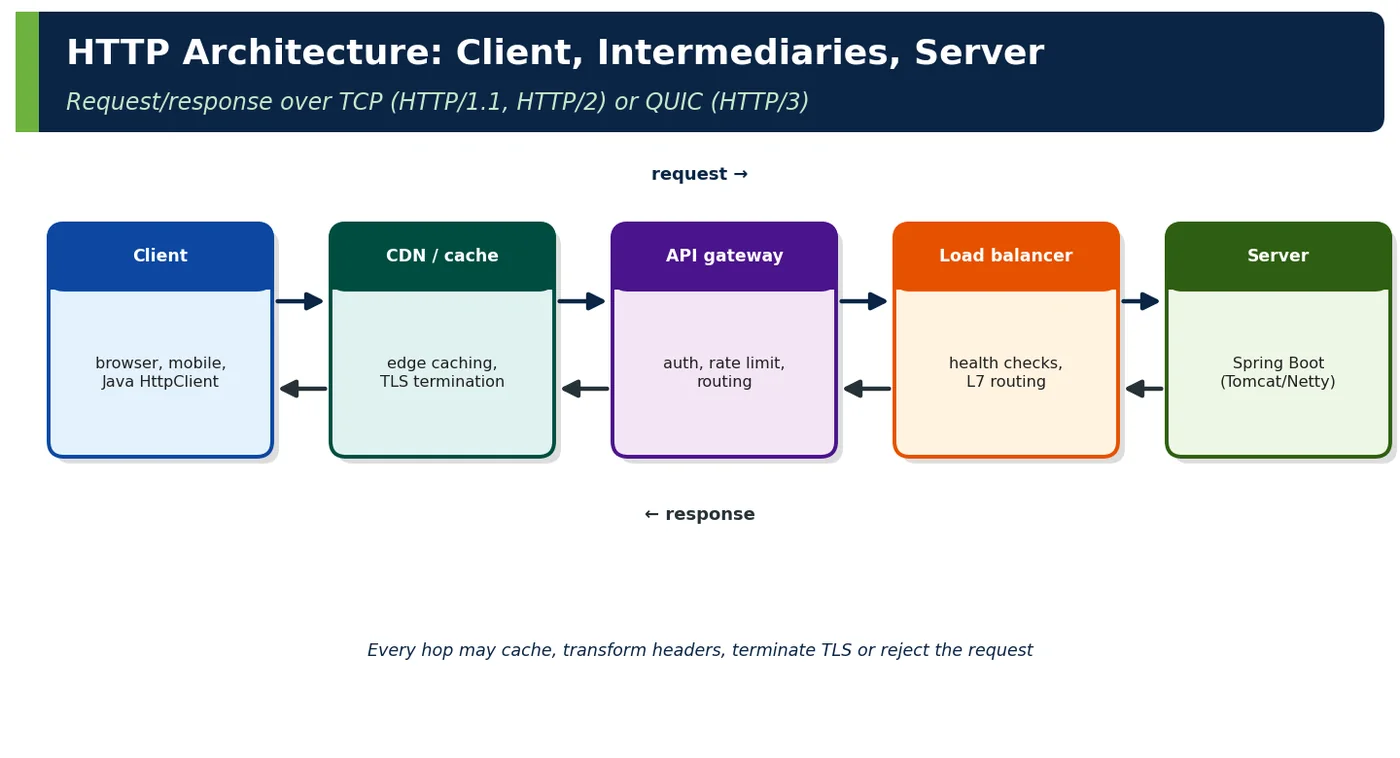
HTTP (Hypertext Transfer Protocol) is a stateless, application-level request/response protocol. A client sends a request to a server, which returns a response; intermediaries may sit in between.
| TOC term | Definition |
|---|---|
| Client | Program that initiates requests (browser, mobile app, Java HttpClient, RestClient, curl) |
| Server | Program that accepts connections and produces responses (origin server: Tomcat/Netty running Spring) |
| Request | Method + target URI + protocol version, headers, optional body |
| Response | Status code + reason, headers, optional body |
2Why It Exists
Tim Berners-Lee designed HTTP (1991) to fetch hypertext documents. Its simple, extensible message model — uniform methods, self-describing headers, stateless exchanges — let caches, proxies and browsers work generically, which is why it became the universal application protocol for APIs as well as web pages. HTTP/2 (2015) and HTTP/3 (2022) improved performance without changing semantics.
| Design property | Consequence for APIs |
|---|---|
| Stateless | Any server instance can handle any request |
| Self-descriptive messages | Intermediaries can cache, route, compress, authenticate |
| Uniform methods and status codes | Generic clients, retries, monitoring |
| Extensible headers | New features without breaking old clients |
3Core Concepts
3.1 Client
| Java client | Characteristics |
|---|---|
java.net.http.HttpClient (JDK 11+) | HTTP/1.1 and HTTP/2, sync/async, connection pooling |
Spring RestClient (Spring 6.1+) | Fluent synchronous API on top of JDK/Apache/Jetty/Reactor clients |
Spring WebClient | Reactive, non-blocking |
HTTP interface clients (@HttpExchange) | Declarative interfaces backed by RestClient/WebClient |
RestClient client = RestClient.builder()
    .baseUrl("https://api.shop.example.com")
    .requestFactory(new JdkClientHttpRequestFactory(HttpClient.newBuilder()
        .version(HttpClient.Version.HTTP_2)
        .connectTimeout(Duration.ofSeconds(2))
        .build()))
    .defaultHeader(HttpHeaders.ACCEPT, MediaType.APPLICATION_JSON_VALUE)
    .build();

OrderView order = client.get().uri("/api/orders/{id}", 5001)
    .retrieve().body(OrderView.class);
3.2 Server
| Server concern | Spring Boot 4 setting |
|---|---|
| Threads | Virtual threads (spring.threads.virtual.enabled=true) |
| Connections | server.tomcat.max-connections, keep-alive timeout |
| HTTP/2 | server.http2.enabled=true (with TLS) |
| Compression | server.compression.enabled=true |
| Graceful shutdown | server.shutdown=graceful |
| Request limits | server.tomcat.max-http-form-post-size, spring.servlet.multipart.max-file-size |
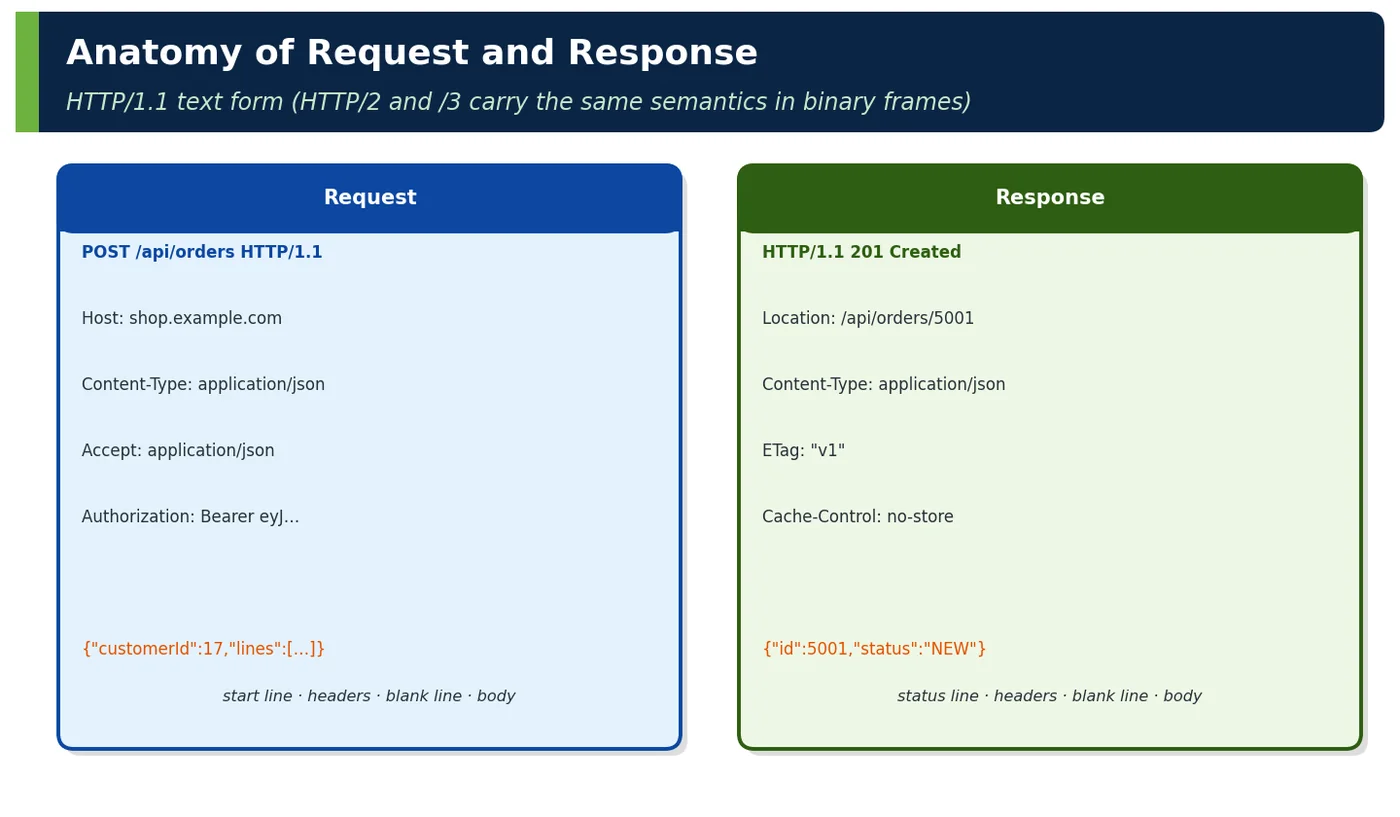
3.3 Request
| Request part | Example |
|---|---|
| Method | GET, POST, … |
| Target (path + query) | /api/orders?status=PAID |
| Headers | Host, Accept, Authorization, Content-Type |
| Body | JSON document for POST/PUT/PATCH |
3.4 Response
| Response part | Example |
|---|---|
| Status | 201 Created |
| Headers | Location, Content-Type, ETag, Cache-Control |
| Body | Representation of the resource or an error document |
| Trailers (rare) | Metadata after streamed body |
4How It Works Internally — From Socket to Controller
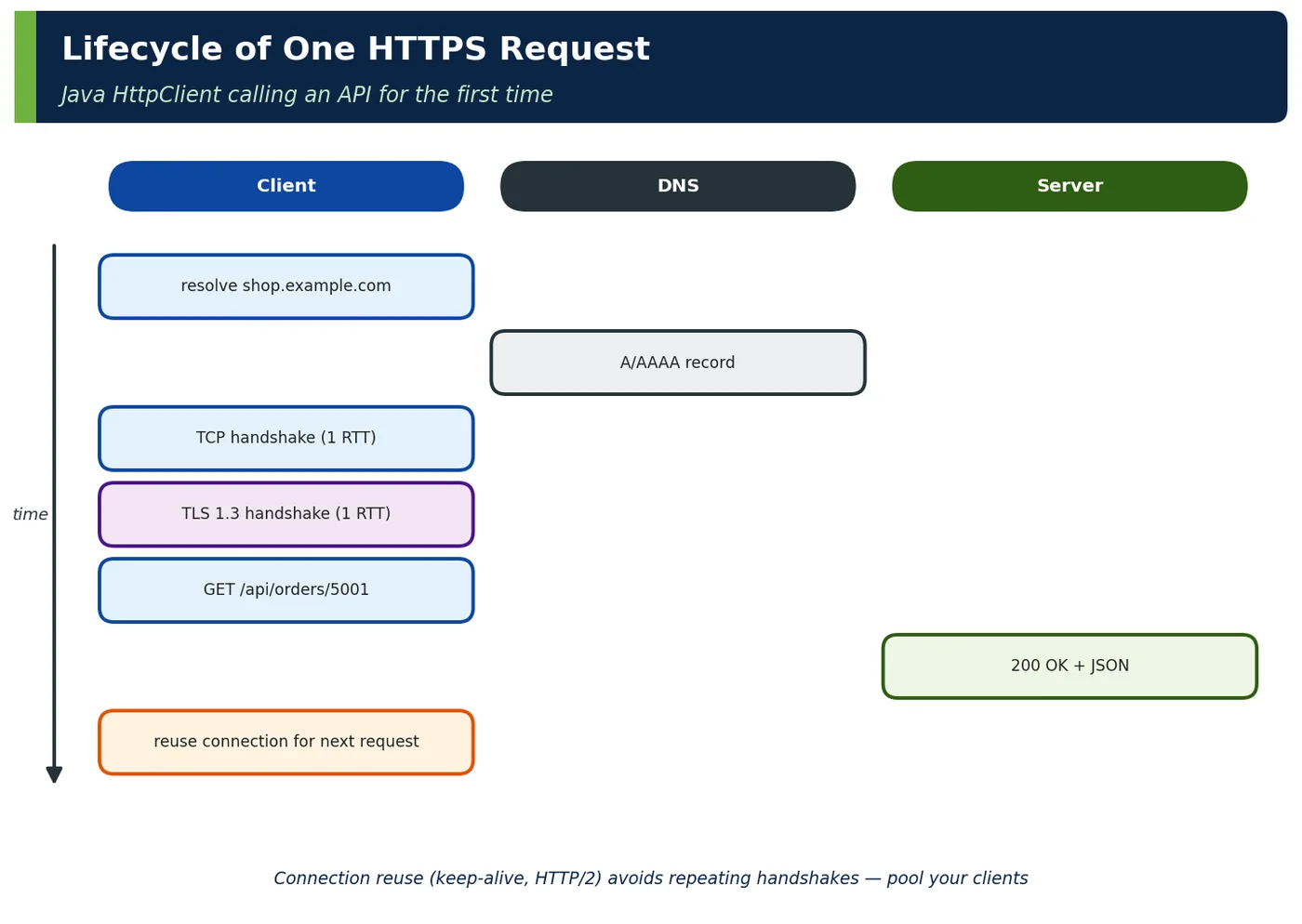
| Step | Detail |
|---|---|
| DNS | Resolve host → IP (cached by OS/JVM; networkaddress.cache.ttl) |
| TCP (or QUIC) connect | 1 RTT (QUIC combines with TLS) |
| TLS handshake | 1 RTT with TLS 1.3 (0-RTT resumption possible) |
| Request framing | HTTP/1.1 text lines or HTTP/2 HEADERS + DATA frames |
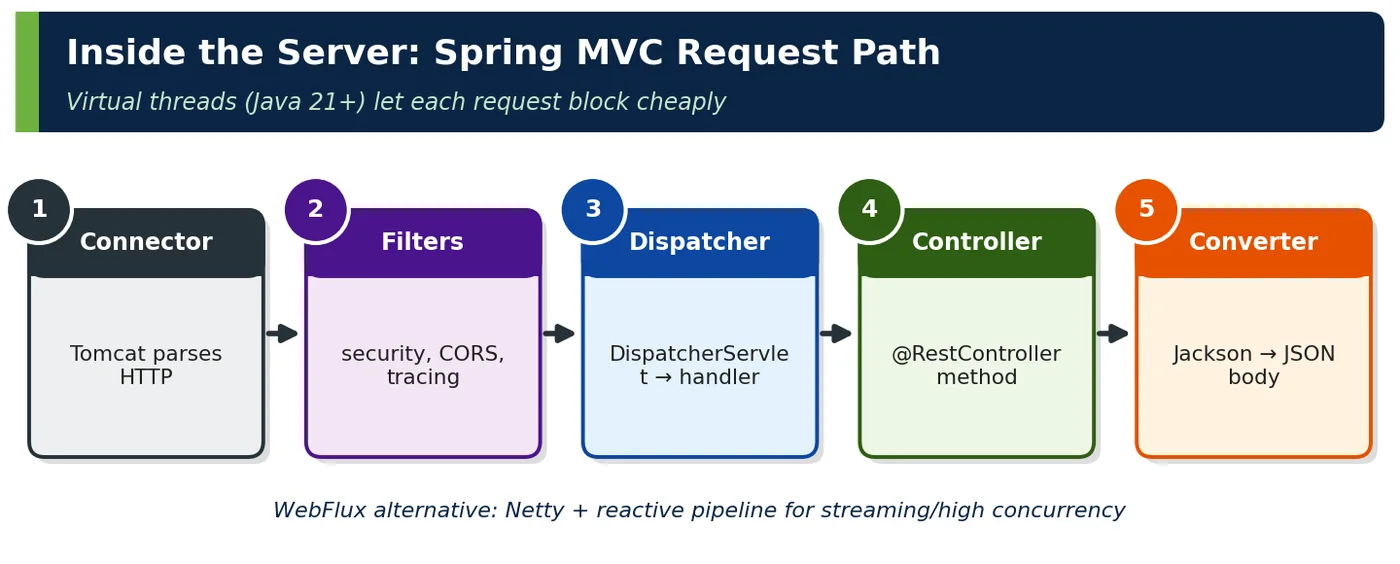
| Server parsing | Tomcat connector → HttpServletRequest |
| Handler dispatch | DispatcherServlet → handler mapping → controller |
| Serialization | HttpMessageConverter (Jackson) writes body |
| Connection reuse | Keep-alive / HTTP/2 stream on existing connection |
4ADeep Dive — HTTP/1.1, HTTP/2 and HTTP/3
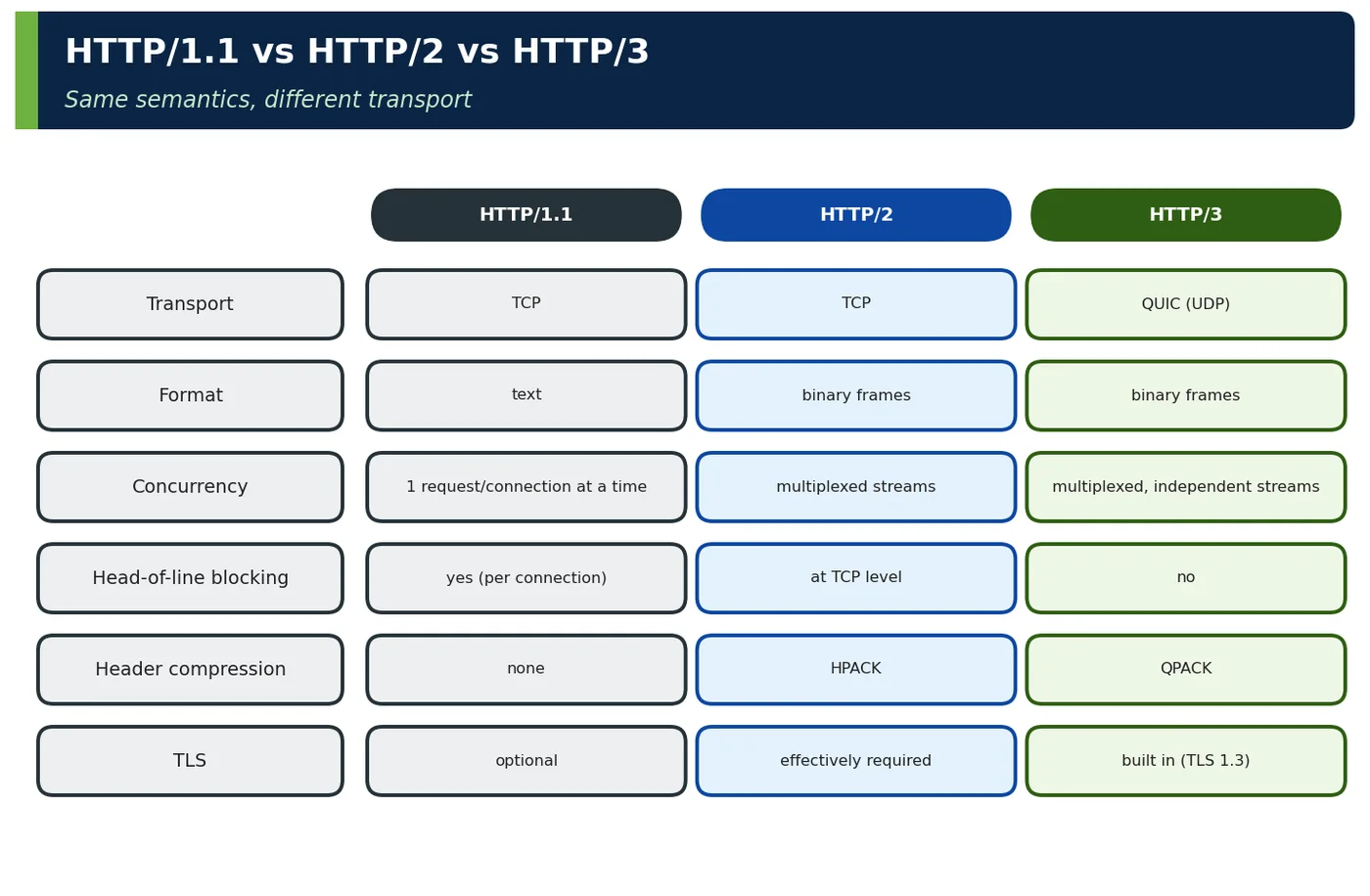
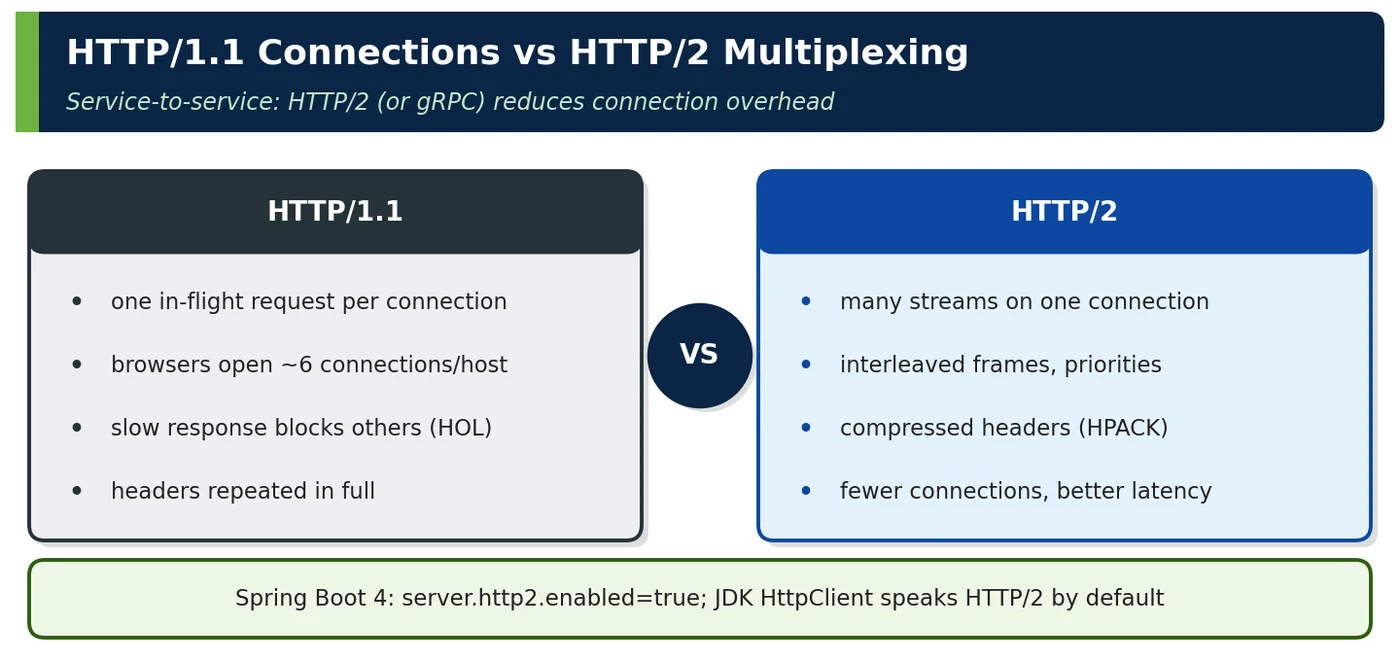
| Choose | When |
|---|---|
| HTTP/1.1 | Legacy clients, simple internal traffic, easy debugging |
| HTTP/2 | Default for browsers and service-to-service (many concurrent requests) |
| HTTP/3 | Mobile/lossy networks, global users (usually at CDN edge) |
| gRPC (HTTP/2) | Internal RPC with streaming and Protobuf (Volume VI) |
5APIs / Features / Syntax
| Tool | Use |
|---|---|
curl -v --http2 https://… | Inspect raw exchange |
HttpClient.newBuilder().version(HTTP_2) | JDK client |
RestClient, @HttpExchange | Spring clients |
@RestController, ResponseEntity<T> | Server responses with status and headers |
HttpServletRequest, @RequestHeader | Access raw request data |
server.forward-headers-strategy=framework | Honour Forwarded/X-Forwarded-* behind proxies |
@RestController
@RequestMapping("/api/orders")
class OrderController {
    @PostMapping
    ResponseEntity<OrderView> create(@Valid @RequestBody CreateOrder cmd,
                                     UriComponentsBuilder uri) {
        OrderView created = service.create(cmd);
        return ResponseEntity.created(uri.path("/api/orders/{id}").build(created.id()))
                             .eTag(String.valueOf(created.version()))
                             .body(created);
    }
}6Practical Examples
6.1 New client per request
A service created a new HttpClient for every outbound call. Each call paid DNS + TCP + TLS (≈ 3 RTT, ~60 ms cross-region) and exhausted ephemeral ports under load. A single shared, pooled client cut p50 latency from 85 ms to 22 ms.
6.2 Wrong URLs behind a proxy
Behind a TLS-terminating load balancer, generated Location headers used http://internal-host:8080. Enabling server.forward-headers-strategy=framework (trusting X-Forwarded-Proto/Host from the LB) produced correct public URLs.
6.3 Worked example — reading a raw exchange
Scenario. A mobile developer reported that the orders API "sometimes returns stale data". Before changing any code, the backend engineer reproduced the call with curl -v to see exactly what travelled over the wire.
$ curl -v https://api.shop.example.com/api/orders/5001 -H 'Accept: application/json'
> GET /api/orders/5001 HTTP/2
> Host: api.shop.example.com
> Accept: application/json
< HTTP/2 200
< content-type: application/json
< etag: "7"
< cache-control: private, max-age=0
{"id":5001,"status":"PAID","total":4500.00}| Observation | Meaning |
|---|---|
HTTP/2 | Negotiated via ALPN during TLS |
| Lowercase headers | HTTP/2 requires lowercase header names |
etag | Version for caching/concurrency (Topic 1.4) |
What it shows. The verbose output shows the request line and headers sent by the client, prefixed with >, and the response status and headers, prefixed with <. It reveals that HTTP/2 was negotiated through ALPN during the TLS handshake, that header names are lowercase as HTTP/2 requires, and that the response carries an ETag of "7" and cache-control: private, max-age=0. Those two headers explained the stale data: the app's HTTP library revalidated with the ETag correctly, but an intermediate cache was ignoring private. The fix was in the cache configuration, not the API.
Takeaway. When an HTTP problem is reported, look at the raw exchange first. Headers such as cache-control, ETag, content-type and the negotiated protocol answer many questions before any code is read.
6.4 Worked example — connection costs
Scenario. A service called a partner API about 50 times per page view, creating a new HttpClient for each call. Pages took several seconds, although the partner's own processing time was only a few milliseconds per call.
| Scenario (client → API 30 ms RTT) | Latency per call |
|---|---|
| New connection + TLS each time | ~100 ms (DNS + TCP + TLS + request) |
| Keep-alive HTTP/1.1 | ~32 ms |
| HTTP/2 multiplexed, 20 parallel calls | ~35 ms for all 20 |
What it shows. With a 30 ms round trip, every new connection pays for DNS lookup, the TCP handshake and the TLS handshake before the request is even sent, adding up to roughly 100 ms per call. Reusing connections with keep-alive brings each call close to one round trip, about 32 ms. With HTTP/2, 20 calls can be multiplexed in parallel over one connection and complete in about 35 ms in total. The fix was a single shared client, created once and injected wherever it was needed.
Takeaway. Create HTTP clients once and reuse them, so connection pools and TLS sessions are shared. Connection set-up, not payload size, usually dominates latency for small API calls.
6.5 Worked example — timeouts on clients
Scenario. During a partner outage, the checkout service stopped responding entirely. Its threads were all waiting on calls to the partner, which accepted connections but never answered, and no timeouts were configured.
HttpClient http = HttpClient.newBuilder()
    .connectTimeout(Duration.ofSeconds(2))
    .build();
HttpRequest req = HttpRequest
    .newBuilder(URI.create("https://api.example.com/orders/5001"))
    .timeout(Duration.ofSeconds(3))                   // whole response
    .header("Accept", "application/json").GET().build();
HttpResponse<String> res = http.send(req, HttpResponse.BodyHandlers.ofString());| Timeout | Purpose |
|---|---|
| Connect | Fail fast on unreachable hosts |
| Request/read | Bound waiting for slow servers |
| Pool acquire (Apache client) | Avoid waiting forever for a connection |
What it shows. Java's HttpClient separates two timeouts. connectTimeout limits how long to wait for a TCP connection, which catches unreachable or overloaded hosts quickly, here 2 seconds. The request timeout limits the time until the response headers arrive, here 3 seconds, which catches servers that accept connections but hang. With both in place, a failing partner produces a fast, handleable exception instead of blocking threads indefinitely, and the caller can fall back, retry with back-off or return a clear error.
Takeaway. Every outbound HTTP call needs explicit timeouts chosen from the caller's latency budget. A missing timeout turns a partner's slowness into your outage.
6.6 Worked example — HTTP/2 in Spring Boot 4
Scenario. An internal API serving a busy mobile app ran on Spring Boot with a 200-thread Tomcat pool. Under load, requests queued while threads waited on database and partner calls, even though CPU usage stayed low.
server:
  http2:
    enabled: true
  ssl:
    bundle: api-tls
spring:
  threads:
    virtual:
      enabled: true
With virtual threads, blocking controllers scale to thousands of concurrent requests without large platform thread pools.
What it shows. Two configuration changes addressed the problem. Enabling HTTP/2 with a TLS bundle lets clients multiplex many requests over one connection, reducing connection overhead at the load balancer and server. Enabling virtual threads makes Tomcat handle each request on a cheap virtual thread, so thousands of requests can block on I/O at once without a huge platform thread pool. The controllers kept their simple blocking style; no reactive rewrite was needed. Load tests showed concurrent request capacity rising roughly tenfold before latency degraded.
Takeaway. For I/O-bound HTTP services, virtual threads and HTTP/2 give large gains through configuration alone. Measure under realistic load, and check that downstream resources, such as database pools, can cope with the higher concurrency.
6.7 Worked example — intermediaries changing messages
Scenario. An API worked perfectly in local testing but behaved differently in production: some PATCH requests failed, client IP addresses in logs were all the same, and cookies sometimes disappeared.
| Intermediary | Possible changes |
|---|---|
| CDN | Caches responses, adds Age, compresses, may strip cookies |
| API gateway | Adds auth headers, rewrites paths, enforces limits |
| Load balancer | Adds X-Forwarded-For/Proto, terminates TLS, closes idle connections |
| Corporate proxy | Blocks methods (e.g. PATCH), limits body size |
What it shows. Between the client and the service sat a CDN, an API gateway, a load balancer and, for some business customers, a corporate proxy. Each one can change messages. The CDN cached responses and stripped cookies on cacheable paths; the load balancer terminated TLS and replaced the client address, adding X-Forwarded-For; the corporate proxy blocked the PATCH method. None of this is visible when testing directly against the service.
Takeaway. Design and test APIs for the whole request path, not just the server. Document each intermediary's behaviour, configure services to trust forwarded headers only from known proxies, and run tests through the production-like path.
6.8 Worked example — streaming large responses
Scenario. Finance downloads a full order export of several hundred thousand rows from an endpoint. The first version built the entire JSON array in memory before responding and occasionally crashed the service with OutOfMemoryError.
@GetMapping(value = "/api/exports/orders", produces = "application/x-ndjson")
ResponseEntity<StreamingResponseBody> export() {
    return ResponseEntity.ok(out -> {
        try (Stream<OrderRow> rows = service.streamAll()) {
            rows.forEach(r -> write(out, r));             // one JSON object per line
        }
    });
}
Streaming avoids building huge bodies in memory; clients process records as they arrive.
What it shows. Returning a StreamingResponseBody lets the controller write to the response output stream as rows are read from the database stream, instead of building one huge object. The application/x-ndjson format, newline-delimited JSON, writes one JSON object per line, so clients can also process records as they arrive. Memory usage stays flat regardless of export size, and the first bytes reach the client almost immediately. The database stream must stay open while writing, so the service method runs in a read-only transaction.
Takeaway. For large responses, stream instead of buffering. Choose a format that clients can process incrementally, and set timeouts and limits appropriate for long-running downloads.
6.9 Worked example — request size limits
Scenario. An attacker sent a few hundred requests with 500 MB JSON bodies to a public endpoint. Each request was buffered in memory before validation, and the service ran out of memory within minutes.
| Limit | Default risk | Setting |
|---|---|---|
| JSON body | Huge payloads exhaust memory | Gateway limit + spring.codec.max-in-memory-size (WebFlux) / Tomcat limits |
| Headers | Large cookies/tokens → 431 | server.max-http-request-header-size |
| Uploads | Multi-GB files | Multipart limits; direct-to-object-storage uploads |
What it shows. Every layer that accepts a request should limit its size. The gateway rejects bodies above a sensible maximum before they reach any service. Inside the service, framework limits, such as Tomcat's settings or WebFlux's spring.codec.max-in-memory-size, cap buffering, and server.max-http-request-header-size limits headers, which otherwise grow with large cookies or tokens and produce 431 errors. Large file uploads bypass the service altogether by going directly to object storage with pre-signed URLs.
Takeaway. Set explicit size limits at every layer, starting at the edge. Defaults are rarely chosen for your threat model, and unlimited request sizes are an easy denial-of-service vector.
6.10 Worked example — observing HTTP in production
Scenario. Customers complained that order history was slow, but each team's dashboard looked healthy. Nobody could say which service in the chain of five calls was responsible.
| Signal | Source |
|---|---|
| Request rate, latency by URI template and status | http.server.requests (Micrometer) |
| Client call latency by target | http.client.requests |
| Trace across services | W3C traceparent header propagation |
| Access logs | Tomcat access log / gateway logs |
What it shows. HTTP provides a natural backbone for observability. Micrometer's http.server.requests metric records rate, latency and status per URI template on each service, and http.client.requests does the same for outbound calls per target. W3C traceparent headers propagate a trace ID across every hop, so a single request can be followed end to end in a tracing tool. Access logs at the gateway and services complete the picture. In this case, the trace showed a reporting service adding 2 seconds through a missing index.
Takeaway. Instrument every HTTP server and client consistently, with templated URIs rather than raw paths to avoid metric explosion, and propagate trace context everywhere. Then slow requests can be explained in minutes.
6.11 Worked example — declarative HTTP client
Scenario. Each team calling the orders service wrote its own client code: building URLs, setting headers, mapping JSON and handling errors, with slightly different bugs in each copy.
@HttpExchange(url = "/api/orders", accept = "application/json")
interface OrdersClient {
    @GetExchange("/{id}") OrderView get(@PathVariable long id);
    @PostExchange ResponseEntity<OrderView> create(@RequestBody CreateOrder cmd);
}

@Bean
OrdersClient ordersClient(RestClient.Builder b) {
    RestClient rc = b.baseUrl("https://orders.internal").build();
    return HttpServiceProxyFactory.builderFor(RestClientAdapter.create(rc)).build()
                                  .createClient(OrdersClient.class);
}
What it shows. Spring's declarative HTTP interface lets a team describe the remote API as a Java interface with annotations such as @GetExchange and @PostExchange. HttpServiceProxyFactory generates the implementation on top of a configured RestClient, which carries the base URL, timeouts, authentication and observability settings. Callers simply inject OrdersClient and call get(id). The orders team can even publish the interface as a small client library, so every consumer uses the same, tested contract.
Takeaway. Use declarative clients to remove repetitive HTTP code and centralise client configuration. Keep the underlying RestClient configured with timeouts, retries and tracing, because the interface hides those details from callers.
6.12 Worked example — HTTP vs other protocols for APIs
Scenario. A new platform team had to decide how services, browser clients and partners should communicate. Some engineers wanted gRPC everywhere; others wanted only REST.
| Need | Protocol |
|---|---|
| Public API, broad clients, caching | HTTP/REST |
| Low-latency internal RPC, streaming | gRPC over HTTP/2 |
| Flexible client-driven queries | GraphQL over HTTP |
| Server push to browsers | SSE / WebSocket (HTTP upgrade) |
| Asynchronous integration | Messaging (Kafka), webhooks over HTTP |
What it shows. The table matches protocols to needs. REST over HTTP suits public APIs with broad client support and HTTP caching. gRPC over HTTP/2 suits low-latency internal calls and streaming between services. GraphQL over HTTP suits clients that need flexible, client-driven queries. Server-sent events or WebSockets, which start as HTTP upgrades, suit server push to browsers. Messaging, such as Kafka, or webhooks suit asynchronous integration. Every option still relies on HTTP concepts, such as TLS, proxies and authentication, or sits beside HTTP.
Takeaway. Choose the protocol per interaction, not per organisation. Standardise a small set, document when each applies, and keep REST over HTTP as the default for external APIs.
7Common Problems & Mistakes
- Creating clients per request (no connection reuse).
- No timeouts on outbound calls.
- Ignoring proxies (wrong scheme/host, blocked methods).
- Huge in-memory bodies instead of streaming.
- Debugging without looking at the wire.
- Assuming HTTP/1.1 behaviour in HTTP/2 environments (header case, connection-specific headers).
8Performance & Production Considerations
| Aspect | Guideline |
|---|---|
| Connections | Shared, pooled clients; keep-alive; HTTP/2 |
| Timeouts | Connect, read, overall per call |
| Threads | Virtual threads for blocking servers |
| Limits | Header/body size limits at gateway and server |
| Observability | Metrics by URI template, tracing headers |
9Architecture & Design Considerations
- Design APIs against HTTP semantics, not a transport version.
- Account for every intermediary in the path (CDN, gateway, LB).
- Standardise client configuration (timeouts, retries, pooling) in shared libraries.
- Choose HTTP/2 or gRPC for high-volume internal traffic.
10Interview Questions & Answers
What are the parts of an HTTP request?
An HTTP request has a request line with a method, such as GET or POST, the target URI, such as /api/orders/5001, and the protocol version. It then has headers, name-value pairs carrying metadata such as Host, Accept, Content-Type, Authorization and caching or tracing information. Finally it may have a body, the payload, used mainly with POST, PUT and PATCH. In HTTP/2 and HTTP/3 the same parts are carried in binary frames, with the method and path as pseudo-headers, but the meaning is identical. Understanding these parts makes it easy to read raw exchanges with tools such as curl -v when debugging.
What does "HTTP is stateless" mean?
Stateless means each request carries everything the server needs to process it, and the server does not depend on memory of earlier requests from the same client at the protocol level. Two requests from the same browser are independent as far as HTTP is concerned. Applications add continuity on top, using cookies with session IDs or tokens that carry identity. Statelessness is what lets any server instance behind a load balancer handle any request, so services can scale horizontally and fail over easily. It also makes requests cacheable and retryable, which is why REST builds on it.
What changed in HTTP/2 compared to HTTP/1.1?
HTTP/2 kept HTTP's semantics, methods, headers and status codes, but changed how messages travel. It uses binary framing instead of text, multiplexes many concurrent request and response streams over a single TCP connection, and compresses headers with HPACK, which matters because headers repeat across requests. This removes the need for many parallel connections and for workarounds such as domain sharding or bundling assets. In practice browsers use HTTP/2 only over TLS, negotiated through ALPN. It does not remove head-of-line blocking at the TCP level, which HTTP/3 addresses by running over QUIC.
Why reuse HTTP client instances?
An HTTP client holds a pool of open connections. Reusing one client instance across requests means later calls reuse those connections, skipping DNS lookups, TCP handshakes and TLS handshakes, which can add 50 to 100 milliseconds or more per call on longer network paths. Creating a new client per request throws the pool away each time and can also exhaust sockets and file descriptors under load. Java's HttpClient, Spring's RestClient and WebClient are thread-safe and designed to be created once and shared, typically as Spring beans with configured timeouts, connection limits and observability.
What problems do intermediaries cause for APIs?
Intermediaries such as CDNs, load balancers, API gateways and corporate proxies sit between clients and services and can change messages. They may cache responses unexpectedly, strip or rewrite headers and cookies, terminate TLS so the service sees plain HTTP, hide the client's real address and the original host, block methods such as PATCH, limit body or header sizes, or close idle connections. Services must therefore be designed for the whole path: use correct caching headers, trust forwarded headers only from known proxies, and test through production-like infrastructure rather than only against the service itself.
How does HTTP/3 improve on HTTP/2?
HTTP/2 multiplexes streams over one TCP connection, but TCP delivers bytes strictly in order, so one lost packet stalls every stream until it is retransmitted: head-of-line blocking at the transport level. HTTP/3 runs over QUIC, a protocol built on UDP that handles streams independently, so packet loss affects only the stream it belongs to. QUIC integrates TLS 1.3 into connection set-up, reducing handshake round trips, and supports connection migration, so a mobile device can switch from Wi-Fi to mobile data without reconnecting. Benefits are largest on lossy and mobile networks; HTTP semantics remain unchanged.
How would you configure a Spring Boot 4 service for high concurrency?
Enable virtual threads, so each request runs on a cheap virtual thread and blocking I/O no longer limits concurrency to the size of a platform thread pool. Enable HTTP/2 with TLS, to reduce connection overhead. Set limits deliberately: maximum connections, request and header sizes, and timeouts on every outbound client. Size downstream resources, such as database connection pools, for the expected concurrency, because they become the new bottleneck. Configure graceful shutdown so in-flight requests finish during deployments, and set server.forward-headers-strategy so the service sees correct client and scheme information behind proxies. Validate everything with load tests.
When would you choose protocols other than plain HTTP/REST?
Plain REST over HTTP is the best default for public and broadly consumed APIs, but other protocols fit specific needs. gRPC over HTTP/2 suits low-latency, high-volume internal service calls and bidirectional streaming, with strongly typed contracts. GraphQL suits clients that need to shape their own queries across many entities, such as a mobile app aggregating data. WebSockets or server-sent events suit pushing updates to browsers in real time. Messaging and webhooks suit asynchronous integration where the caller does not wait for the result. Choose per interaction, and standardise a small set across the organisation.