Bind parameters of every common type correctly, explain why binding prevents SQL injection and where it cannot help, handle dynamic SQL safely (IN lists, sorting, optional filters), and make statements fast with server-side preparation, statement caching and batching
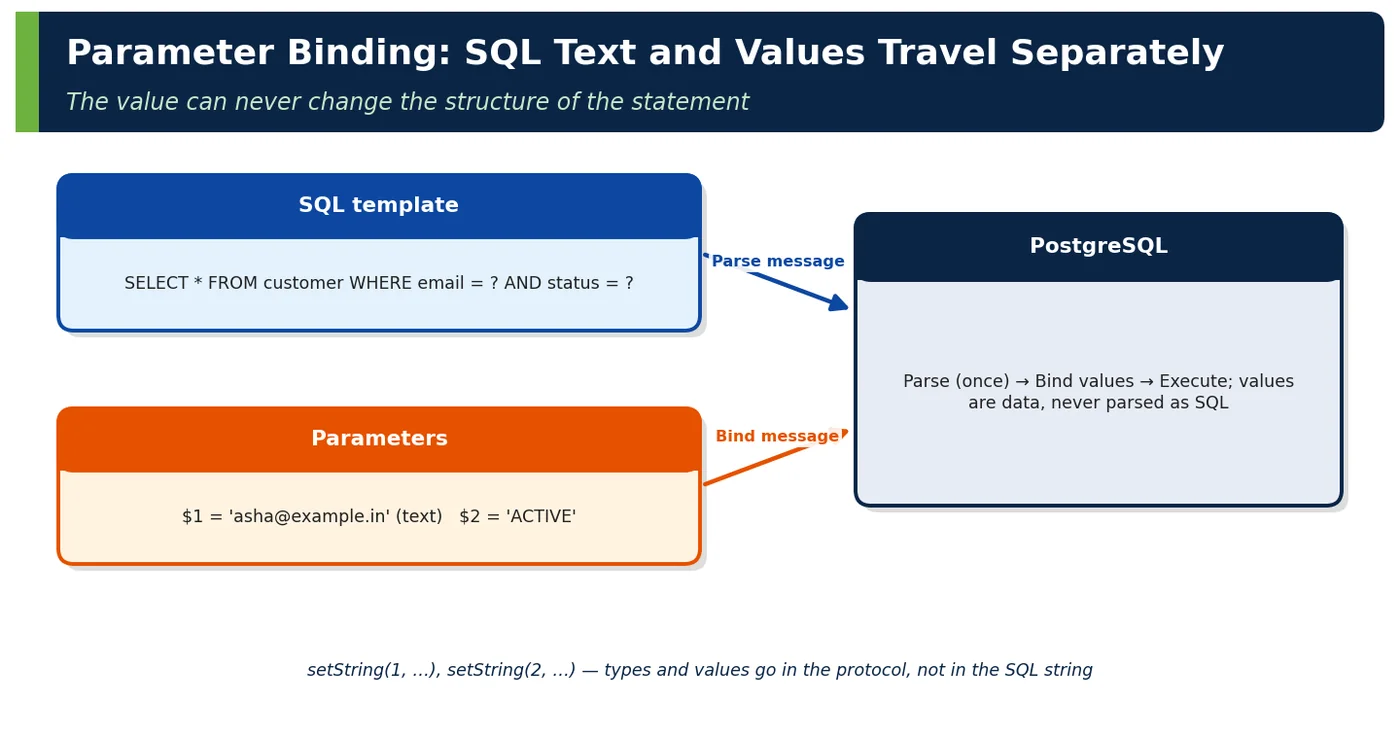
A PreparedStatement is a SQL statement with placeholders (?) whose values are supplied separately through typed setter methods. The SQL text is fixed; only the parameter values vary.
Figure 1 — Parameter binding: SQL text and values travel separately
JAVA
try (PreparedStatement ps = con.prepareStatement( "SELECT customer_id, full_name FROM customer WHERE email = ? AND status = ?")) { ps.setString(1, email); // parameter 1 ps.setString(2, "ACTIVE"); // parameter 2try (ResultSet rs = ps.executeQuery()) { … }}
Term
Meaning
Parameter binding
Associating typed values with placeholders (setXxx(index, value))
SQL injection
Attack where input changes the structure of a SQL statement
Server-side prepared statement
Statement parsed once on the server and executed many times
Batch
Multiple parameter sets executed in one round trip
Table 1 — Vocabulary
2Why It Exists
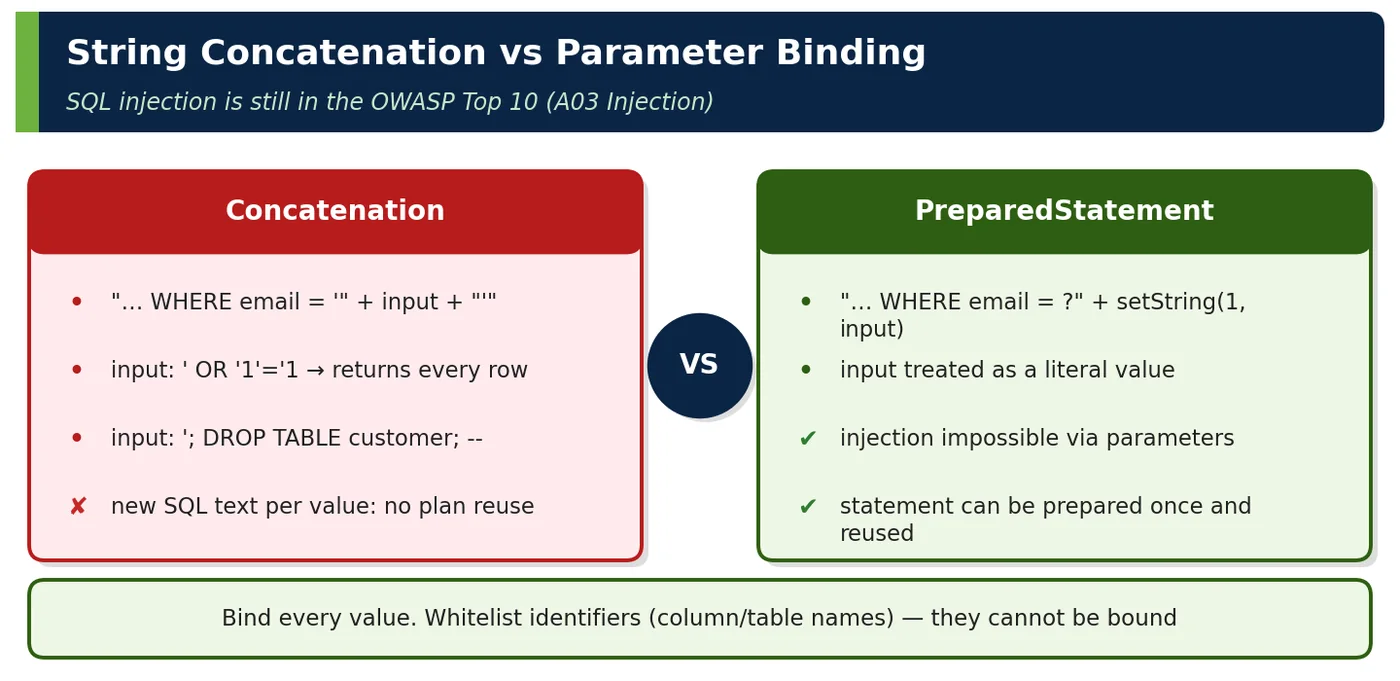
Building SQL by string concatenation mixes code and data: any quote character in the data can alter the query, and every distinct value produces distinct SQL text that must be parsed and planned again. PreparedStatement separates the two — solving the most common database security flaw and a significant performance cost in one design.
3Core Concepts
3.1 Parameter binding
Java value
Setter
PostgreSQL type
String
setString
text/varchar
long / Long (nullable)
setLong / setObject(i, v, Types.BIGINT)
bigint
BigDecimal
setBigDecimal
numeric
Instant
setObject(i, OffsetDateTime.ofInstant(v, UTC))
timestamptz
LocalDate
setObject(i, date)
date
UUID
setObject(i, uuid)
uuid
boolean
setBoolean
boolean
null
setNull(i, Types.BIGINT)
any
Long[]
setArray(i, con.createArrayOf("bigint", arr))
bigint[]
Table 2 — Binding common types
JAVA
// Named parameters with Spring JdbcClient (translated to ? placeholders)List<Order> orders = jdbcClient.sql(""" SELECT * FROM purchase_order WHERE customer_id = :customerId AND placed_at >= :from AND status = ANY(:statuses)""") .param("customerId", customerId) .param("from", from.atOffset(ZoneOffset.UTC)) .param("statuses", new String[] { "PAID", "SHIPPED" }) .query(Order.class) .list();
3.2 SQL injection protection
Figure 2 — String concatenation vs parameter binding
JAVA
// VULNERABLE: input is spliced into SQL textString sql = "SELECT * FROM customer WHERE email = '" + email + "'";// email = "x' OR '1'='1" → ... WHERE email = 'x' OR '1'='1' (every row)// SAFE: input is a bound valuePreparedStatement ps = con.prepareStatement("SELECT * FROM customer WHERE email = ?");ps.setString(1, email); // the whole string is compared to email, quotes included
Injection vector
Does binding protect?
Defence
Values in WHERE/SET/VALUES
Yes
Bind
Table/column names, ORDER BY columns
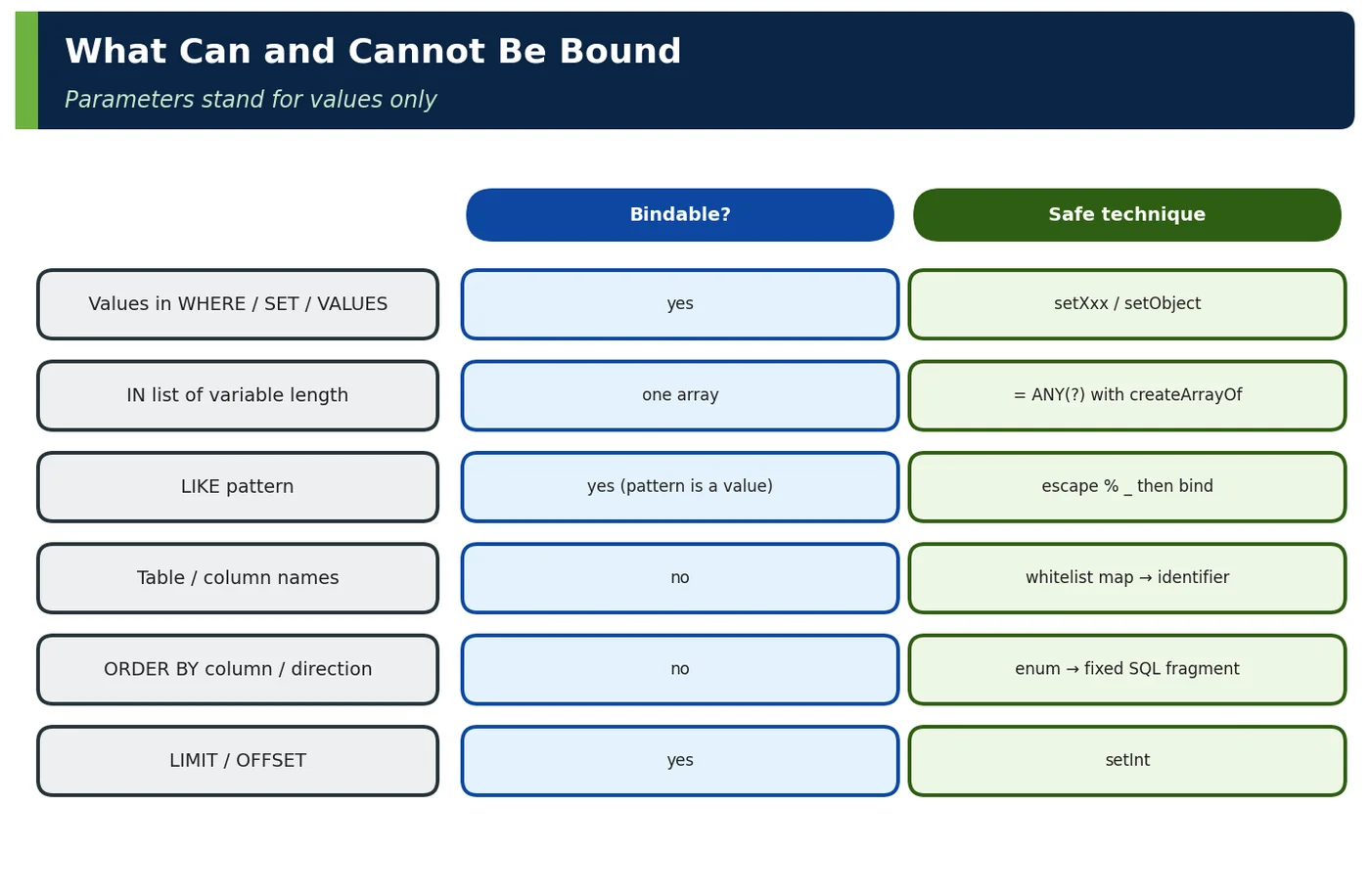
No — cannot be bound
Whitelist mapping
SQL fragments built from input
No
Never; use query builders (jOOQ, Criteria)
Stored procedures using dynamic SQL internally
No
format('%I', …) / quote_ident inside the function
JPQL/HQL concatenation
No
Named parameters in JPQL too
Table 3 — Where binding stops protecting
Figure 3 — What can and cannot be bound
3.3 Performance
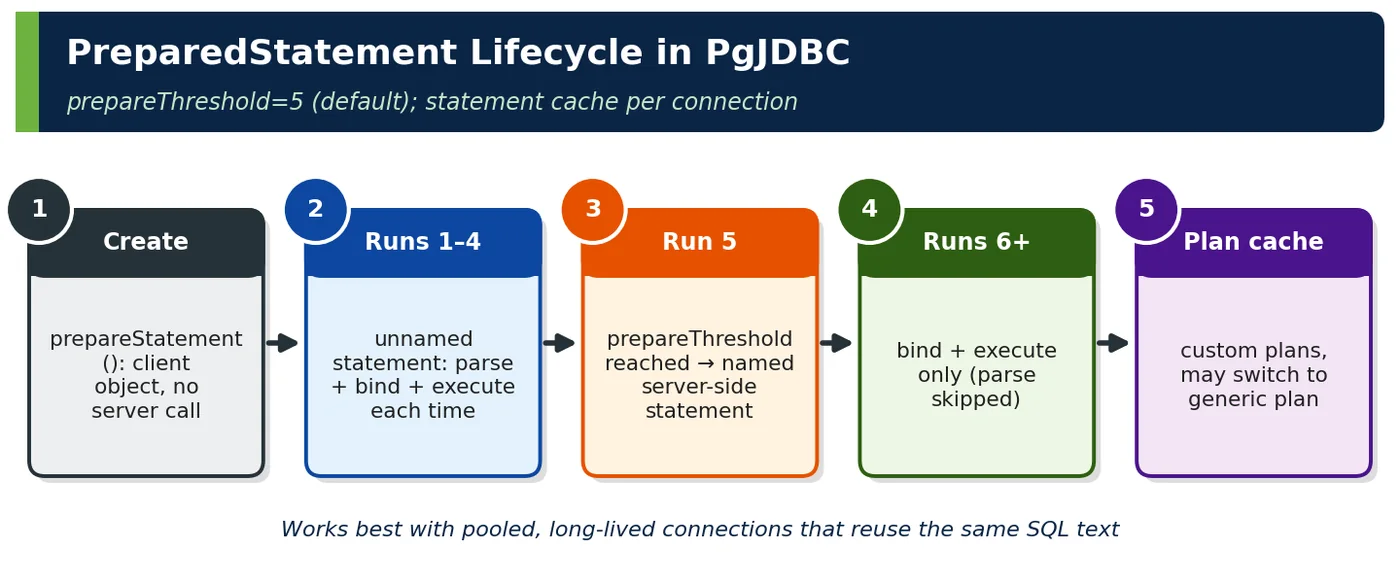
Figure 4 — PreparedStatement lifecycle in PgJDBC
Performance mechanism
Effect
Server-side preparation (after prepareThreshold)
Parse/analyse skipped on repeat executions
Plan caching
Custom plans for early executions; generic plan may be reused (Volume II 3.1)
4How It Works Internally — The Extended Query Protocol
Message
Carries
Injection relevance
Parse
SQL text with $1, $2 …
Structure fixed here
Bind
Parameter values + formats
Values never parsed as SQL
Describe
Result column types
—
Execute
Portal + max rows
—
Sync
End of message group
—
Table 5 — Protocol messages
PgJDBC converts ? to $n before sending Parse. The server then treats $n strictly as values of a type. Even '; DROP TABLE x; -- becomes a harmless text value.
4ADeep Dive — Dynamic SQL without Injection
JAVA
// 1) Variable-length IN list → one array parameterjdbcClient.sql("SELECT * FROM product WHERE product_id = ANY(:ids)") .param("ids", ids.toArray(Long[]::new)).query(Product.class).list();// 2) Sorting chosen by the user → whitelist enum, never raw inputenum SortField { NEWEST("placed_at DESC, order_id DESC"), TOTAL("total DESC, order_id DESC");final String sql; SortField(String sql) { this.sql = sql; }}String sql = "SELECT * FROM purchase_order WHERE customer_id = :c ORDER BY " + sort.sql;// 3) Optional filters → build SQL from constants, bind all valuesvar where = new ArrayList<String>();var params = new HashMap<String, Object>();if (f.status() != null) { where.add("status = :status"); params.put("status", f.status());}if (f.from() != null) { where.add("placed_at >= :from"); params.put("from", f.from()); }String q = "SELECT * FROM purchase_order" + (where.isEmpty() ? "" : " WHERE " + String.join(" AND ", where));
Technique
Keeps structure fixed by code, values bound
= ANY(array)
One statement for any list size (plan cache friendly)
An internal admin tool built "… WHERE name LIKE '%" + term + "%'". A penetration test extracted password hashes via UNION SELECT. Binding the pattern (LIKE ? with escaped %/_) closed it; a static-analysis rule (SpotBugs/SonarQube "SQL injection") now blocks concatenated SQL.
6.2 Plan cache pollution from IN lists
A service generated IN (?, ?, …) with 1–500 placeholders; 500 distinct statements per query shape filled the statement cache and forced re-parsing. Switching to = ANY(?) with an array made it one statement.
6.3 Worked example — escaping LIKE patterns
JAVA
static String likeContains(String input) { String escaped = input.replace("\\", "\\\\").replace("%", "\\%").replace("_", "\\_");return "%" + escaped + "%";}jdbcClient.sql("SELECT * FROM product WHERE name ILIKE :p ESCAPE '\\'") .param("p", likeContains(term)).query(Product.class).list();
6.5 Worked example — observing server-side preparation
SQL
-- In the session used by the application (or via pg_stat_statements)SELECT name, statement, prepare_time, generic_plans, custom_plans FROM pg_prepared_statements;
name
statement
generic_plans
custom_plans
S_1
SELECT … FROM customer WHERE email = $1
1,832
5
S_2
INSERT INTO order_line … VALUES ($1, …)
0
44
Table 10 — PgJDBC's named statements after prepareThreshold
6.6 Worked example — prepared statements and PgBouncer
PgBouncer ≥ 1.21 with max_prepared_statements = 200
Protocol-level prepared statements work in transaction mode
Table 11 — Pooler compatibility
6.7 Worked example — setQueryTimeout vs statement_timeout
Mechanism
How it works
Caveat
ps.setQueryTimeout(5)
Driver timer sends a cancel request after 5 s
Extra connection for cancel; client-side
SET statement_timeout = '5s' (session/role)
Server aborts the statement
Applies to all statements in session
SET LOCAL statement_timeout in a transaction
Server, scoped to one transaction
Needs a transaction
Table 12 — Prefer server-side timeouts; use setQueryTimeout for per-call limits
6.8 Worked example — JPQL injection is still injection
JAVA
// VULNERABLE: string-built JPQLem.createQuery("select c from Customer c where c.email = '" + email + "'");// SAFEem.createQuery("select c from Customer c where c.email = :email", Customer.class) .setParameter("email", email);
Spring Data derived queries and @Query with :param are safe; @Query with SpEL concatenation or native queries built from strings are not.
6.9 Worked example — code review rules for SQL
Rule
Enforcement
No + or String.format building SQL with runtime values
SpotBugs SQL_INJECTION, Semgrep rule
Identifiers only from enums/whitelists
Code review
Arrays for variable lists
Code review
All user-facing search inputs escaped for LIKE
Shared utility
Database role has least privilege
DBA review (defence in depth)
Table 13 — Making injection structurally impossible
6.10 Worked example — safe dynamic search with jOOQ
JAVA
public List<OrderRecord> search(OrderFilter f) { Condition c = DSL.noCondition();if (f.status() != null) c = c.and(PURCHASE_ORDER.STATUS.eq(f.status()));if (f.from() != null) c = c.and(PURCHASE_ORDER.PLACED_AT.ge(f.from()));if (f.minTotal() != null) c = c.and(PURCHASE_ORDER.TOTAL.ge(f.minTotal()));if (f.text() != null) c = c.and(CUSTOMER.FULL_NAME.containsIgnoreCase(f.text())); SortField<?> sort = switch (f.sort()) { case NEWEST -> PURCHASE_ORDER.PLACED_AT.desc(); case TOTAL -> PURCHASE_ORDER.TOTAL.desc(); };return dsl.select(PURCHASE_ORDER.fields()) .from(PURCHASE_ORDER).join(CUSTOMER).onKey() .where(c).orderBy(sort, PURCHASE_ORDER.ORDER_ID.desc()) .limit(50).fetchInto(OrderRecord.class);}
Property
How jOOQ provides it
Every value bound
Generates ? placeholders automatically
Identifiers from generated code
Compile-time checked columns
containsIgnoreCase escaping
Handled by the DSL
Readable composition
No string assembly
Table 14 — Query builders make safe dynamic SQL the easy path
6.11 Worked example — measuring parse/plan savings
Workload: 5,000 executions of a 6-join lookup
Mean latency
Planning share
Statement with literal values (new SQL each time)
2.9 ms
~45%
PreparedStatement, prepareThreshold=0 (unnamed each time)
Table 15 — Planning cost matters for complex, frequent queries
Verify generic plans with EXPLAIN (GENERIC_PLAN) on skewed columns before relying on them (Volume II Topic 3.1).
7Common Problems & Mistakes
Concatenating values into SQL or JPQL.
Trying to bind identifiers (table/column names).
Variable-length IN (?, ?, …) lists polluting caches.
Unescaped LIKE patterns.
Row-by-row execution instead of batching.
Server-side prepared statements through old transaction poolers.
8Performance & Production Considerations
Aspect
Guideline
Statement reuse
Same SQL text, long-lived pooled connections
Batching
500–5,000 rows per batch; commit per chunk
Generic plans
Watch for skewed parameters (Volume II 3.1)
Statement cache
Default 256 per connection is usually enough
Security
Least-privilege DB roles even with binding
Table 16 — Operational guidelines
9Architecture & Design Considerations
Make parameterised SQL the only allowed form, enforced by tooling.
Provide shared utilities for dynamic filters, sorting whitelists and LIKE escaping.
Choose query builders (jOOQ, Criteria, Querydsl) for complex dynamic queries.
Combine binding with least-privilege roles and input validation (defence in depth).
10Interview Questions & Answers
Q1BasicConcept
What is a PreparedStatement?
A PreparedStatement is a JDBC statement whose SQL text contains ? placeholders, with the values supplied separately through typed setters such as setString, setLong or setObject. The SQL structure is fixed when the statement is created; only the parameter values change between executions. That separation gives three benefits at once: values can never be interpreted as SQL, so injection through values is impossible; types are converted correctly, for example a BigDecimal to numeric or an OffsetDateTime to timestamptz; and the same statement can be executed repeatedly, letting the driver and server skip parsing and reuse plans. Spring's JdbcClient and JPA named parameters build on exactly this mechanism.
Q2BasicInternals
How does a PreparedStatement prevent SQL injection?
Because the SQL text and the values travel separately and are never combined into one string. With PostgreSQL's extended protocol, the driver sends the statement with $1, $2 placeholders in a Parse message, and the server fixes the statement's structure at that point. The values arrive later in a Bind message and are treated strictly as typed data. So an input like x' OR '1'='1 is simply compared with the email column as a literal string, quotes included, and matches nothing. Concatenation fails because the input becomes part of the code the parser reads. Note the limits: binding protects values only, not identifiers, ORDER BY columns or SQL fragments built from input.
Q3IntermediateTricky
Can you bind a table or column name?
No. Placeholders can stand only for values, because the server must know the full structure of the statement, including which tables and columns it touches, at parse and planning time, before any values arrive. Writing ORDER BY ? binds a constant string, so the query sorts by a literal and the ordering is silently ignored; FROM ? is a syntax error. When the user must choose a sort column or a table, map their input onto a fixed whitelist, ideally an enum whose constants carry the SQL fragment, and reject anything else. Never escape and concatenate the raw input. Query builders such as jOOQ give the same safety through generated, compile-time-checked column references.
Q4IntermediateCode
How do you pass a variable-length list of IDs?
Bind the whole list as one array parameter and write WHERE product_id = ANY(?), passing a Long[] through setArray or, in Spring JdbcClient, param with an array. The SQL text is then identical whatever the list size. Generating IN (?, ?, ?) with a different number of placeholders creates a distinct statement for each list length, so a lookup with 1 to 500 ids becomes 500 statements that pollute the driver's statement cache and the server's plan cache and force re-parsing. Very long IN lists can also hit limits; PostgreSQL allows 65,535 bind parameters per statement. For tens of thousands of ids, consider a join against a temporary table or unnest of an array.
Q5Senior EngineerInternals
Why are prepared statements faster when reused?
Reuse lets both the driver and the server skip repeated work. PgJDBC switches to a named server-side prepared statement after prepareThreshold executions, five by default, so later executions send only Bind and Execute and the server skips parsing and analysis. After several executions PostgreSQL may also switch to a cached generic plan, skipping planning, which matters for complex joins where planning can be a large share of latency. The driver's per-connection statement cache, 256 queries by default, means the same SQL text on a pooled connection reuses that statement. Add batching, which sends many parameter sets per round trip, and you remove most per-statement overhead. Concatenated SQL gets none of this.
Q6Senior EngineerInternals
What does reWriteBatchedInserts do in PgJDBC?
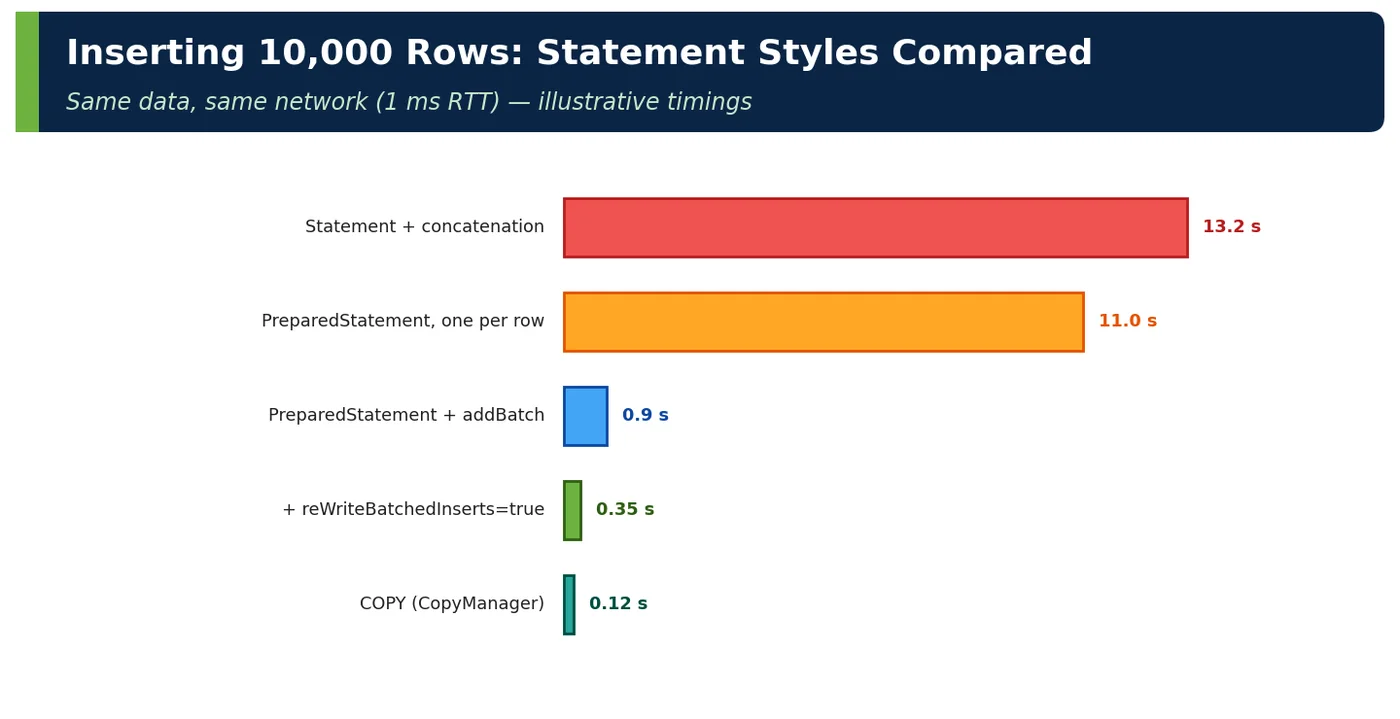
It is a PgJDBC connection property that makes the driver rewrite a JDBC batch of single-row INSERT statements into multi-row INSERT ... VALUES (...), (...), (...) statements before sending them. Without it, the driver still sends the batch efficiently, but PostgreSQL executes each row as a separate statement with its own bind and execute overhead. With it, the server inserts many rows per statement, which in this note's example cut 10,000 rows from 0.9 seconds to 0.35 seconds. It only affects INSERTs; updates and deletes are unchanged. A side effect is that executeBatch returns SUCCESS_NO_INFO instead of a per-row count, so code must not rely on individual update counts.
Q7Technical ArchitectTricky
What problem do server-side prepared statements cause with PgBouncer?
Server-side prepared statements belong to one physical server connection. In PgBouncer transaction pooling, each transaction may run on a different server connection, so a statement that PgJDBC prepared as S_1 on one backend does not exist on the next, and the application gets errors such as prepared statement "S_1" does not exist, or already exists. The old workaround was prepareThreshold=0, which disables server-side preparation and loses its parse and plan savings. Since PgBouncer 1.21, setting max_prepared_statements lets the pooler track protocol-level prepared statements and re-prepare them transparently on whichever server connection it uses, so you get transaction pooling and preparation together.
Q8Solution ArchitectDesign
How do you make SQL injection structurally impossible across teams?
I make the safe path the only path and enforce it with tooling, not good intentions. The engineering standard says all SQL, JPQL and native queries use bound parameters; static analysis, such as SpotBugs or Sonar SQL-injection rules and Semgrep, fails the build on concatenated or String.format-built SQL. The platform team provides shared building blocks for what binding cannot cover: enum whitelists for sorting and identifiers, array parameters for lists, a LIKE-escaping utility, and query builders like jOOQ or the Criteria API for dynamic search. Code review checklists cover the remaining cases. Finally, defence in depth: each service connects with a least-privilege role, so a missed bug cannot read or drop other data.
Newsletter
Get new tutorials every week
New ArchitectMind tutorials and interview questions, once a week. No spam, unsubscribe anytime.
Your subscription could not be saved. Please try again.
Almost done! Check your inbox and click the confirmation link to complete your subscription.
 Architect