 Architect

- Prerequisites
- 1.1 JPMS Fundamentals
- Covers
- Module path · Class path vs module path · Readability · Encapsulation
- Related
- B1V4 6.2 (setAccessible) · Book 2 (class loaders, layers)
On this page
1Concept / Definition
At run time the JVM builds a module graph from the modules it finds on the module path, while everything on the traditional class path is placed in a single unnamed module. Readability edges record which modules may see which, and encapsulation rules decide which packages are accessible through those edges. Together they determine whether each class reference and each reflective access succeeds.
2Why It Exists
For twenty years Java found classes through the class path, a flat list of directories and JARs searched in order. It had no idea which JAR depended on which, so a missing library was discovered only when a class was first used, often in production, and two versions of the same library could both be present, with the first one silently winning. Every public class was usable by every other class, so internal packages such as sun.misc became de facto APIs that the JDK could never change.
The module runtime fixes these problems by making dependencies and boundaries part of what the JVM checks. Each module declares what it requires and what it exports, and the JVM resolves and verifies the whole graph before main runs. That gives reliable configuration, because missing or duplicate modules stop the launch, and strong encapsulation, because internal packages stay internal. It also made it possible to split the JDK itself into about 70 modules and to build small custom runtimes with jlink.
3Core Concepts
Module path
The module path (--module-path / -p) lists directories or JARs treated as modules. A JAR with module-info.class becomes an explicit named module; a JAR without one becomes an automatic module, named from its Automatic-Module-Name manifest entry or its file name, which reads every other module and exports all its packages — a bridge for libraries that haven't been modularised. The application is launched with -m module/mainclass.

Class path vs module path
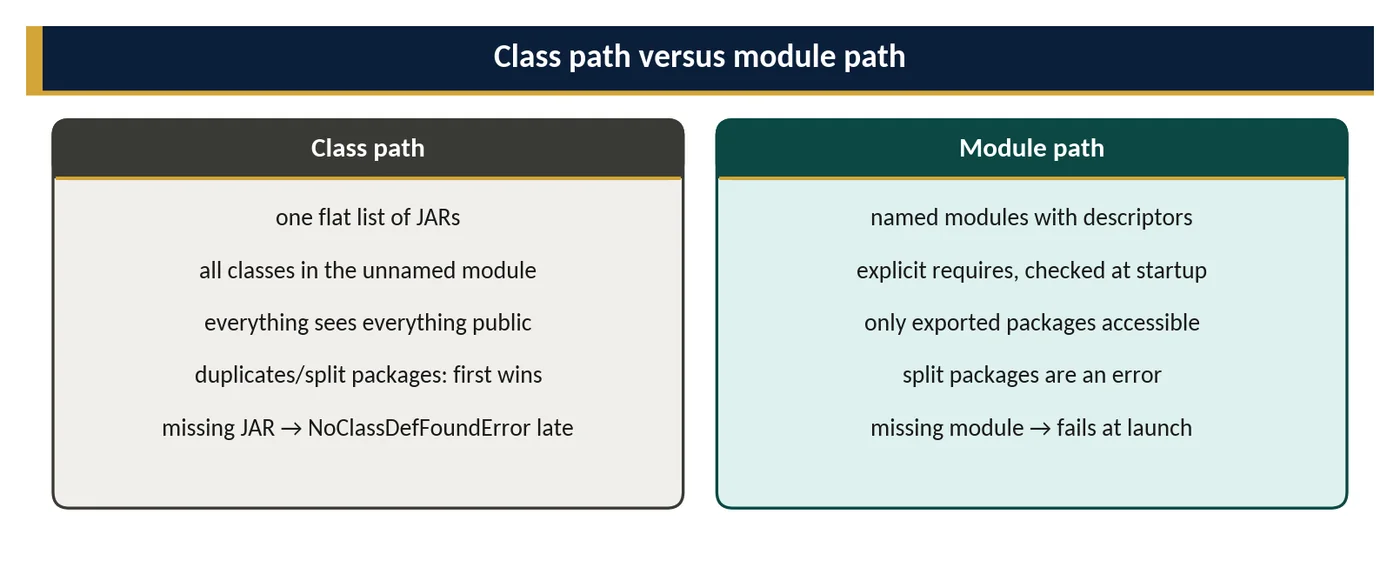
The class path is a flat, unchecked list: all types are in the unnamed module, all public types are visible to all code, duplicate classes silently shadow each other, and missing dependencies surface only when a class is first used. The module path is checked at startup: missing modules, duplicate modules and split packages stop the launch. The two coexist: the unnamed module reads all named modules, but named modules cannot read the unnamed module — which is why modularisation proceeds bottom-up.
Readability
Module A reads module B if A requires B, if A reads a module that requires B transitively, or if readability is added at run time (Module.addReads, or --add-reads on the command line). Readability is the precondition for any access: without it, even exported public types are inaccessible. Automatic modules and the unnamed module read everything; named modules read only what they declare.
Encapsulation
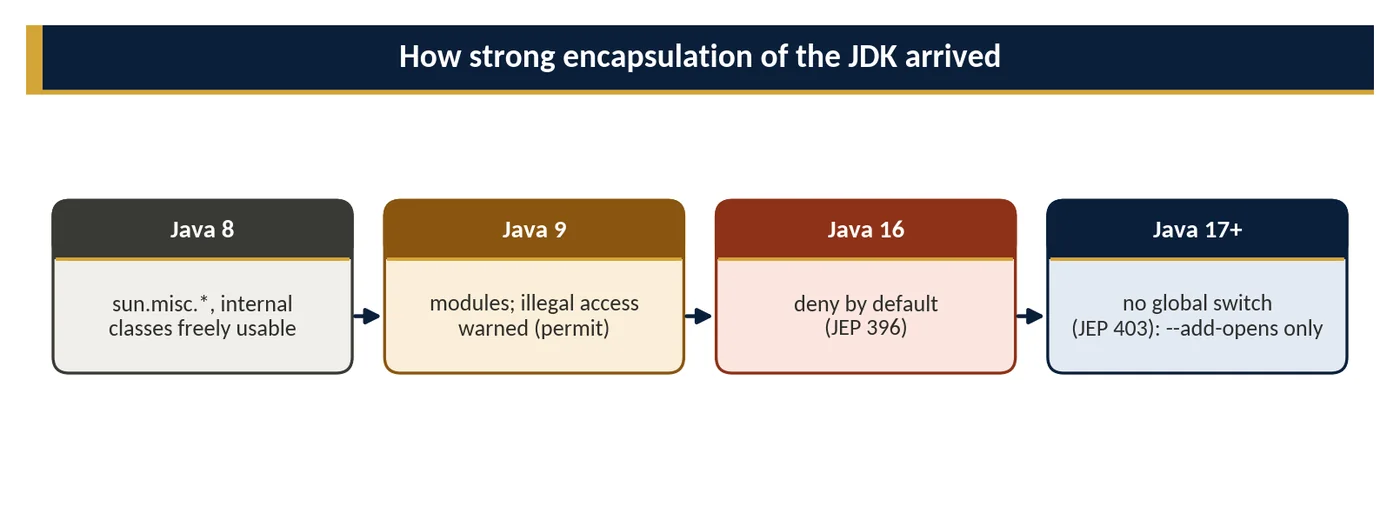
Given readability, access to a type requires its package to be exported to the reader (or opened, for deep reflection). Since Java 16 (JEP 396) the JDK's internal packages are strongly encapsulated by default, and since Java 17 (JEP 403) the --illegal-access switch is gone: reflective access to JDK internals throws InaccessibleObjectException unless explicitly granted with --add-opens java.base/java.lang=ALL-UNNAMED (or --add-exports for compile-time access). The supported alternatives — VarHandle, MethodHandles, the FFM API (Java 22) — replace most former uses of sun.misc.Unsafe.

4How It Works Internally
Resolution at startup
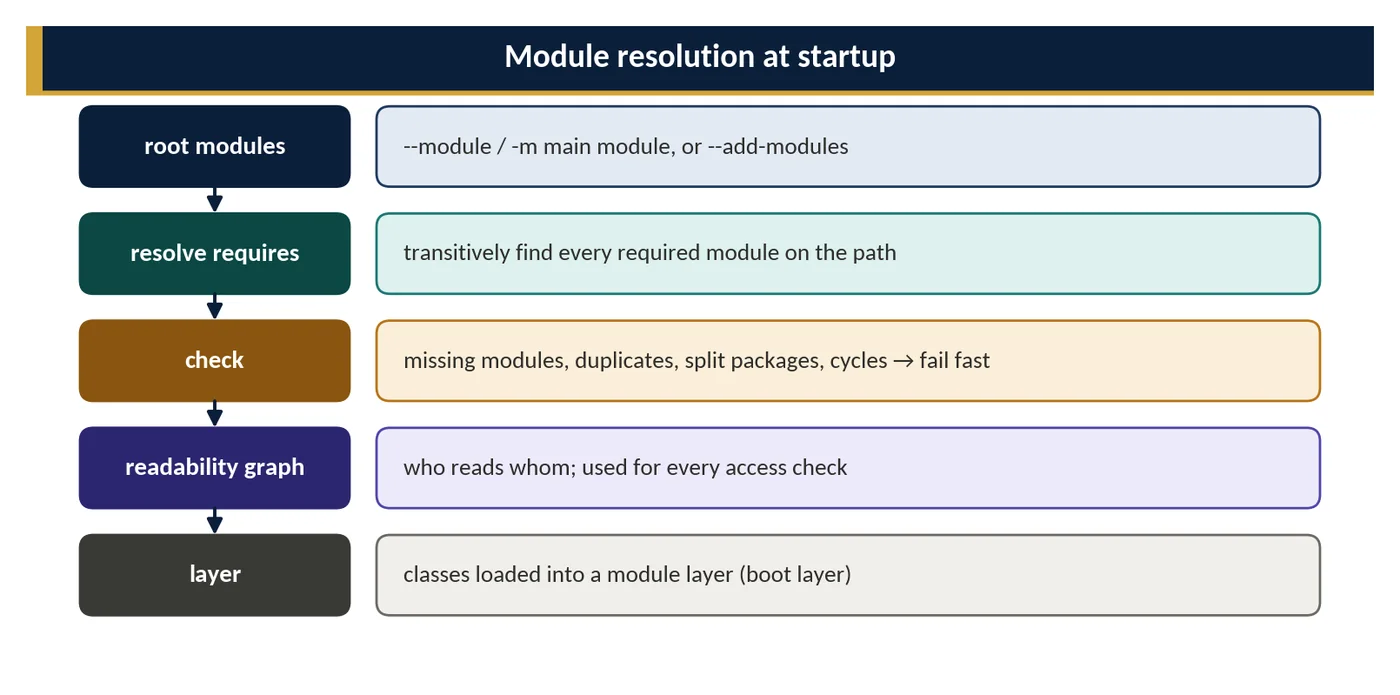
When the JVM starts, it begins with the root modules, the module named with -m plus any added with --add-modules, and follows their requires clauses through the module path and the system image. The result is a configuration, a graph of resolved modules and readability edges. Resolution fails fast with a clear error if a required module is missing, if two modules have the same name, or if two modules in the graph contain the same package.
Layers and class loaders
The resolved configuration is turned into a ModuleLayer, which maps each module to a class loader. JDK modules are spread across the bootstrap, platform and application loaders; application modules normally go to the application loader. Because a package belongs to exactly one module in a layer, the class loader can find a class by looking up its package's module directly, instead of searching JARs in order as it does for the class path.
Access checks
Access rules are enforced in two places. At link time, when bytecode refers to a class in another module, the JVM checks that the referring module reads the target and that the package is exported to it; otherwise it throws IllegalAccessError. At run time, reflection such as setAccessible(true) checks that the package is opened to the caller's module; otherwise it throws InaccessibleObjectException. Command-line flags such as --add-reads, --add-exports and --add-opens add edges to the graph before these checks run.
5APIs / Features / Syntax
The runtime is controlled through the module descriptor, a handful of launcher options and the java.lang.Module API.
// module-info.java
module com.shop.orders {
    requires transitive com.shop.common;   // re-exported to readers
    requires static org.jspecify;           // compile time only
    exports com.shop.orders.api;            // public API
    exports com.shop.orders.spi to com.shop.app;  // qualified
    opens com.shop.orders.model to com.fasterxml.jackson.databind;
    uses com.shop.orders.spi.PricingRule;
}

// inspecting the module graph at run time
Module m = OrderService.class.getModule();
m.getName();                    // "com.shop.orders"; null if unnamed
m.isNamed();
m.getDescriptor().exports();
m.canRead(Object.class.getModule());  // true: all read java.base
ModuleLayer.boot().modules().size();
Launcher options: -p or --module-path adds module locations, -m names the main module, --add-modules adds root modules (for example ALL-MODULE-PATH), and --add-reads, --add-exports and --add-opens grant extra access for compatibility.
6Practical Examples
// Launch on the module path
// $ java -p mods:libs -m com.shop.app/com.shop.app.Main

// Mixed mode: application on the class path, JDK modular (most enterprise apps)
// $ java -cp app.jar:libs/* com.shop.app.Main

// Diagnosing resolution
// $ java -p mods --show-module-resolution -m com.shop.app
// $ java --list-modules
// $ java -p mods --describe-module com.shop.orders

// Temporary escape hatches for a legacy library (document and track removal!)
// $ java --add-opens java.base/java.lang=ALL-UNNAMED \
//        --add-exports java.base/sun.nio.ch=ALL-UNNAMED -cp app.jar Main

// Automatic module name in a library's MANIFEST.MF (stable name before full modularisation)
// Automatic-Module-Name: com.shop.common
The commands in this example cover the full life of a modular application: launching on the module path, the mixed mode most enterprise systems use, diagnosing why a module was or was not resolved, and the temporary flags used to keep a legacy library working. The descriptor below shows the other side, granting a framework the reflective access it needs without opening the whole module.
module com.shop.orders {
    requires com.fasterxml.jackson.databind;
    exports com.shop.orders.api;

    // Jackson needs deep reflection on DTOs, but only there
    opens com.shop.orders.api.dto to com.fasterxml.jackson.databind;
}

// Without the opens clause, deserialising a DTO fails with:
// InaccessibleObjectException: Unable to make field private ... accessible:
// module com.shop.orders does not "opens com.shop.orders.api.dto" to
// module com.fasterxml.jackson.databind
A qualified opens ... to keeps the encapsulation benefit: only Jackson can reflect on the DTO package, and other packages stay closed even to it.
7Common Problems & Mistakes
InaccessibleObjectExceptionafter a JDK upgrade — a library reflects into JDK internals; upgrade the library before adding--add-opens.- Named module cannot read the unnamed module — a modular JAR depending on class-path JARs; put those on the module path as automatic modules.
- Automatic module names derived from file names (
guava-33.0.jar→guava) change unexpectedly — libraries should declareAutomatic-Module-Name. - Split packages when moving JARs to the module path — often from old
javax.*or test-fixture JARs. - Accumulated
--add-opensflags in start scripts that nobody understands — keep a documented list with owners.
8Performance & Production Considerations
Resolving the module graph adds a small cost at startup, measured in milliseconds for typical applications, and the JDK caches the resolution of its own modules in the CDS archive. In return, class lookup on the module path is faster than class path scanning, because the loader knows which module owns each package.
The bigger production gains are elsewhere. jlink builds a runtime that contains only the modules the application needs, which shrinks container images from hundreds of megabytes to tens and reduces the attack surface. Startup failures caused by missing or duplicate modules appear in the first second of a deployment instead of hours later. Keep the list of --add-opens and --add-exports flags short, documented and reviewed at every JDK upgrade, because each one is a compatibility debt that can break in a future release.
9Architecture & Design Considerations
Most Spring Boot and Jakarta EE applications run on the class path: frameworks rely on reflection and classpath scanning, and fat JARs don't map neatly to modules. They still benefit from strong encapsulation of the JDK and from jlink runtimes. Libraries and platforms, by contrast, should publish an Automatic-Module-Name at least, and ideally full descriptors, so consumers can modularise. The key architectural lesson of JPMS — explicit, enforced module boundaries — applies whether or not the enforcement mechanism is JPMS itself.
10Interview Questions & Answers
What is the unnamed module?
The unnamed module is the module that holds every class loaded from the class path. Each class loader has one, and in a normal application the application class loader's unnamed module contains all your class-path JARs. It reads every other module and exports all of its packages, so class-path code works much as it did before Java 9. The reverse is not true: named modules cannot declare a dependency on the unnamed module, because it has no name to put in a requires clause. This is why existing applications run unchanged and why modularisation usually starts with the lowest-level libraries.
What is an automatic module?
An automatic module is an ordinary JAR without a module-info.class that is placed on the module path instead of the class path. The JVM turns it into a named module automatically. Its name comes from the Automatic-Module-Name entry in the JAR's manifest or, if there is none, is derived from the file name, for example guava-33.0.jar becomes guava. An automatic module reads every other module, including the unnamed module, and exports and opens all of its packages. It acts as a bridge, so modular code can depend on libraries that have not been modularised yet.
What does it mean for a module to read another?
Module A reads module B when the module graph has a readability edge from A to B. That edge exists if A declares requires B, if A requires a module that declares requires transitive B, or if it is added at run time with Module.addReads or the --add-reads launcher option. Readability is the first condition for access: even a public type in an exported package is inaccessible if its module is not read. The second condition is that the package is exported, or opened for deep reflection, to the reading module. Every module reads java.base automatically.
Why can't a named module depend on JARs on the class path?
A named module can only depend on modules it can name in a requires clause, and the unnamed module, which holds all class-path JARs, has no name. So the module graph contains no edge from a named module to the unnamed one, and a class reference from modular code to a class-path class fails. The fix is to move the dependency onto the module path, where it becomes an explicit module if it has a descriptor or an automatic module if it does not. This is why migration usually goes bottom-up: libraries first, then the applications that use them.
What changed in Java 16 and 17 regarding encapsulation?
Java 9 introduced strong encapsulation but turned it off by default for JDK internals, printing an illegal-access warning instead. Java 16, through JEP 396, made strong encapsulation the default, so reflective access to internal JDK packages failed unless the --illegal-access option relaxed it. Java 17, through JEP 403, removed the effect of --illegal-access entirely. Since then, code that reflects into JDK internals throws InaccessibleObjectException unless each package is explicitly opened with --add-opens, or exported with --add-exports for compile-time access. sun.misc.Unsafe remains accessible through the jdk.unsupported module, but its memory-access methods are being deprecated.
How would you handle a critical dependency that fails on Java 21 because of illegal reflective access?
First check whether a newer version of the dependency supports Java 21, because most widely used libraries fixed these issues years ago; upgrading is the real fix. If no compatible version exists, add the narrowest flag that works, such as --add-opens java.base/java.lang=ALL-UNNAMED for the one package named in the exception, not a long list copied from the internet. Document every flag with the library that needs it, an owner and a ticket. Add a test that runs without the flag, so you notice when it can be removed, and plan to replace the library if it is unmaintained.