 Architect

- Prerequisites
- None
- Covers
- Java language · Java platform · JDK · JRE · JVM · Java SE · Jakarta EE · Java ecosystem
- Related
- 1.2 Source-to-Execution Lifecycle · 1.3 Language Characteristics · B1V5 Ch1 Java Modules · Book 2 Vol I JVM Architecture · Book 3 Vol VI Jakarta EE Platform
On this page
1Concept / Definition
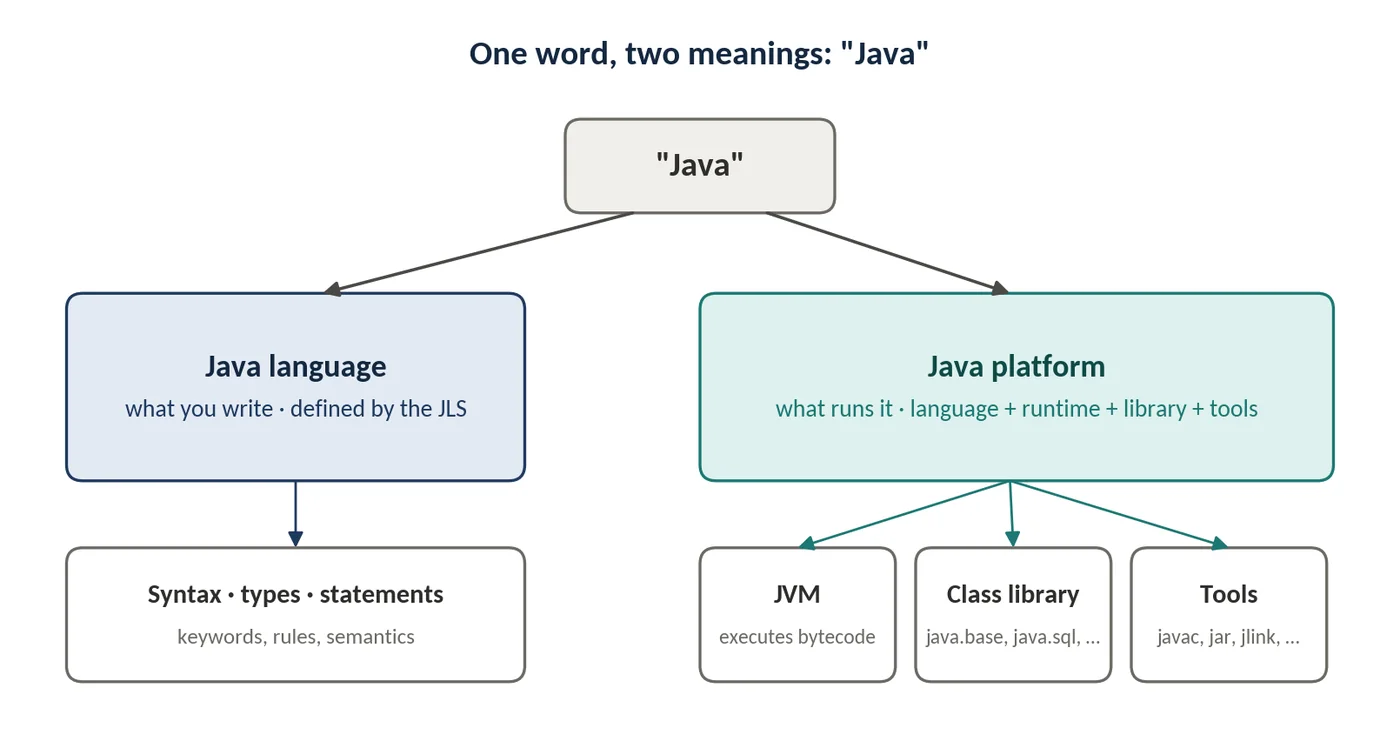
"Java" is used for two different things, and most confusion about the platform starts with mixing them up. The Java language is what you write: a set of syntax rules, types and semantics defined by the Java Language Specification (JLS). The Java platform is what runs it: the Java Virtual Machine, a standard class library and a set of development tools. The language is one input to the platform, but not the only one — Kotlin, Scala and Groovy also compile to bytecode and run on the same platform.
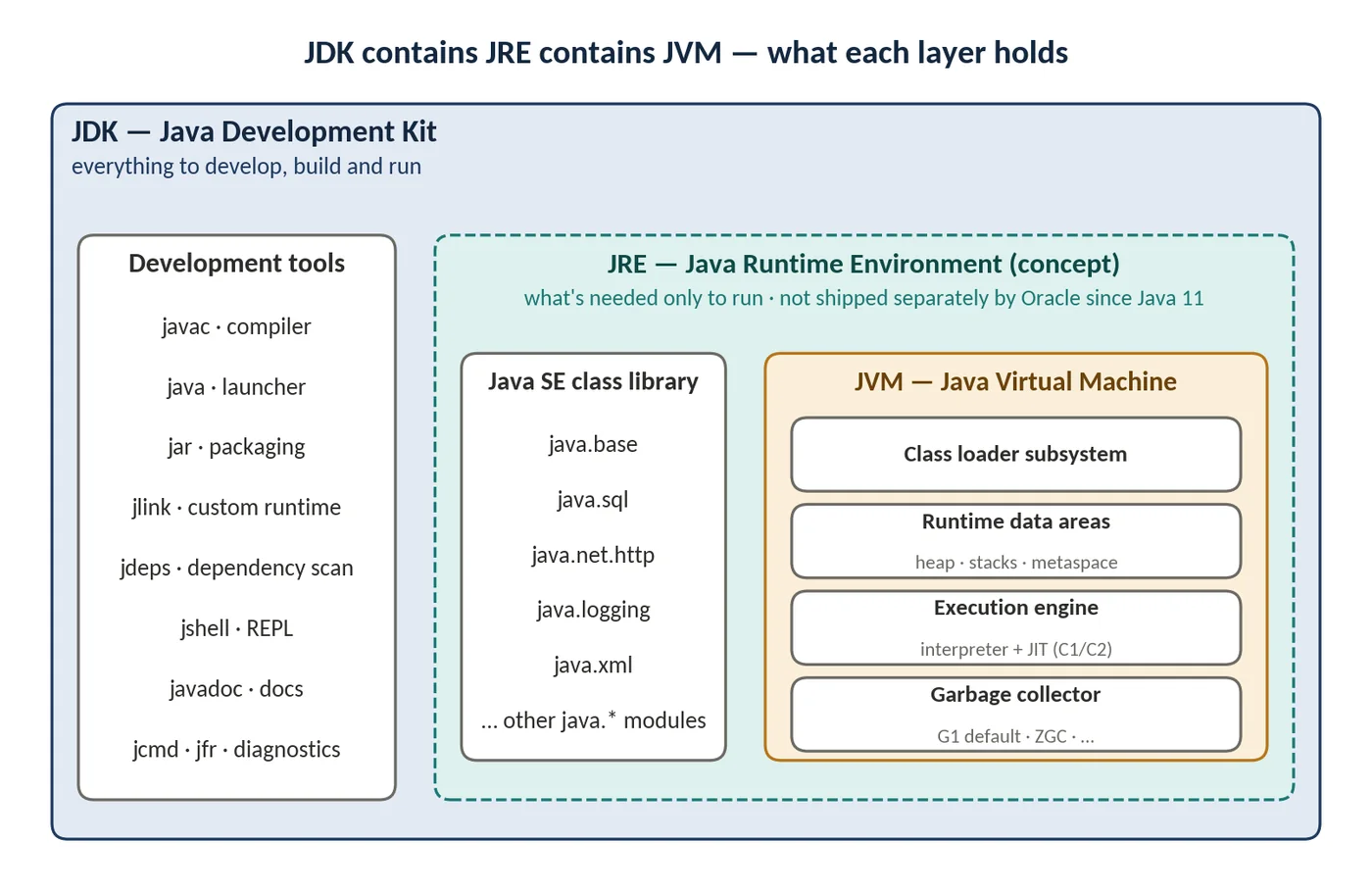
Three acronyms describe how the platform is packaged. The JVM (Java Virtual Machine) is the engine that loads and executes bytecode. The JRE (Java Runtime Environment) historically meant the JVM plus the class library — everything needed to run a program. The JDK (Java Development Kit) adds the tools needed to build programs: the compiler, packager, diagnostic tools and more.
Two further terms describe *which* platform. Java SE (Standard Edition) is the core platform: the language plus the standard library, currently at release 25. Jakarta EE is a separate set of enterprise specifications — web, persistence, messaging, dependency injection — that sit on top of Java SE. Around all of this sits the Java ecosystem: JDK distributions, build tools, frameworks, other JVM languages and tooling.
2Why It Exists
In the early 1990s, software was compiled separately for every operating system and CPU. A C or C++ program built for Windows on x86 could not run on Solaris on SPARC without recompiling, and often without code changes. Memory errors — dangling pointers, buffer overruns — were a leading cause of crashes and security holes.
Java, released by Sun Microsystems in 1996, was designed to remove both problems at once. Instead of compiling to machine code, the compiler produces bytecode, an instruction set for a virtual machine. Each platform gets its own JVM, and the JVM translates bytecode for the machine it runs on. Memory is managed automatically, pointers are replaced by type-checked references, and code is verified before it runs.
| Problem in the 1990s | How the platform design answers it |
|---|---|
| Recompile for every OS and CPU | Compile once to bytecode; a platform-specific JVM executes it |
| Manual memory management causing crashes | JVM allocates and garbage-collects memory |
| Untrusted code downloaded over networks | Bytecode verifier, no raw pointers, security checks |
| Rebuilding common facilities in every project | A large standard class library shipped with the platform |
| Scaling to enterprise systems | Enterprise specifications (J2EE → Java EE → Jakarta EE) on top of the core |
The original applet-in-the-browser use case has disappeared, but the same design choices are why Java dominates server-side enterprise systems today: a stable, portable runtime with a long compatibility record and strong tooling.
3Core Concepts
Java language
The Java language is defined by the Java Language Specification (JLS). The JLS specifies keywords, types, expressions, statements, classes, generics, exceptions and the rules the compiler must enforce. Each Java SE release has a matching JLS edition, so "Java 25" means both a language version and a platform version.
The language evolves through JDK Enhancement Proposals (JEPs). Large features often arrive first as *preview* features, which must be enabled explicitly and can still change, before becoming final. Records, sealed classes and pattern matching all followed this route. Backward compatibility is a strong design value: code written for Java 8 generally compiles and runs on Java 25, with exceptions mostly around removed internal APIs.
Java platform
The Java platform is the combination of three things: the JVM, the Java SE class library and the tools that build and inspect programs. The platform's contract is the bytecode format defined by the Java Virtual Machine Specification (JVMS). Anything that produces valid bytecode — javac, the Kotlin compiler, a bytecode-generation library — can run on it.
JDK — Java Development Kit
The JDK is the complete kit for developing, building and running Java programs. It contains the compiler (javac), the launcher (java), packaging and linking tools (jar, jlink, jpackage), analysis tools (jdeps, javap), an interactive shell (jshell), documentation (javadoc) and diagnostic tools (jcmd, jfr, jstack). It also contains the full runtime: the JVM and the class library.
All mainstream JDKs are built from the same open-source code base, OpenJDK. Vendors such as Eclipse Adoptium (Temurin), Amazon (Corretto), Oracle, Azul (Zulu), BellSoft (Liberica) and Microsoft publish their own builds. The differences are in support terms, patch timing, licensing and optional extras, not in the core language or library.
JRE — Java Runtime Environment
The JRE was the runtime-only subset of the JDK: JVM plus class library, without the compiler and tools. Up to Java 8, users installed a JRE to run Java applications, and servers typically had a JRE installed globally.
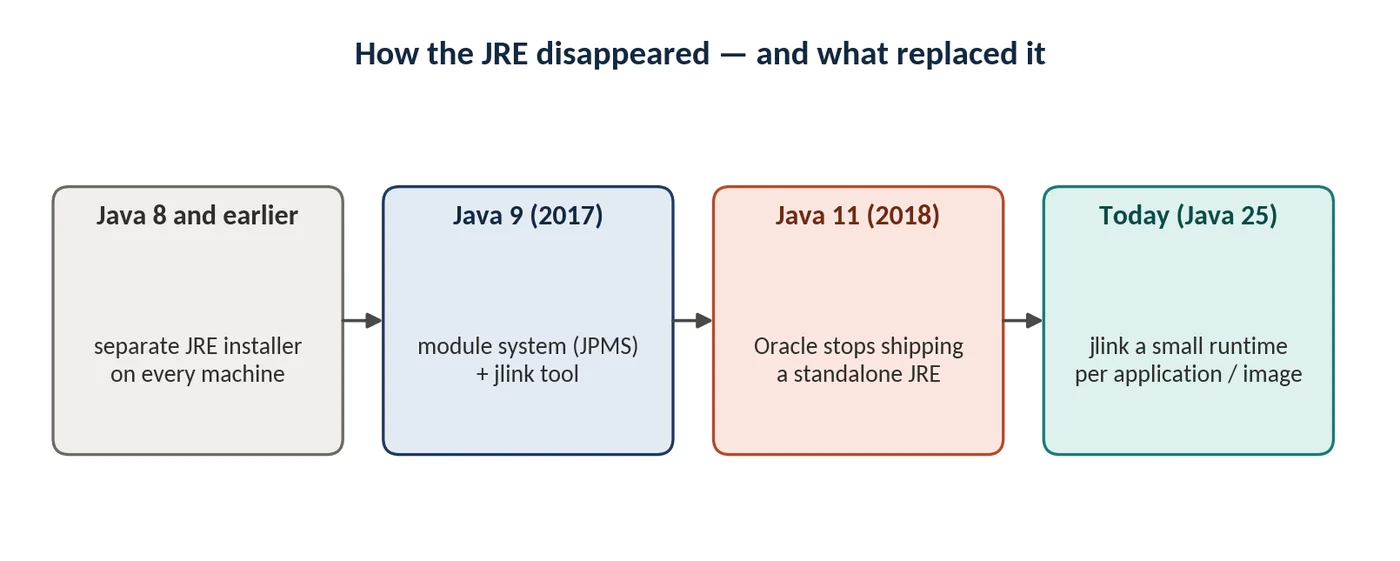
Java 9 introduced the module system and the jlink tool, which can assemble a runtime containing only the modules an application needs. With Java 11, Oracle stopped shipping a separate JRE. The idea of "a runtime" still exists, but in modern practice you either run on a full JDK or build a small custom runtime with jlink. Some distributions, such as Eclipse Temurin, still publish JRE-style builds and container images for convenience.
JVM — Java Virtual Machine
The JVM is an abstract computing machine defined by the JVMS. It is worth separating three meanings of the word:
- The specification — the JVMS, defining the class file format, bytecode instructions, class loading and verification rules.
- An implementation — a program that meets the specification. HotSpot is the reference implementation used by most JDKs; Eclipse OpenJ9 and GraalVM are alternatives.
- An instance — one running JVM process, created when you run the
javacommand, with its own heap, threads and loaded classes.
A JVM implementation has four main parts: the class loader subsystem, which finds and loads classes; the runtime data areas (heap, thread stacks, metaspace); the execution engine, which interprets bytecode and compiles hot code to native instructions with the just-in-time (JIT) compiler; and the garbage collector, which reclaims unreachable objects. Topic 1.2 follows code through each part.

The JVM itself is platform-specific — there is a different HotSpot binary for Linux on ARM64 and for Windows on x86-64. What is platform-neutral is the bytecode it executes. That is the meaning of "write once, run anywhere".
Java SE — Java Standard Edition
Java SE is the standard definition of the core platform: the language (JLS), the virtual machine (JVMS) and the standard API. Each release is defined through the Java Community Process, and OpenJDK is its reference implementation. The Java SE API is organised into modules whose names start with java. — for example java.base (lang, util, io, time, concurrency), java.sql, java.net.http and java.logging. JDK-specific modules start with jdk..
Since Java 10 (March 2018), a new feature release ships every six months, in March and September. Every two years, one release is designated long-term support (LTS) by vendors, receiving security and bug-fix updates for many years. The LTS releases are 8, 11, 17, 21 and 25.

Jakarta EE
Jakarta EE is a set of specifications for enterprise applications built on Java SE: Servlet, Contexts and Dependency Injection (CDI), Persistence (JPA), RESTful Web Services, Messaging, Validation, Transactions, Security and others. It began as J2EE (1999), became Java EE (2006), and moved from Oracle to the Eclipse Foundation in 2017, where it was renamed Jakarta EE.
The move brought one breaking change that still matters in migrations: from Jakarta EE 9 (2020), all package names changed from javax.* to jakarta.*. Jakarta EE is delivered as specifications with compatible implementations — WildFly, Open Liberty, Payara and GlassFish, among others — and as smaller profiles (Web Profile, Core Profile) for lighter runtimes.
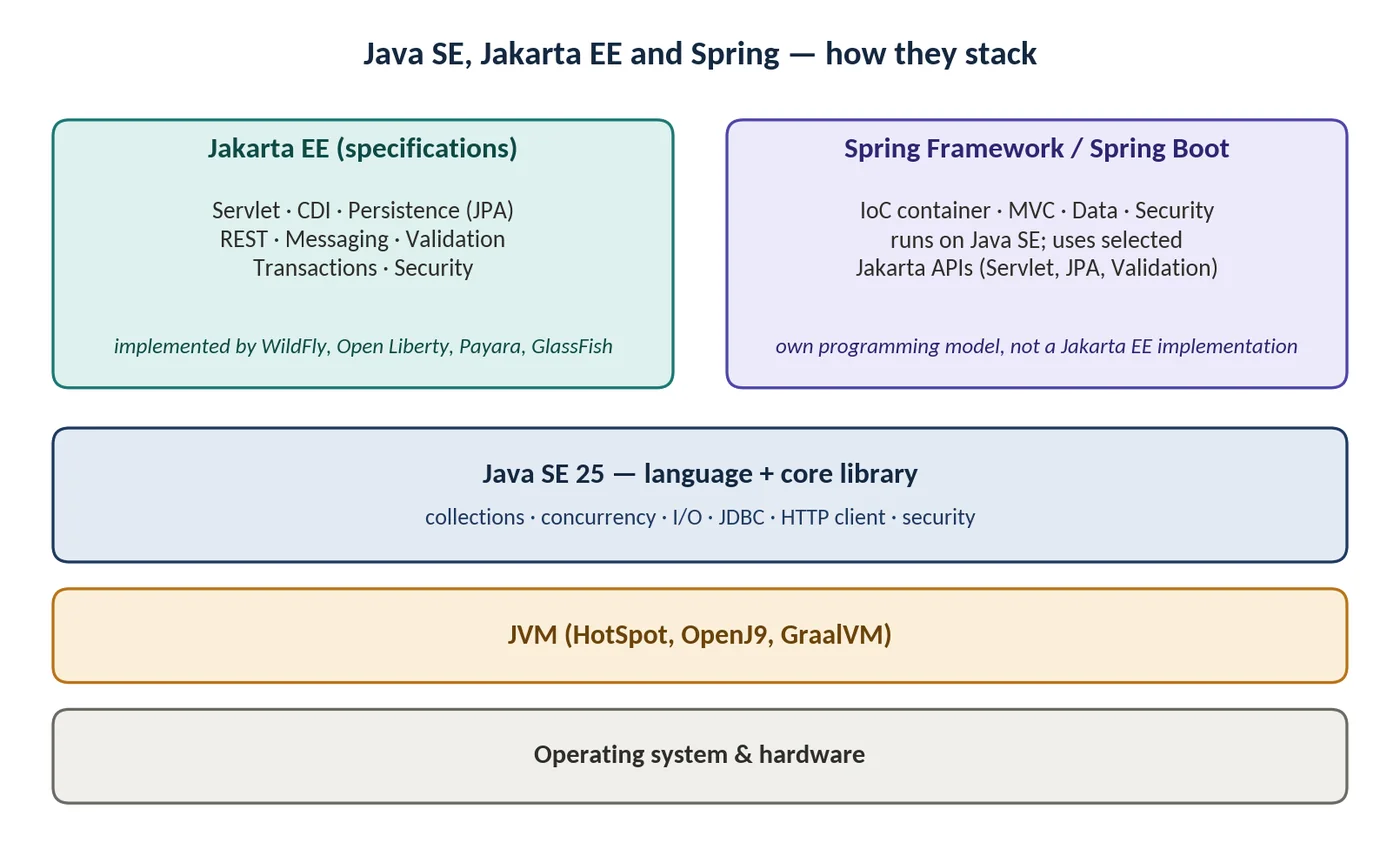
Spring is often placed in the same category, but it is not a Jakarta EE implementation. Spring Framework and Spring Boot run on Java SE with their own programming model, and they use selected Jakarta APIs such as Servlet, Persistence and Validation. Spring Boot 3 and later require the jakarta.* namespace.
Java ecosystem
The ecosystem is everything around the platform that makes it productive in real projects. For an architect it is as important as the language, because most delivery risk sits in the choice and management of these parts.
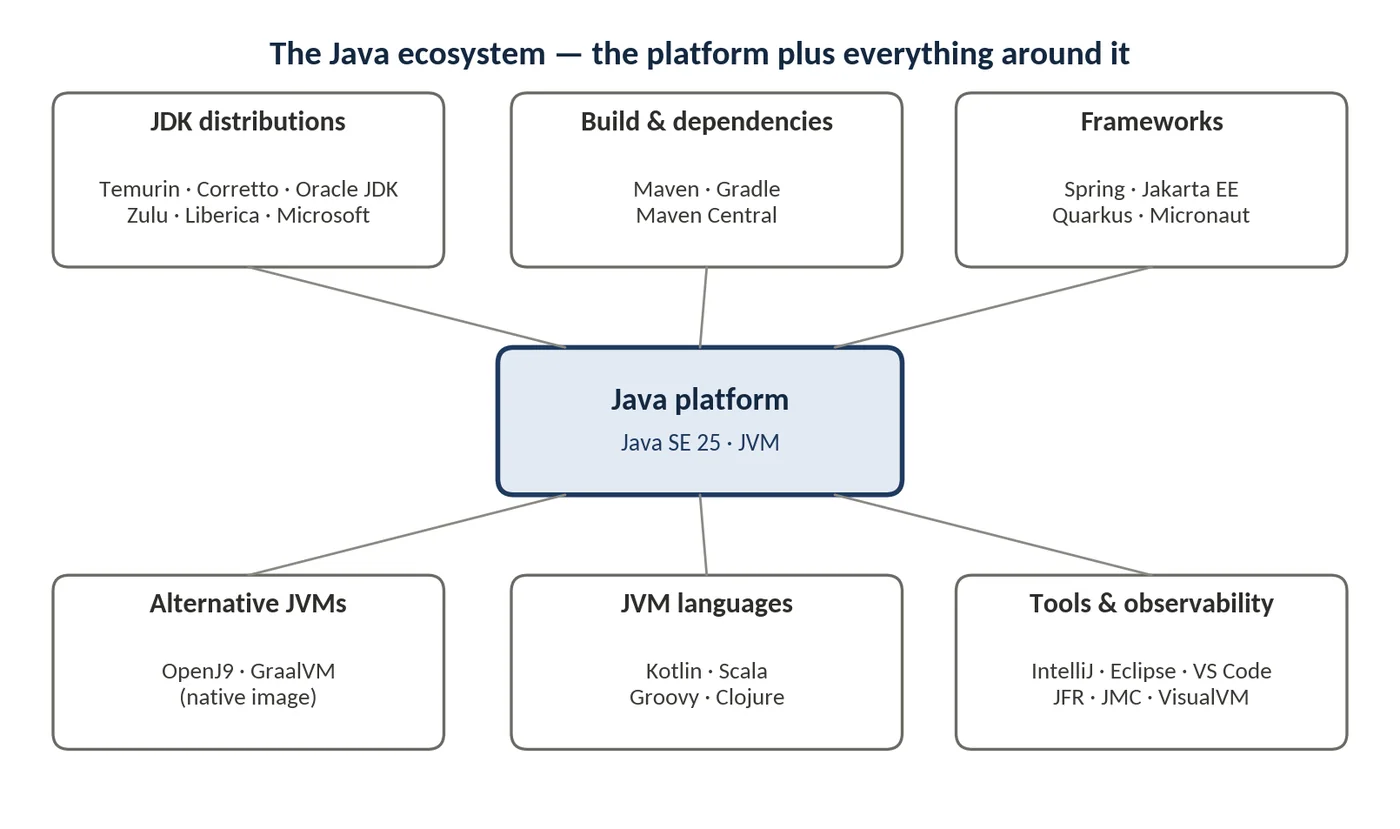
| Area | Main options | Architect's question |
|---|---|---|
| JDK distributions | Temurin, Corretto, Oracle JDK, Zulu, Liberica, Microsoft Build of OpenJDK | Who patches us, how fast, and under what licence? |
| Build and dependencies | Maven, Gradle; Maven Central | How do we control versions and supply-chain risk? |
| Frameworks | Spring Boot, Jakarta EE runtimes, Quarkus, Micronaut | Which programming model fits the team and the deployment target? |
| Alternative JVMs | Eclipse OpenJ9; GraalVM (including native image) | Do startup time or memory footprint justify a non-default runtime? |
| JVM languages | Kotlin, Scala, Groovy, Clojure | Is a second language worth the hiring and tooling cost? |
| Tools and observability | IntelliJ IDEA, Eclipse, VS Code; JFR, JDK Mission Control, VisualVM | Can we diagnose production issues without restarting services? |
4How It Works Internally
When you type java -jar app.jar, the java executable is a small native launcher. It locates the JVM shared library (libjvm.so on Linux, jvm.dll on Windows), creates a JVM instance inside the same process, and hands it the main class. The bootstrap class loader then reads the core modules from a single optimised file, lib/modules, rather than from hundreds of JAR files as in Java 8.
| Directory in a JDK | Contents |
|---|---|
| bin/ | Launchers and tools: java, javac, jar, jlink, jcmd, … |
| lib/ | The JVM library, the modules image (lib/modules), security files |
| conf/ | Editable configuration: security policy, logging, network properties |
| jmods/ | Packaged modules used by jlink (some builds omit this since JDK 24, JEP 493) |
| include/ | C headers for native interfaces |
| legal/ | Licence files |
Two layers of specification keep implementations interchangeable. The JLS governs what javac must accept and produce; the JVMS governs what every JVM must execute. A JDK build that claims Java SE compatibility must pass the Technology Compatibility Kit (TCK). This is why an application built with Corretto normally runs unchanged on Temurin: the code bases are the same, and the behaviour is specified and tested.
5APIs / Features / Syntax
Core JDK tools
| Tool | Purpose | Typical use |
|---|---|---|
| java | Launch a JVM and run a class, JAR or single source file | java -jar app.jar |
| javac | Compile .java to .class | javac -d out src/**/*.java |
| jar | Create and inspect JAR archives | jar --create --file app.jar -C out . |
| jlink | Build a custom runtime image | jlink --add-modules java.base,… |
| jdeps | Show module and package dependencies | jdeps --print-module-deps app.jar |
| jshell | Interactive REPL | jshell |
| javap | Disassemble class files | javap -c -v Order.class |
| jcmd | Send diagnostic commands to a running JVM | jcmd <pid> VM.version |
| jfr | Record and inspect Flight Recorder data | jcmd <pid> JFR.start |
| jpackage | Create native installers | jpackage --input target … |
Platform information at runtime
The Runtime.version() API returns a structured version object, and system properties expose the vendor, JVM and operating system. These are the standard way for an application or health endpoint to report the platform it is actually running on.
Runtime.Version v = Runtime.version();   // e.g. 25.0.1+8-LTS
int feature = v.feature();                // 25
String vendor = System.getProperty("java.vendor");
String vmName = System.getProperty("java.vm.name");
// vmName e.g. "OpenJDK 64-Bit Server VM"6Practical Examples
Example 1 — Inspect the installed platform
$ java -version
openjdk version "25.0.1" 2025-10-21 LTS
OpenJDK Runtime Environment Temurin-25.0.1+8 (build 25.0.1+8-LTS)
OpenJDK 64-Bit Server VM Temurin-25.0.1+8 (build 25.0.1+8-LTS,
  mixed mode, sharing)
$ javac -version
javac 25.0.1
$ java --list-modules | head -5
java.base@25.0.1
java.compiler@25.0.1
java.datatransfer@25.0.1
java.desktop@25.0.1
java.instrument@25.0.1
Read the output carefully: the version (25.0.1), the vendor build (Temurin), the VM (64-Bit Server VM, i.e. HotSpot), and "mixed mode" — interpreter plus JIT. "Sharing" means class data sharing is active, which improves startup (see 1.2).
Example 2 — Report platform details from code
public class PlatformInfo {

    public static void main(String[] args) {
        Runtime rt = Runtime.getRuntime();
        Runtime.Version v = Runtime.version();

        System.out.println("Java version : " + v);
        System.out.println("Feature      : " + v.feature());
        System.out.println("Vendor       : " + prop("java.vendor"));
        System.out.println("VM           : " + prop("java.vm.name"));
        System.out.println("OS / arch    : " + prop("os.name")
                + " / " + prop("os.arch"));
        System.out.println("CPUs         : " + rt.availableProcessors());
        System.out.println("Max heap MB  : " + rt.maxMemory() / (1024 * 1024));
    }

    private static String prop(String key) {
        return System.getProperty(key);
    }
}
This kind of output is useful in a service's startup log or an actuator-style info endpoint. When a production incident is caused by a different JDK than expected — for example an old base image — the log line makes the cause visible immediately.
Example 3 — A Java 25 compact source file
// Hello.java — no class declaration, no static main (Java 25, JEP 512)
void main() {
    IO.println("Running on Java " + Runtime.version().feature());
}$ java Hello.java
Running on Java 25Example 4 — Build a small custom runtime with jdeps and jlink
A service rarely needs the whole JDK. jdeps finds the modules it uses, and jlink assembles a runtime containing only those modules. This replaces the old separate JRE.
# 1. Which Java SE modules does the application need?
$ jdeps --print-module-deps --ignore-missing-deps \
    --multi-release 25 target/app.jar
java.base,java.logging,java.naming,java.sql

# 2. Build a runtime with only those modules
$ jlink --add-modules java.base,java.logging,java.naming,java.sql \
    --strip-debug --no-man-pages --no-header-files \
    --compress zip-6 --output build/runtime

# 3. Run the application on the custom runtime
$ build/runtime/bin/java -jar target/app.jar
A full JDK is typically a few hundred megabytes; a trimmed runtime for a typical service is usually a fraction of that. The exact saving depends on the modules needed, so measure it for your own application.
Example 5 — Multi-stage container image
# Stage 1: build a custom runtime using the full JDK
FROM eclipse-temurin:25-jdk AS jre-build
COPY target/app.jar /app/app.jar
RUN jlink --add-modules java.base,java.logging,java.naming,java.sql \
      --strip-debug --no-man-pages --no-header-files --compress zip-6 \
      --output /opt/runtime

# Stage 2: small final image with only the runtime and the application
FROM debian:bookworm-slim
COPY --from=jre-build /opt/runtime /opt/runtime
COPY --from=jre-build /app/app.jar /app/app.jar
ENTRYPOINT ["/opt/runtime/bin/java", "-jar", "/app/app.jar"]7Common Problems & Mistakes
| Mistake or misconception | Reality | What to do |
|---|---|---|
| "Users need to install a JRE to run our app" | No standalone Oracle JRE since Java 11 | Ship a jlink runtime or a container image with the runtime included |
| Treating JDK, JRE and JVM as synonyms | They are nested layers with different contents | Use the terms precisely in design documents and runbooks |
| Building on one JDK and running on another | Class-version errors or behaviour differences | Pin the same feature version in build, CI and runtime images |
| Mixing javax.* and jakarta.* libraries | Jakarta EE 9 renamed every package | Upgrade dependencies together; use migration tooling for source changes |
| Assuming Oracle JDK is "the real Java" | All mainstream JDKs build from OpenJDK and pass the TCK | Choose on support, patch cadence and licence terms |
| JAVA_HOME and PATH pointing at different JDKs | Tools and the runtime disagree on the version | Check java -version, javac -version and echo $JAVA_HOME together |
| Staying on a non-LTS release in production | Updates stop after six months | Use LTS releases for production unless there is a clear reason not to |
8Performance & Production Considerations
- Patch cadence. Security updates for supported releases arrive quarterly (January, April, July, October). Production images should be rebuilt and redeployed on that cycle.
- Distribution choice. Pick one distribution per organisation and standardise it across build agents, developer machines and base images. Mixed distributions are rarely a functional problem but always an operational one.
- Image size and startup. A jlink runtime reduces image size and pull time. Class data sharing, and the ahead-of-time cache introduced in recent releases, reduce startup time (see 1.2).
- Container awareness. Modern JVMs read container CPU and memory limits and size the heap and thread pools from them. Very old runtimes did not, which caused out-of-memory kills in containers.
- Observability. Keep
jcmdand Java Flight Recorder available through some route, even when the production image is trimmed; they are the first tools used in a JVM incident.
9Architecture & Design Considerations
At solution level, "which Java platform" is really three decisions: the Java version and upgrade policy, the JDK distribution and support model, and the application runtime model.
| Runtime model | Fits when | Trade-offs |
|---|---|---|
| Plain Java SE | Libraries, batch jobs, CLI tools, very small services | Few dependencies; you build infrastructure concerns yourself |
| Spring Boot on Java SE | Most enterprise services and APIs; large hiring pool | Rich ecosystem; larger memory and startup than minimal runtimes |
| Jakarta EE runtime | Organisations standardised on application servers or specs | Vendor-neutral specifications; smaller modern community than Spring |
| Quarkus / Micronaut | Container-first services where startup and memory matter | Build-time optimisation; some libraries need adaptation |
| GraalVM native image | Serverless or fast-scaling workloads needing millisecond startup | Longer builds, reflection configuration, different profiling model |
10Interview Questions & Answers
What is the difference between the JDK, the JRE and the JVM?
The JVM executes bytecode. The JRE was the JVM plus the standard class library — everything needed to run a program. The JDK is the JRE plus development tools such as javac, jar, jlink and jcmd. They are nested layers: JDK contains the runtime, which contains the JVM.
Since Java 11, Oracle no longer ships a separate JRE; you run on a JDK or on a custom runtime built with jlink.
What is the difference between Java SE and Jakarta EE?
Java SE is the core platform: the language, the JVM specification and the standard library. Jakarta EE is a set of enterprise specifications (Servlet, CDI, Persistence, REST, Messaging and others) built on top of Java SE and implemented by application runtimes such as WildFly or Open Liberty.
Why is the JVM called platform-specific when Java is called platform-independent?
The bytecode is platform-independent: the same .class file runs anywhere. The JVM that executes it is a native program built separately for each operating system and CPU, and it translates the bytecode into that machine's instructions. Portability is achieved by moving the platform-specific part out of the application and into the JVM.
What are the JLS and the JVMS, and why does the distinction matter?
The JLS specifies the Java language — what the compiler must accept and how programs behave. The JVMS specifies the virtual machine — the class-file format, bytecode instructions, loading and verification. The distinction matters because other languages target the JVMS without the JLS, and because runtime behaviour such as class loading is governed by the JVMS, not by the language.
How would you reduce the size of a Java service's container image?
Use jdeps --print-module-deps to find the modules the application needs, then jlink to build a runtime with only those modules, stripping debug information, man pages and headers. Use a multi-stage build so the final image contains only the runtime and the application, on a slim base image.
Keep a separate route for diagnostics — a debug image or an ephemeral container with jcmd — so that trimming the image does not remove your ability to troubleshoot.
A service fails at startup with UnsupportedClassVersionError. What happened and how do you fix it?
Some class in the application or a dependency was compiled for a newer Java release than the runtime. The class-file major version is higher than the JVM supports. Fix it by aligning versions: run on a runtime at least as new as the compilation target, or compile with --release set to the runtime version. Check that CI, build images and runtime images use the same feature version.
Our organisation uses three different JDK distributions across teams. Is that a problem?
Functionally it is rarely a problem, because all mainstream distributions build from OpenJDK and pass the TCK. Operationally it is a problem: three patch schedules, three sets of base images, and inconsistent behaviour for vendor-specific options or bundled extras. Standardising on one distribution per organisation simplifies patching, security scanning and incident diagnosis.
What changes when you migrate an application from Java EE 8 to Jakarta EE 10 or Spring Boot 3?
The main breaking change is the namespace: javax.* enterprise packages become jakarta.*. Every affected import, configuration file and dependency must change together; a library still on javax cannot be mixed in. Plan it as a coordinated upgrade using migration tooling for source changes, and check every third-party dependency for a Jakarta-compatible version before starting.
How would you choose between Spring Boot, a Jakarta EE runtime and Quarkus for a new service?
Start from constraints rather than preference. Consider team skills and hiring, the deployment target (long-running containers, autoscaling, serverless), startup and memory requirements, existing organisational standards, and the libraries the service depends on. Spring Boot is the default for most enterprise services because of its ecosystem; Jakarta EE fits organisations with specification-based standards; Quarkus or native images fit when fast startup and small footprint are hard requirements. Record the decision and the trade-offs in an ADR.
What should an organisation's Java version policy look like?
Standardise on LTS releases for production, with a planned upgrade to each new LTS within a defined window, for example 12–18 months. Keep build and runtime on the same feature release, apply quarterly security updates automatically through base-image rebuilds, and track end-of-support dates per application. This keeps upgrades small and regular instead of rare and risky.
A bank asks you to justify Java as the platform for a new core payments system expected to live 15 years. How do you argue it?
Focus on longevity and risk. Java has a long backward-compatibility record, a six-monthly release cycle with LTS releases every two years, multiple independent vendors building from OpenJDK, and commercial support options, which reduces vendor lock-in and supports regulatory requirements.
Add the ecosystem: mature frameworks, observability tooling such as Flight Recorder, a large hiring pool and extensive security tooling. Then state the trade-offs honestly — higher memory than some runtimes, warm-up behaviour, and the need for disciplined dependency and upgrade management — and show how the architecture addresses them, for example with LTS upgrade policy, standard base images and capacity planning.
Key Takeaways
- "Java" is both a language (JLS) and a platform (JVM + library + tools); bytecode is the contract between them.
- JDK contains the runtime, which contains the JVM. There is no separate Oracle JRE since Java 11; jlink builds custom runtimes.
- Java SE is the core platform; Jakarta EE is an enterprise specification layer on top; Spring uses selected Jakarta APIs but is not an implementation.
- All mainstream JDKs build from OpenJDK. Choose a distribution for support, patching and licensing, and standardise on it.
- Use LTS releases (current baseline: Java 25) and upgrade LTS to LTS on a plan.
Coverage checklist
Java language ✔ · Java platform ✔ · JDK ✔ · JRE ✔ · JVM ✔ · Java SE ✔ · Jakarta EE ✔ · Java ecosystem ✔