 Architect

On this page
- 1. · Concept & Definition
- 2. · Why It Matters
- 3. · How It Works
- Deep Dive — The Path of One Request
- 4. · Java / Jakarta EE Code Examples
- 5. · Configuration, Defaults & Diagnostics
- 6. · Production Usage Patterns
- 7. · Common Pitfalls & Misconceptions
- 8. · Best Practices
- 9. · Architect's Perspective & Trade-offs
- 10. · Interview Q&A
1· Concept & Definition
The three runtime categories differ in how many enterprise services they provide. A web server serves static content and proxies HTTP. A servlet container (web container) runs Jakarta Servlet, Pages, EL and WebSocket components. An application server is a full Jakarta EE runtime: a web container plus CDI, REST, Persistence, Transactions, Messaging, Security and more, certified against a Jakarta EE profile.

2· Why It Matters
- Choosing the runtime determines which APIs are available without adding libraries, and who is responsible for integrating them.
- It drives operational model: embedded containers in fat JARs vs. managed server installations with deployed WARs/EARs.
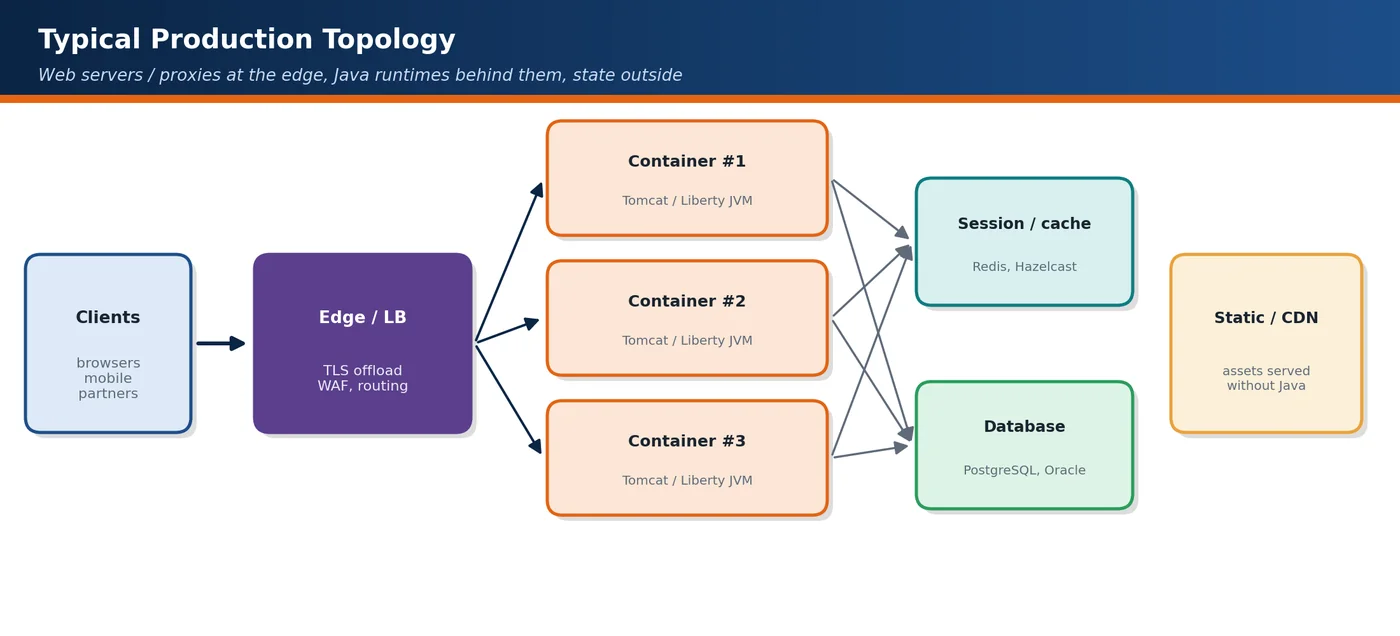
- It shapes the network topology — which component terminates TLS, serves static assets and balances load.
The distinction also matters because people use the words loosely. Many design documents say "application server" when they mean an embedded Tomcat inside a Spring Boot JAR, and the difference only surfaces when someone assumes that a JTA transaction manager, a managed JMS connection factory or a JNDI data source is available. Being precise about the category tells reviewers which services the platform provides, which ones the team must select, configure and patch itself, and which component owns each concern at run time. It is also the first question in any runtime migration, because moving from a full server to a plain container means replacing every built-in service the application silently relied on.
3· How It Works
Web server
A web server (nginx, Apache httpd, Caddy) is optimised for high-concurrency network I/O. It does not run Java components; in Java architectures it acts as a reverse proxy in front of containers.
| Capability | Typical implementation |
|---|---|
| Static content | HTML, JS, CSS, images with sendfile and caching headers |
| Reverse proxy & load balancing | proxy_pass / mod_proxy to container pools, health checks |
| TLS termination | Certificates, OCSP stapling, HTTP/2 and HTTP/3 to clients |
| Compression & caching | gzip/Brotli, proxy caching of cacheable responses |
| Edge security | Rate limiting, request size limits, IP filtering, basic WAF rules |
Servlet container
A servlet container implements the Jakarta Servlet specification and related web specifications. It manages connectors (network listeners), thread pools, request mapping, the filter chain, sessions and component lifecycle.
| Container | Current line (Jakarta EE 11 era) | Notes |
|---|---|---|
| Apache Tomcat | Tomcat 11 — Servlet 6.1, Pages 4.0, WebSocket 2.2 | Most widely used; embedded in Spring Boot by default |
| Eclipse Jetty | Jetty 12 — multiple EE levels on one core | Lightweight, strong async/HTTP/2 support |
| Undertow | Used by WildFly | Non-blocking core, embeddable |
Application server
An application server provides the full Jakarta EE programming model and manages shared resources such as connection pools, transaction managers, JMS destinations and security realms. Modern servers are modular and can also run as runnable JARs.
| Server | Profile support | Characteristic |
|---|---|---|
| WildFly / JBoss EAP | Platform, Web | Modular subsystems; Galleon provisioning trims the runtime |
| Open Liberty / WebSphere Liberty | Platform, Web, Core | Feature-based: enable only required features |
| Payara Server / Micro | Platform, Web | GlassFish-derived; Micro edition for containers |
| Eclipse GlassFish | Platform, Web | Compatible implementation used for specification work |
Responsibilities
| Responsibility | Web server | Servlet container | Application server |
|---|---|---|---|
| Static files | Primary | Possible (default servlet) | Possible |
| TLS termination | Primary | Supported | Supported |
| Servlet / Pages / WebSocket | — | Yes | Yes |
| CDI, REST, Validation | — | Add libraries | Built in |
| JTA transactions, JMS, EJB, Batch | — | Add libraries (limited) | Built in |
| Managed resources (pools via JNDI) | — | Basic | Full, admin-managed |
Deep Dive — The Path of One Request
Following a single HTTPS request through a typical topology shows where each runtime category does its work. The client opens a TLS connection to nginx or a cloud load balancer, which decrypts it, answers directly if the URL matches a static location, and otherwise picks a healthy upstream and forwards the request over a pooled keep-alive connection, adding X-Forwarded-For and X-Forwarded-Proto headers so the container knows the original client and scheme.
In Tomcat, the connector's acceptor thread accepts the socket and registers it with a poller, which uses non-blocking I/O to wait until bytes are readable. Only then is the socket handed to a worker thread from the executor. The worker parses the request line and headers, maps the URL to a context and a servlet, runs the filter chain and calls service(). It stays busy until the response is committed, unless the servlet uses asynchronous processing to release it while waiting for slow back-end work.
An application server adds layers inside that call. Before a business method runs, container interceptors start or join a JTA transaction, propagate the authenticated identity and activate CDI contexts, and managed resources such as data sources and JMS connection factories come from server-wide pools. A servlet container with libraries can provide similar behaviour, but each piece is wired and configured by the application rather than by the platform.
4· Java / Jakarta EE Code Examples
# nginx reverse proxy in front of two Tomcat instances
upstream app_pool {
    server 10.0.1.11:8080 max_fails=3 fail_timeout=10s;
    server 10.0.1.12:8080 max_fails=3 fail_timeout=10s;
}
server {
    listen 443 ssl http2;
    location /static/ { root /var/www; expires 7d; }           # served by nginx
    location / {
        # forwarded to containers
        proxy_pass http://app_pool;
        proxy_set_header Host              $host;
        proxy_set_header X-Forwarded-For   $proxy_add_x_forwarded_for;
        proxy_set_header X-Forwarded-Proto $scheme;
    }
}<!-- Tomcat server.xml: trust forwarded headers only from the proxy network -->
<Valve className="org.apache.catalina.valves.RemoteIpValve"
internalProxies="10\.0\.0\.\d{1,3}"
remoteIpHeader="X-Forwarded-For"
protocolHeader="X-Forwarded-Proto" /><!-- Open Liberty server.xml: enable only the features the application uses -->
<featureManager>
<feature>servlet-6.1</feature>
<feature>restfulWS-4.0</feature>
<feature>cdi-4.1</feature>
<feature>persistence-3.2</feature>
</featureManager>5· Configuration, Defaults & Diagnostics
| Setting | Tomcat default | Meaning |
|---|---|---|
maxThreads | 200 | Maximum request-processing threads per connector |
minSpareThreads | 10 | Threads kept ready |
maxConnections | 8192 (NIO) | Connections accepted and kept open |
acceptCount | 100 | OS backlog when all connections are busy |
connectionTimeout | 20000 ms (shipped server.xml) | Wait time for request line after accept |
Most runtime-layer incidents first appear as 502 or 504 responses at the proxy, so diagnose from the outside in. A 502 means the proxy did not get a valid response, often because the container closed an idle keep-alive connection that the proxy reused, or because the instance was restarting. A 504 means the upstream was slower than the proxy's read timeout. Inside the container, compare busy threads with maxThreads, log request duration in the access log, and take a thread dump when the pool is saturated to see what the workers are waiting for.
# Busy request threads (Spring Boot needs
# server.tomcat.mbeanregistry.enabled=true for this metric)
curl -s localhost:8080/actuator/metrics/tomcat.threads.busy

# Tomcat access log pattern with request time in ms (%D)
#   %h %t "%r" %s %b %D

# nginx: log upstream time separately from total request time
log_format timed '$remote_addr "$request" $status '
                 'rt=$request_time urt=$upstream_response_time';

# Thread dump of a saturated container
jcmd <pid> Thread.print > threads.txt6· Production Usage Patterns
- Edge proxy + embedded container per service: each microservice packages Tomcat/Jetty/Undertow; nginx, an ingress controller or cloud LB handles TLS and routing.
- Shared application server with multiple WARs: common in established enterprises; centralised resources and administration.
- Trimmed application server in containers: Liberty features or WildFly Galleon layers produce small images with full Jakarta EE APIs.
- CDN for static assets with the Java tier serving only dynamic content and APIs.
7· Common Pitfalls & Misconceptions
- Calling Tomcat an "application server" in design documents — it is a servlet container; missing services must be added and integrated.
- Serving large static files through the Java tier — wastes request threads and heap.
- Double compression or double TLS configured accidentally on both proxy and container.
- Deploying many unrelated applications on one server — shared failure domain and coupled upgrades.
8· Best Practices
- Choose the smallest runtime that provides the required specifications (Core/Web profile or container + selected libraries).
- Put a reverse proxy or managed load balancer in front of Java runtimes for TLS, static content and protection.
- Keep one application per runtime in container-based deployments for isolation and independent scaling.
- Align container thread pools, proxy timeouts and load-balancer timeouts end to end.
9· Architect's Perspective & Trade-offs
| Criterion | Servlet container + libraries | Jakarta EE application server |
|---|---|---|
| Footprint & startup | Small, fast | Larger (reduced by feature trimming) |
| API integration | Team selects and integrates | Certified, integrated, tested together |
| Operations | App owns config in code | Admin console/CLI, managed resources |
| Portability | Tied to chosen libraries | Portable across certified servers |
| Typical fit | Microservices, Spring Boot | Enterprise suites, JTA/JMS-heavy integration |
10· Interview Q&A
What is the difference between a web server and a servlet container?
A web server handles HTTP at the network edge but does not run Java code, while a servlet container hosts Java web components. nginx, Apache httpd and Caddy accept connections, terminate TLS, serve static files, compress responses and proxy requests to upstream servers; they are optimised for very high concurrency with little memory per connection. A servlet container such as Tomcat or Jetty implements the Jakarta Servlet specification: it maps URLs to servlets, runs filters, manages sessions and component lifecycles, and gives each request a worker thread. Most production deployments use both, with nginx or a managed load balancer in front and one or more containers behind it.
Is Tomcat an application server?
Not in the Jakarta EE sense. Tomcat 11 is a servlet container: it implements Servlet 6.1, Pages 4.0, Expression Language and WebSocket, which is only part of the Web Profile. It does not provide CDI, Jakarta REST, Persistence, JTA transactions or messaging out of the box, so applications add them as libraries, such as Weld, Jersey and Hibernate, or use Spring, which supplies its own equivalents. Calling Tomcat an application server is harmless in conversation, but in a design document the distinction matters, because every missing service becomes something the team must choose, integrate, configure and patch. Apache TomEE is the variant that adds Jakarta EE profile support.
Why place nginx in front of a Java container?
Because it handles edge concerns more efficiently than Java request threads and keeps them in one place. nginx terminates TLS and HTTP/2 or HTTP/3, serves static assets with sendfile and caching headers, compresses responses, and buffers slow clients, so a container thread is not held while a mobile user uploads slowly. It load-balances across instances with health checks and enforces rate limits, request size limits and basic filtering before traffic reaches the application. That leaves container threads for dynamic work. In Kubernetes or the cloud the same role is usually played by an ingress controller or a managed load balancer, so a separate nginx tier is not always needed.
Which settings must be aligned between the proxy and the container?
Timeouts, connection handling, size limits and forwarded headers. The proxy read timeout must exceed the slowest legitimate request, or users see 504s while the container keeps working. The container's keep-alive timeout should be longer than the proxy's idle timeout for upstream connections; otherwise the container closes a socket the proxy is about to reuse and some requests fail with 502. Maximum request body sizes must match, or uploads are rejected at one layer with confusing errors. Proxy connection limits and container thread pools should be sized together. Finally, the container must trust X-Forwarded-Proto and X-Forwarded-For only from the proxy, or redirects point to http.
When would you choose a full application server over an embedded container?
I choose a full application server when the application genuinely uses several integrated Jakarta EE services together: distributed JTA transactions across a database and a message broker, JMS with message-driven beans, EJB timers, Jakarta Batch, or server-managed connection pools and security realms that operations administer centrally. Integrating those by hand on a bare container is possible but error-prone, while a certified server provides them tested together. For a typical REST microservice with one database, an embedded container with a few libraries, or a framework such as Spring Boot or Quarkus, is simpler and starts faster. Open Liberty and WildFly can be trimmed to only the features needed, which narrows the gap.
How do you decide the runtime strategy for a portfolio of Java applications?
I would classify applications by what they need from the runtime and how they are operated, then standardise a small set of supported options. Typically that means an embedded-container image, such as Spring Boot or a MicroProfile runtime, for stateless services, and a trimmed Jakarta EE server such as Open Liberty or WildFly for integration-heavy systems that use JTA, JMS or batch. Each option gets a platform template with a base image, hardened configuration, observability, a patching cadence and an owner. Legacy shared servers get a migration path rather than new tenants. Every extra runtime adds patching, skills and support contracts, so variety should be a deliberate choice.